
Many people spend most of their day inside an office. The quality of lighting in this space can affect energy, comfort, and even job performance. But how bright should an office be? This is where lux levels come in. Understanding the right lux levels for office work is not just a technical detail—it’s an essential part of building a healthy, productive workspace. Many offices get this wrong, and employees end up with tired eyes, headaches, or low energy. This guide will help you avoid common mistakes, choose the right lighting, and understand why lux levels matter.
What Are Lux Levels?
Lux is a unit that measures illuminance, or how much light falls on a surface. One lux is equal to one lumen per square meter. In simple terms, higher lux means brighter light. Measuring lux levels helps us make sure workspaces are not too dark or too bright. Both extremes can cause problems.
For example, a dark office makes it hard to read or write, leading to eye strain. Too much light, on the other hand, creates glare and discomfort. The right lux level depends on the task. Reading a book is different from working on a computer or drawing detailed plans.
Recommended Lux Levels For Office Work
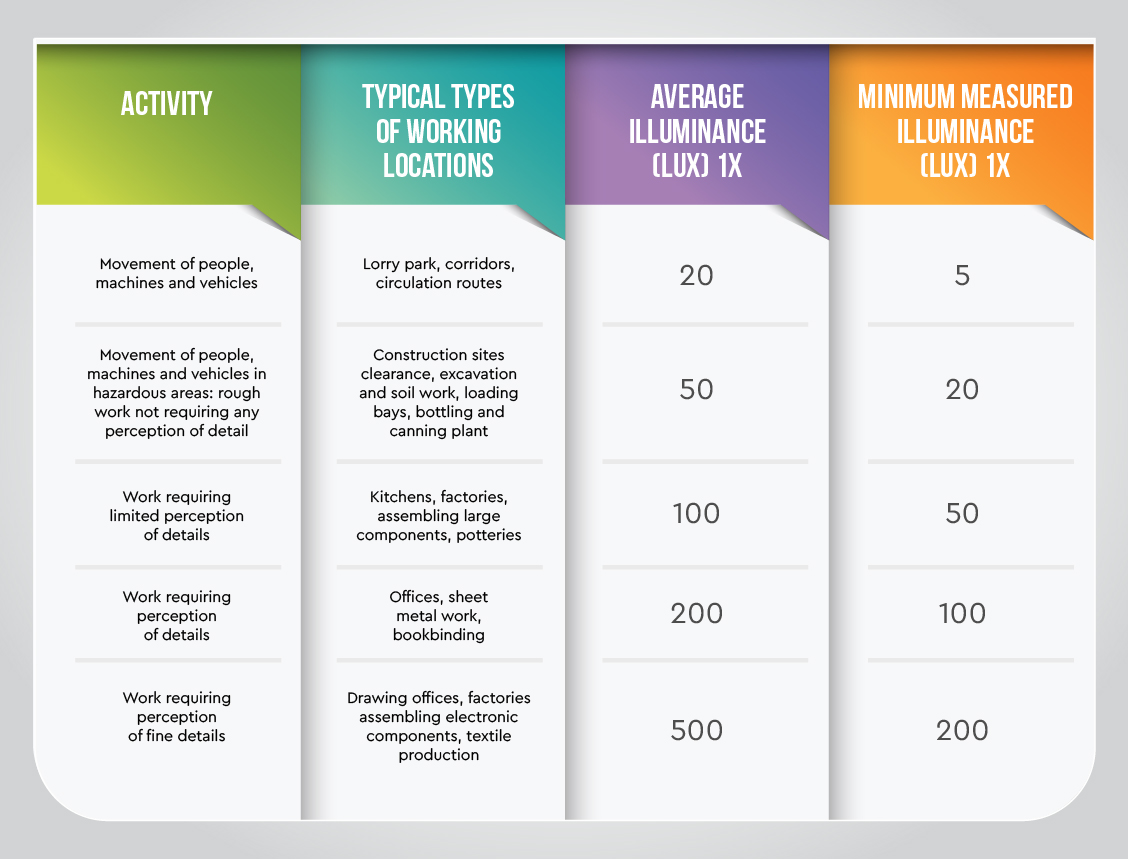
Experts and standards organizations give clear recommendations for office lighting. Here are the main guidelines:
- General office work (reading, writing, typing): 300–500 lux
- Computer work: 300–500 lux
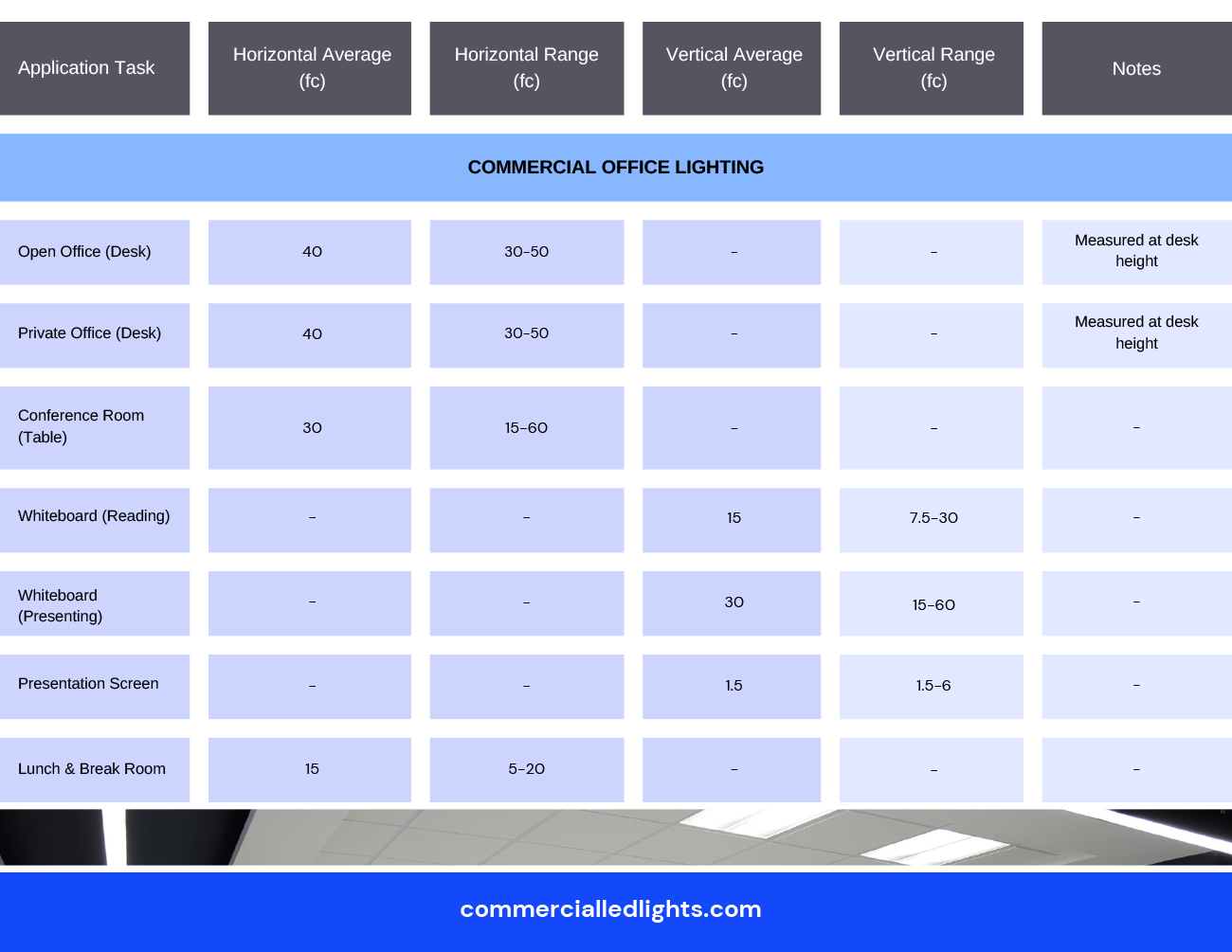
- Conference rooms: 300–500 lux
- Reception areas: 200–300 lux
- Corridors and hallways: 100–200 lux
- Technical drawing or detail work: 750–1,500 lux
These values come from groups like the International Organization for Standardization (ISO) and the Illuminating Engineering Society (IES). Offices should aim for at least 300 lux, but not much over 500 lux for standard desk work.
Why Lux Levels Matter In Offices
Proper lux levels in offices have real effects on people. Here are some of the main reasons:
- Reduces eye strain: When lighting is too dim, eyes must work harder to focus, causing fatigue or headaches.
- Boosts productivity: Good lighting helps people concentrate and reduces mistakes.
- Improves mood and well-being: Natural-feeling light can make employees feel happier and more energetic.
- Lowers accident risk: Properly lit spaces prevent slips, trips, and other accidents.
Many office managers think only about saving energy, but poor lighting can cost more in lost work and health problems. Getting lux levels right is an investment, not just a cost.
How To Measure Lux Levels
You can measure lux with a device called a lux meter. This tool is easy to use and not expensive. Here’s how to use one:
- Place the sensor at the height of the work surface (usually the desk).
- Make sure lights are on as they are during normal work.
- Take readings at different points, not just in one spot.
- Record the results and compare with recommendations.
Some modern phones have apps that claim to measure lux, but they are less accurate than real meters. For important checks, use a dedicated device.
Credit: awayishome.com
Common Mistakes With Office Lux Levels
Many offices have lighting problems that are easy to fix. Here are some common mistakes:
- Uneven lighting: Some desks are bright, others are dark.
- Glare: Direct light or reflections from screens cause discomfort.
- Wrong color temperature: Using very warm (yellowish) or very cool (bluish) lights can feel unnatural.
- Ignoring maintenance: Dusty or old bulbs give off less light over time.
- Not adjusting for daylight: Offices with windows get changing light, but many don’t adjust artificial lighting.
Fixing these problems can be simple. For example, move desks away from direct sunlight, or clean light fixtures regularly.
Lux Levels For Different Office Areas
Not all office spaces need the same amount of light. Here’s a breakdown:
Open Plan Desks
These areas should have 300–500 lux. Too much light can cause glare on computer screens, so indirect lighting is best.
Private Offices
The same range applies—300–500 lux. Private offices might need adjustable lamps for reading or specific tasks.
Meeting Rooms
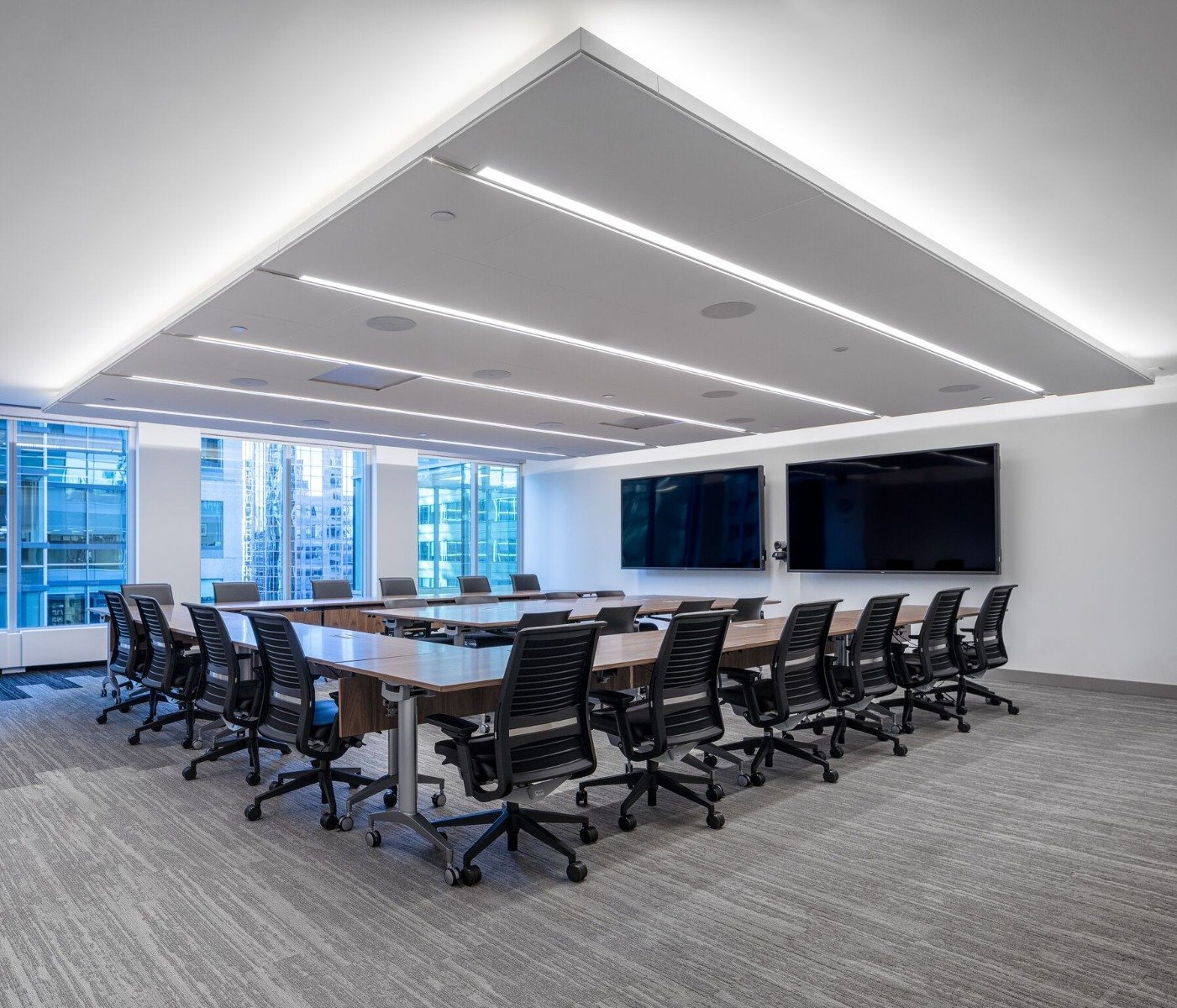
A good target is 300–500 lux. Flexible lighting is helpful, so rooms can be dimmed for presentations.
Reception And Waiting Areas
200–300 lux is enough here. The goal is to make the area feel welcoming, not too clinical.
Corridors And Hallways
These spaces need less light—100–200 lux. This saves energy, but still keeps spaces safe.
Areas For Detailed Work
For tasks like drawing or inspecting small parts, you need 750–1,500 lux. Use task lights that can be directed right where needed.
Here’s a quick comparison of recommended lux levels for main office areas:
| Office Area | Recommended Lux |
|---|---|
| Open Plan Desks | 300–500 lux |
| Private Offices | 300–500 lux |
| Meeting Rooms | 300–500 lux |
| Reception | 200–300 lux |
| Corridors | 100–200 lux |
| Technical Drawing/Detail Work | 750–1,500 lux |
Credit: www.ledrise.eu
Factors Affecting Lux Levels
Several factors can change how much light reaches your workspace:
- Ceiling height: Higher ceilings spread light over a larger area, lowering lux at desk level.
- Wall and floor color: Dark surfaces absorb light, while light colors reflect it.
- Lamp type: LED, fluorescent, and incandescent bulbs all produce different amounts and qualities of light.
- Window placement: Sunlight can boost or reduce the need for artificial lighting.
Small changes—like painting walls a lighter color or rearranging desks—can have a big impact on lux levels.
Choosing Lighting Fixtures For The Right Lux Level
Picking the right fixture is about more than just looks. Here’s what to consider:
Light Output (lumens)
Choose lamps that give enough lumens for the area. For a standard desk (1.5 m x 0.8 m), you want about 300–400 lumens directly on the work surface.
Light Distribution
Use fixtures that spread light evenly. Avoid spotlights or unshielded bulbs that cause sharp shadows.
Color Temperature
Offices usually work best with neutral white light (around 4000–5000 Kelvin). This color feels natural and helps people stay alert.
Glare Reduction
Look for fixtures with diffusers or covers to soften the light. Position lights so they do not shine directly into eyes or onto screens.
Dimming Controls
If possible, use lights that can be dimmed. This helps adjust levels for different tasks or times of day.
Here’s a look at how different fixture types compare:
| Fixture Type | Best Use | Glare Risk | Light Spread |
|---|---|---|---|
| Recessed LED Panels | General Office | Low | Wide |
| Desk Lamps | Task Lighting | Medium | Narrow |
| Pendant Lights | Meeting Tables | Medium | Moderate |
| Track Lighting | Accent/Display | High | Spot |
Credit: commercialledlights.com
Daylight And Lux Levels
Natural daylight can help reach the right lux levels, but it changes through the day. Offices with many windows need to balance sunlight with artificial lighting. Too much sunlight causes glare, while too little makes the space gloomy.
Practical tips:
- Use blinds or shades to control strong sunlight.
- Arrange desks to avoid direct sun on screens.
- Combine daylight with dimmable artificial lights.
Some offices use daylight harvesting systems. These adjust artificial lights based on the amount of natural light, keeping lux levels steady and saving energy.
Energy Efficiency And Lux Levels
It’s possible to have good lighting without wasting electricity. Here’s how:
- Choose LED fixtures, which use up to 80% less energy than old bulbs.
- Install motion sensors in areas that are not always used, like meeting rooms.
- Use task lighting (small desk lamps) instead of brightening the whole room.
- Regularly clean fixtures and replace old bulbs.
Balancing lux levels and efficiency means you get a bright, healthy office without a big energy bill.
Adjusting Lux Levels For Special Needs
Not all workers have the same needs. Some people, especially older adults or those with vision problems, need more light to see comfortably. Others may be sensitive to glare. Offering adjustable lighting is a smart idea:
- Let people add desk lamps if needed.
- Make sure light switches are easy to reach.
- Allow for dimming or color temperature changes where possible.
This flexibility shows care for employees and helps everyone do their best work.
The Impact Of Poor Lux Levels: Real-life Examples
Ignoring proper lux levels can cause real problems. For example, a tech company installed very bright overhead lights to “boost alertness.” Instead, staff complained of headaches and screen glare. Productivity dropped until new, softer lighting was added.
Another case: A law firm used old fluorescent tubes. The light faded over time, and people found it hard to read documents. After measuring, they found some desks had only 120 lux—less than half the needed amount. Upgrading to LEDs at the right lux level improved both comfort and accuracy.
These examples show that checking and adjusting lux is more than theory—it makes a difference every day.
How To Maintain Proper Lux Levels
Even the best lighting setup needs care to keep working well. Here’s how to maintain your office lighting:
- Regularly check lux levels with a meter, especially if staff complain.
- Clean fixtures every few months to remove dust.
- Replace old bulbs before they get dim.
- Re-evaluate after moving furniture or changing layouts.
- Ask for feedback from staff about glare, shadows, or eye strain.
Taking these steps helps your office stay comfortable, efficient, and healthy.
Non-obvious Insights For Office Lighting
Many beginners miss these points:
- Light quality matters as much as brightness. Flicker, color rendering, and even noise from fixtures can affect comfort.
- Lighting affects teamwork. Poor lighting in meeting spaces can make it hard to read faces or see presentations.
- Emergency lighting is part of overall office safety, but must also be considered in lux planning.
Thinking beyond just “enough light” makes your office a better place to work.
Frequently Asked Questions
What Is The Ideal Lux Level For Computer Work?
The best lux level for computer work is between 300 and 500 lux. This provides enough light to see the keyboard and documents, but not so much that it creates glare on the screen.
Can Natural Light Replace Artificial Lighting In An Office?
Natural light is valuable, but it changes with the time of day and weather. Most offices need a mix of daylight and artificial lighting to keep lux levels steady and comfortable all day long.
How Do I Check If My Office Has The Right Lux Level?
You need a lux meter. Take readings on desks at different spots and compare with the recommended 300–500 lux for most tasks. If you don’t have a meter, check if people complain about eye strain or dimness—these are signs of problems.
What Happens If The Office Is Too Bright?
Too much light (over 1,000 lux) can create glare, headaches, and eye strain. It also wastes energy. Adjust lighting by lowering wattage, using diffusers, or adding dimmers.
Are There Official Standards For Office Lux Levels?
Yes. Organizations like the Illuminating Engineering Society (IES) and ISO set standards for office lighting. For more details, you can visit the Wikipedia page on lux.
Creating the right office lighting is not guesswork. By understanding lux levels and making smart choices, you build a workspace that supports health, energy, and success. Investing time in good lighting means fewer complaints, higher productivity, and a happier team.
