
Taking notes during video calls is now an essential skill for students, remote workers, and business professionals everywhere. Whether you’re attending online classes, joining team meetings, or discussing projects with clients, capturing key points helps you stay organized and productive.
But video calls can move quickly, with many people talking and screens being shared. How can you make your notes clear, useful, and easy to review later?
This guide will show you practical strategies for taking better notes during video calls. You’ll discover step-by-step methods, recommended tools, and clever tips that even experienced note-takers often overlook. By the end, you’ll be ready to capture information efficiently—even during fast-paced or complex online discussions.
Why Note-taking Matters During Video Calls
Video calls can feel informal, but important decisions and details are often shared. Without good notes, you may forget tasks, lose track of deadlines, or miss action items. Unlike in-person meetings, you might not see everyone’s reactions, and technical glitches can happen.
Writing things down helps you stay focused, remember what matters, and follow up correctly.
A recent study by Harvard Business Review found that people remember up to 40% more information when they take notes actively during meetings. Well-organized notes also make it easier to share updates with those who missed the call, or to review later when preparing reports or summaries.
Preparing Before The Call
Getting ready before the video call saves time and reduces stress. Preparation also means you’ll be able to focus on listening, rather than scrambling to organize your screen or tools.
1. Choose Your Note-taking Method
Decide if you’ll use a digital tool (like a laptop, tablet, or phone) or traditional pen and paper. Digital tools are faster for searching and sharing, while handwriting may help you remember information better.
2. Set Up Your Workspace
Close unnecessary tabs or apps. Keep only the video call window and your note tool open. This reduces distractions and helps you switch quickly between screens if needed.
3. Review The Agenda
If the meeting host shares an agenda, read it in advance. This helps you guess which topics are most important and where you should focus your notes.
4. Prepare A Note Template
You can save time by making a simple note template before the call. For example, create headings for “Decisions,” “Tasks,” and “Questions” so you can fill in details during the discussion.
5. Test Your Equipment
Check your camera, microphone, and internet connection. If your device crashes or lags, you might miss something important.

Credit: www.ringcentral.com
Effective Note-taking Techniques
Not all notes are equal. The way you structure and write them makes a big difference. Here are proven methods for taking clear, useful notes during video calls.
The Cornell Method
This system divides your page into three sections: main notes, keywords, and a summary. During the call, write key points in the largest section. After the meeting, add keywords on the left and a short summary at the bottom.
Example:
- Main notes: “Project deadline moved to June 15. John will handle design tasks.”
- Keywords: “Deadline, John, Design”
- Summary: “John responsible for design, new deadline June 15.”
Mind Mapping
A mind map is a visual way to connect ideas. Start with the meeting topic in the center, then draw branches for each main point. Use smaller branches for details or actions.
This method is excellent for brainstorming sessions or creative team meetings, as it shows how ideas relate.
Bullet Journaling
Bullet points make notes quick to write and easy to scan. Use symbols to highlight different types of information:
- ● Main idea or topic
- → Action item or task
- ? Question to follow up
Example:
- ● Marketing strategy for Q2
- → Research new social media trends (Sarah)
- ? What’s the budget for paid ads?
Table-based Note-taking
For meetings with lots of details, tables help organize information. Here’s how you might track action items:
| Task | Person Responsible | Deadline |
|---|---|---|
| Prepare monthly report | Ali | May 12 |
| Update website | Maria | May 15 |
This format is especially helpful for project updates or follow-ups.
Choosing The Right Digital Tools
Many apps and platforms can make note-taking easier during video calls. The best one for you depends on your needs and devices.
Popular Note-taking Apps
| App | Best For | Key Features |
|---|---|---|
| Microsoft OneNote | Team projects, syncing across devices | Templates, drawing, voice notes |
| Google Docs | Real-time collaboration | Live editing, comments, sharing |
| Evernote | Personal organization | Tagging, search, attachments |
| Notion | Custom databases | Tables, reminders, integrations |
Tip: Some video call platforms, like Zoom and Microsoft Teams, have built-in chat or note features. You can copy important points directly from the chat into your notes.
Using Voice Recording
If you find it hard to write everything, consider recording the call (with permission). Later, you can replay key sections and add missing points. Most smartphones and laptops have free recording apps. Some note tools, like Otter. ai, can transcribe spoken words into text automatically.
Note: Always ask for permission before recording, as it may be illegal or against company policy in some regions.
Staying Focused During The Call
It’s easy to get distracted by chat messages, emails, or background noise. Here’s how to keep your attention on the meeting and your notes.
1. Mute Notifications
Turn off alerts from other apps or your phone.
2. Use Headphones
This blocks outside noise and helps you hear speakers clearly.
3. Pin The Speaker Or Presentation
Most video call tools let you focus the screen on the main speaker or shared slides. This makes it easier to follow discussions.
4. Ask For Clarification
If you miss something, don’t be afraid to politely ask, “Can you repeat that? ” or “Could you summarize the action points? ”
5. Write Short, Not Long
Instead of trying to write everything word-for-word, focus on key facts, decisions, and next steps.
Organizing Your Notes After The Call
Reviewing and organizing your notes right after the meeting helps you remember details and keeps your records useful.
Summarize Main Points
Within 10–15 minutes after the call, read your notes and highlight the most important ideas, tasks, and decisions. Add a summary at the top or bottom of your notes for quick reference.
Assign And Track Action Items
List out all tasks, who’s responsible, and deadlines. If you’re using a shared document, tag people or color-code their names.
Share Notes With Participants
Send a summary or the full notes to everyone who needs them. This is especially important if someone missed the meeting or if you want to confirm that tasks are clear.
Store Notes For Easy Access
Save your notes in a folder or app where you can find them quickly. Use clear file names, such as “Marketing_Meeting_2024-05-01. ”
Advanced Tips For Better Note-taking
Even if you already take notes, these expert tips can help you capture more useful information from your video calls.
1. Use Shortcuts And Templates
Many note apps let you create custom templates or keyboard shortcuts. For example, type “/task” to insert a new action item, or use a pre-made meeting template.
2. Color-code Information
Highlight decisions in yellow, questions in red, and deadlines in blue. This makes it easy to scan notes later and find what you need.
3. Add Screenshots Or Images
If someone shares a chart or document on the screen, take a screenshot and paste it into your notes. Visuals can help you remember details that are hard to describe in words.
4. Link To Relevant Files
Include links to shared documents, presentations, or websites mentioned in the call. This saves time searching for resources later.
5. Review And Edit Regularly
At the end of each week, read through your notes to spot patterns, unfinished tasks, or information you missed. Regular review helps you stay organized and prepared for future meetings.
Common Mistakes And How To Avoid Them
Even experienced note-takers can fall into bad habits. Here are some pitfalls to watch for:
| Mistake | Why It’s a Problem | How to Fix |
|---|---|---|
| Writing everything word-for-word | Slows you down and makes notes messy | Focus on main ideas and actions |
| Not reviewing notes after the call | Forgetting details or missing tasks | Summarize and organize within 15 minutes |
| Using only one format for all meetings | Some meetings need different styles | Match your method to the meeting type |
| Not sharing notes with the team | Leads to confusion and repeated questions | Email or share notes after each meeting |
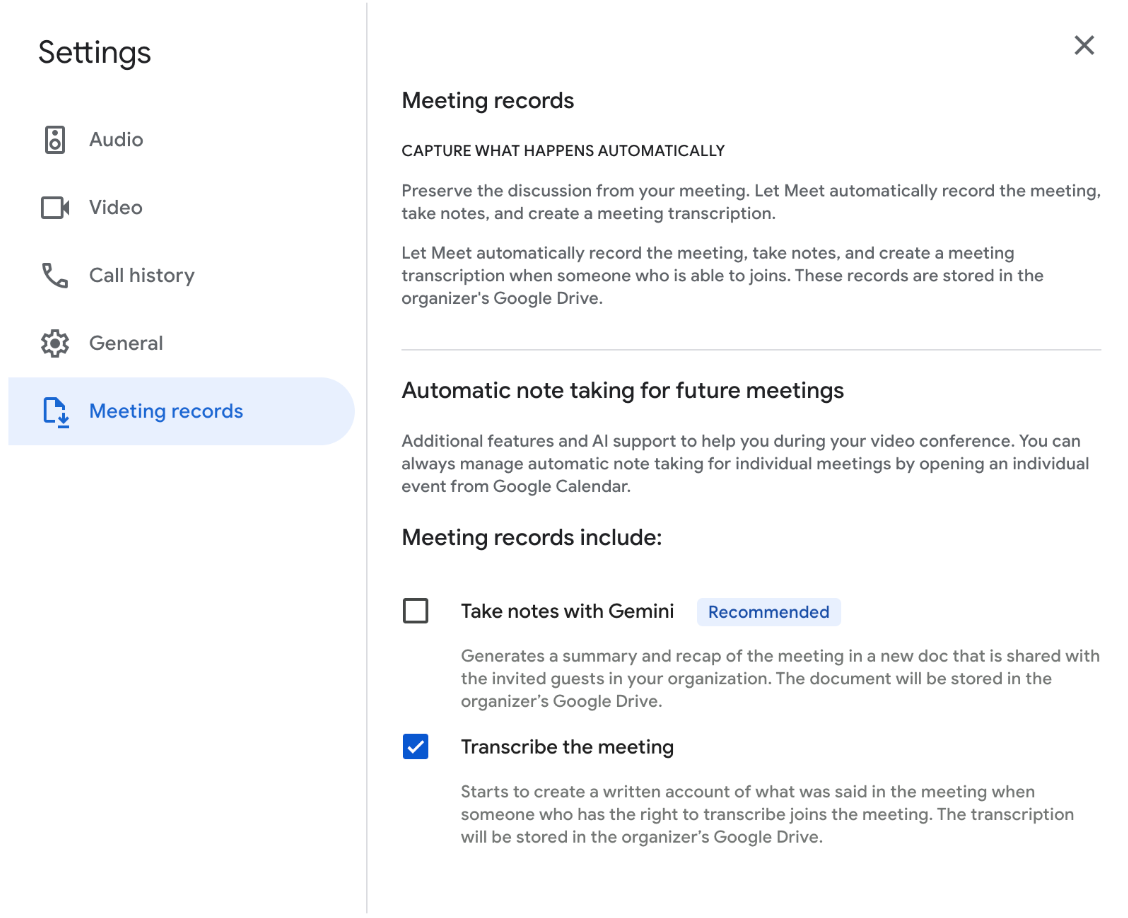
Credit: workspaceupdates.googleblog.com
Special Considerations For Remote Teams
If you work in a team spread across different time zones or countries, note-taking becomes even more important. Here’s how to handle common challenges:
- Language Barriers: Use simple language and avoid jargon. If someone’s English is not strong, write clear action steps and add explanations.
- Different Time Zones: Record calls (with permission) and send notes soon after the meeting, so people in other regions can catch up easily.
- Access to Tools: Make sure everyone can open the note files or shared documents. Use popular platforms like Google Docs, which work on most devices.
Building A Habit Of Good Note-taking
Like any skill, effective note-taking improves with practice. Try to review your notes from past meetings and notice what worked well. Set a goal to improve one part each week, such as summarizing faster or organizing action items more clearly.
If you want to learn more about note-taking techniques, visit this helpful guide from Cornell University.

Credit: unsplash.com
Frequently Asked Questions
How Can I Take Notes Without Missing What’s Being Said?
Focus on key ideas and use abbreviations or symbols. You can also record the call (with permission) and fill in details later. Practicing note-taking regularly helps you get faster.
Which Is Better: Typing Notes Or Writing By Hand?
Typing is faster and easier to share, but writing by hand can help you remember information better. Choose the method that fits your style and the meeting’s pace.
What Should I Do If The Video Call Moves Too Fast?
Don’t try to write everything. Instead, jot down main points and ask for a summary at the end. If possible, ask the organizer to share slides or a meeting summary.
Are There Apps That Transcribe Video Calls Into Notes?
Yes, tools like Otter.ai and some paid versions of Zoom offer automatic transcription. Always check privacy rules before using these features.
How Should I Organize Notes From Recurring Meetings?
Use the same template each time, with clear dates and topics. Store your notes in one folder or app, so you can compare progress and track old action items easily.
By following these strategies, you’ll be able to take effective notes during video calls—no matter how busy or complex your meetings become. With practice, your notes will help you remember, share, and act on the important details that drive your success.
