
Running meetings is a part of modern work life. Yet, many people feel meetings waste time, drain energy, or fail to achieve results. The truth is, effective meetings are possible—and they can become a powerful tool for team success. If you know how to prepare, lead, and follow up, your meetings can save time, boost collaboration, and drive real progress.
Let’s explore how to run effective meetings, step by step. You will learn practical tips, common mistakes to avoid, and real examples. Whether you are a manager, team leader, or just want to improve meetings in your group, this guide will help you master the art of the productive meeting.
Why Effective Meetings Matter
Meetings are expensive. A study from Harvard Business Review found that unnecessary meetings cost businesses billions of dollars each year. For example, a one-hour meeting with 10 people takes 10 hours of work time. Multiply that by many meetings a week, and the cost adds up fast.
But it’s not just about money. Bad meetings lower morale, slow decisions, and make teams less creative. On the other hand, well-run meetings bring out the best ideas, solve problems quickly, and help everyone stay in sync.
Planning Before The Meeting
The most effective meetings start before anyone enters the room or joins the call. Good planning sets the stage for success.
Define A Clear Purpose
Ask yourself: Why are we meeting? Every meeting needs a clear goal. Are you solving a problem, making a decision, sharing updates, or brainstorming? If the purpose is unclear, people will lose focus.
Example: Instead of saying “Weekly Team Meeting,” write “Decide Q2 Marketing Campaign” or “Review Customer Feedback Data.”
Create A Focused Agenda
An agenda is your meeting’s roadmap. List the main topics, the time for each, and who will lead each item. Share the agenda at least a day before the meeting. This helps people come prepared and keeps things on track.
A simple agenda might look like:
- Quick project updates (10 min)
- Discuss roadblocks (15 min)
- Decide on next steps (10 min)
Invite Only The Right People
Not everyone needs to be in every meeting. Invite only those who have something to contribute or need the information. Too many people can slow things down and make it hard to reach decisions.
Tip: If someone only needs to know the results, send them a summary after the meeting instead.
Set The Time And Place
Choose a time that works for all, especially if you have team members in different time zones. Start and end on time—every time. For online meetings, check that the link works and everyone can access it.
Share Materials In Advance
Send documents, slides, or reports before the meeting. Ask people to review them ahead of time. This saves time and allows deeper discussion.
Non-obvious insight: If people never read pre-meeting materials, make them shorter or highlight key points. Sometimes, a one-page summary is better than a long report.
Running The Meeting
How you run the meeting affects everything. Good facilitation keeps people engaged, focused, and moving forward.
Start With Context And Purpose
Begin by reminding everyone why you are meeting and what you want to achieve. This helps people focus and sets a clear tone.
Example: “Today, our goal is to pick the final design for our new website. We’ll start by reviewing the options, then vote.”
Assign Roles
Some meetings work better when roles are clear. Common roles:
- Facilitator: Guides the meeting, keeps time, and moves the agenda forward.
- Note taker: Records key points, decisions, and action items.
- Timekeeper: Warns when topics go over time.
Assigning roles, even informally, helps everyone stay on track.
Encourage Participation
Invite input from everyone, not just the loudest voices. Ask quiet team members for their views. Use techniques like “round robins” (everyone speaks in turn) or “silent brainstorming” (everyone writes ideas before sharing).
Non-obvious insight: Some people process information by writing, not speaking. Give time for silent thinking before group discussion.
Stay On Topic
If the discussion drifts, bring it back to the agenda. Politely note off-topic ideas for a “parking lot” list to revisit later if there’s time.
Example: “That’s an important issue, but let’s finish today’s topic first and come back to it if we have time.”
Use Visuals And Tools
Whiteboards, slides, or shared screens can help clarify ideas and keep people engaged. For online meetings, tools like polls or chat can gather input quickly.
Make Decisions Clearly
If a decision is needed, summarize options and confirm agreement. Don’t let decisions remain vague or unspoken.
Example: “So, we agree to launch the campaign on April 10. Is everyone on board?”
Keeping Meetings Productive
Some simple habits can make a big difference in meeting quality.
Start And End On Time
Respect people’s schedules. If meetings always go over time, people lose focus and trust. Start at the scheduled time—even if some are late. End on time or earlier.
Limit Meeting Length
Research shows that attention drops after 45–60 minutes. For longer topics, take short breaks or split into multiple sessions.
Avoid Multitasking
Ask people to close laptops or mute phones unless needed for the meeting. Multitasking lowers focus and leads to missed points.
Watch Group Energy
If people are tired or distracted, take a quick break. For long meetings, add a few minutes to stand, stretch, or grab coffee.
Handle Conflict Respectfully
Disagreements are normal. Set ground rules: listen, don’t interrupt, and focus on ideas, not people. If conflict stalls progress, suggest taking it offline or getting help from a neutral person.
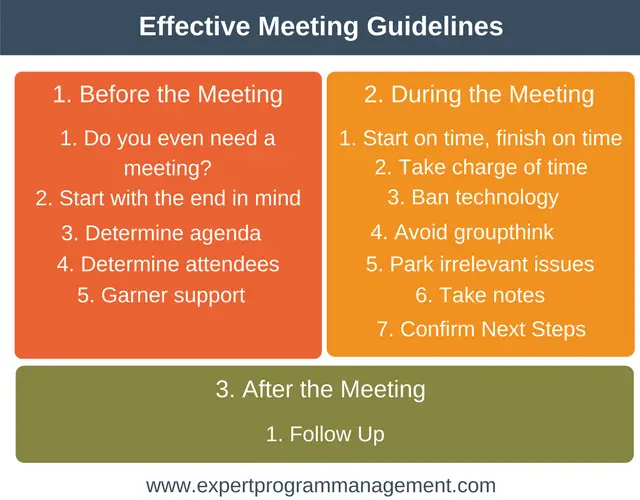
Credit: expertprogrammanagement.com
Following Up After The Meeting
A meeting is only useful if it leads to action. Make sure everyone knows what happens next.
Send Clear Notes And Action Items
Share a short summary within 24 hours. Include:
- Key decisions
- Who will do what, by when
- Any topics for future meetings
A sample action note:
- Maria: Send updated budget by Friday
- Team: Review proposal before next Monday
Track Progress
Check in on action items at the next meeting or via email. This builds accountability and shows the meeting made a difference.
Ask For Feedback
Once in a while, ask the group: “How can we make our meetings better?” Small changes can have a big impact.
Common Meeting Mistakes To Avoid
Even experienced leaders fall into these traps. Watch out for these common problems:
- No clear goal: Meetings without a purpose waste time.
- Overloaded agendas: Too many topics lead to rushed or unfinished discussions.
- Inviting everyone: Only include those who really need to be there.
- Not following the agenda: Going off-topic frustrates people.
- No follow-up: Without clear action items, nothing gets done.
- Letting one person dominate: This shuts down other voices.
- Ignoring remote participants: Online members need equal attention.
- Relying only on meetings: Some updates or decisions can be handled by email or chat.
Meeting Types And When To Use Them
Different meetings serve different purposes. Choose the right type for your goal.
| Meeting Type | Best For | Typical Length |
|---|---|---|
| Stand-up | Quick project updates | 10-15 minutes |
| Brainstorming | Generating ideas | 30-60 minutes |
| Decision-making | Choosing between options | 30-60 minutes |
| Problem-solving | Finding solutions to challenges | 45-90 minutes |
| One-on-one | Private feedback, coaching | 30-60 minutes |
Tip: If your goal can be met in a 10-minute call or a quick chat, skip the meeting.
In-person Vs. Virtual Meetings
Remote work has made virtual meetings common. Each style has pros and cons.
| Aspect | In-Person | Virtual |
|---|---|---|
| Body Language | Easy to read | Harder to see expressions |
| Participation | Side chats possible | Everyone hears one speaker |
| Tools | Whiteboards, sticky notes | Screen sharing, polls |
| Time zones | Everyone must be present | More flexible, can record |
Best practice: For hybrid teams, give remote members equal voice. Call on them first, or use tools that let all contribute.
Data: The Real Cost Of Bad Meetings
Research shows the impact of poor meetings:
- The average worker spends 31 hours a month in unproductive meetings.
- 67% of workers say too many meetings keep them from doing their work.
- Companies with effective meetings report 20% higher employee engagement.
(source: Harvard Business Review, Atlassian)
How To Make Meetings More Engaging
People tune out when meetings feel boring or pointless. Try these ideas:
- Start with a quick icebreaker for new teams.
- Use visuals, stories, or real examples.
- Change the meeting leader sometimes—let others practice leading.
- End with a quick feedback round: “What worked well? What could be better?”
Credit: www.concordiatechnology.org
Technology Tools For Better Meetings
Today, many tools can help you run smoother meetings:
- Scheduling: Calendly, Doodle
- Agendas and notes: Google Docs, Notion
- Video calls: Zoom, Microsoft Teams
- Collaboration: Miro, MURAL for whiteboarding
- Task tracking: Asana, Trello
Choose tools your team actually likes and uses. Too many tools can confuse, not help.
For more on digital meeting tools, see this Wikipedia article on meetings.
Sample Action Items List
| Action Item | Owner | Deadline |
|---|---|---|
| Update project timeline | Samira | June 15 |
| Contact supplier | Lee | June 12 |
| Prepare design draft | Diego | June 18 |
Credit: www.youtube.com
Frequently Asked Questions
How Long Should An Effective Meeting Last?
Most meetings should last no more than 30 to 60 minutes. Shorter meetings keep people focused. If you need more time, consider splitting the session or scheduling a break.
What Should I Do If People Don’t Participate?
Try asking for input directly, using round-robin speaking, or silent brainstorming. Make sure the meeting feels safe for all voices. If someone is always quiet, check with them privately.
How Can I Handle Meetings With Remote Team Members?
Use video whenever possible so people can see each other. Make space for remote voices by calling on them first or using chat tools. Always share notes after the meeting.
What Is The Best Way To Follow Up After A Meeting?
Send a short summary with key points and action items within 24 hours. Include who is responsible for each task and the deadline. Check progress at the next meeting.
How Do I Know If A Meeting Was Effective?
Ask: Did we meet our goal? Are action steps clear? Was everyone engaged? You can also ask for feedback with a quick survey or a show of hands at the end.
Running effective meetings is a skill that improves with practice. Plan ahead, stay focused, involve everyone, and always follow up. With these steps, your meetings can become a tool for real progress, not just a time on the calendar.
