
Eco Mode Ups Explained
Saving energy is not just good for the environment—it also helps your wallet. In today’s world, many devices use smart features to reduce power use. One common tool is Eco Mode found in UPS (Uninterruptible Power Supply) systems. But what does Eco Mode really do, and is it right for everyone?
Let’s break down how Eco Mode works, where it fits best, and what you need to know before using it. Whether you’re a homeowner, small business owner, or IT manager, understanding Eco Mode in UPS systems can help you make smarter choices for your equipment and electricity bills.
What Is A Ups?
A UPS is a device that provides backup power to computers, servers, and other electronics when the main power fails. It acts as a bridge, giving you time to save your work or safely shut down devices. UPS systems also protect against power surges, drops, or noise that can damage sensitive electronics.
There are three main types of UPS:
- Offline/Standby UPS: Basic protection; switches to battery power when needed.
- Line-Interactive UPS: Offers better voltage regulation and faster switch time.
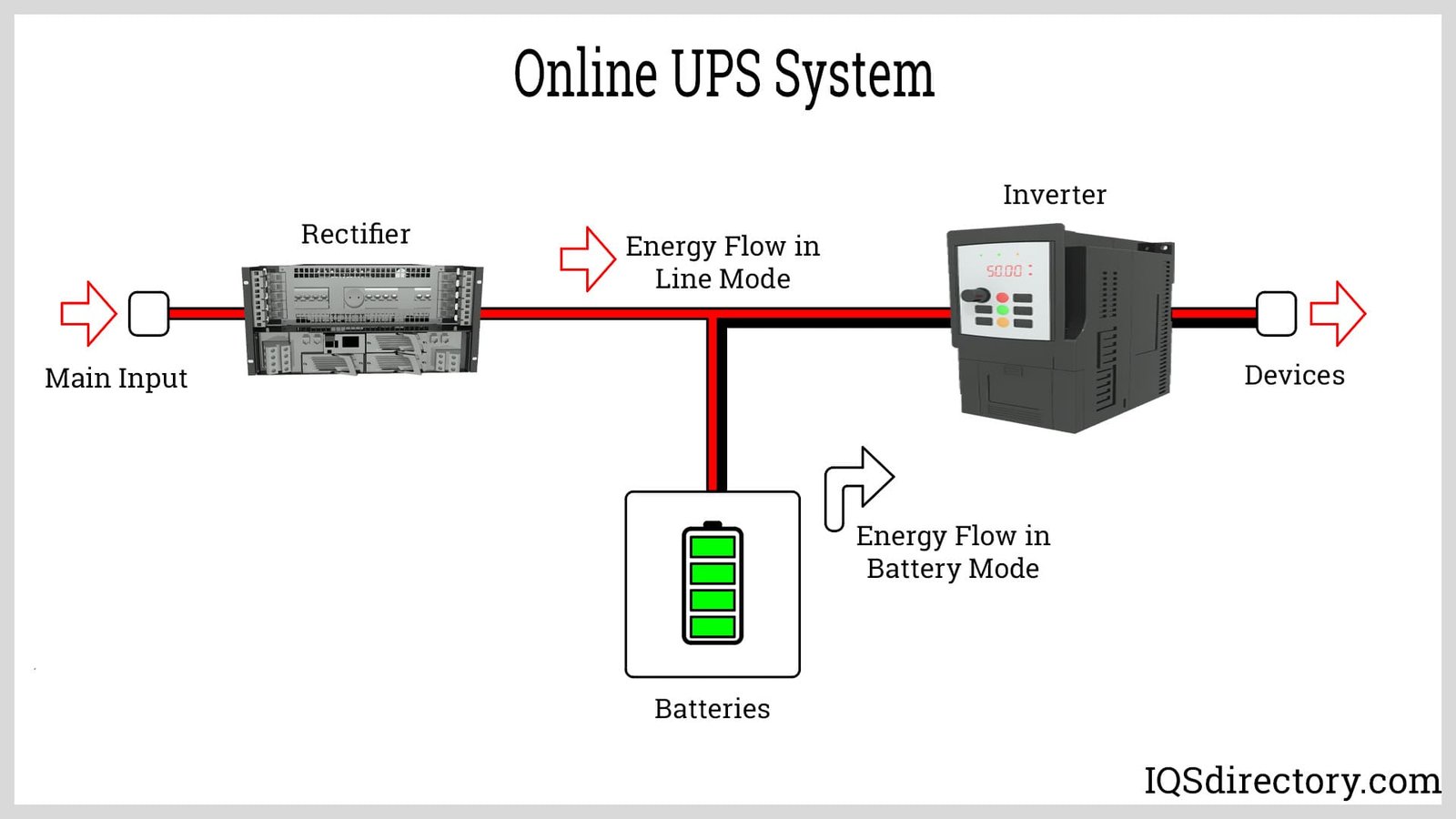
- Online/Double Conversion UPS: Always powers devices from the battery and inverter, providing the highest protection.
Eco Mode is mostly found in the more advanced line-interactive and online UPS models.
Understanding Eco Mode In Ups
Eco Mode (sometimes called Green Mode or Energy Saver Mode) is a special feature in many modern UPS systems. Its main goal is to save energy by reducing how much power the UPS uses when the main power is stable.
How Does Eco Mode Work?
In normal or online mode, the UPS always converts AC power from the wall to DC to charge the battery, then back to AC to power your devices. This process is safe but uses energy even when there are no power problems.
When Eco Mode is enabled, the UPS allows the main AC power to go directly to your devices as long as the power quality is within safe limits. The battery and inverter are kept on standby. If the power quality goes outside those limits (for example, voltage drops or spikes), the UPS quickly switches to battery mode to protect your equipment.
This switch happens in a few milliseconds (often under 10ms), which is fast enough for most devices not to notice. But for some sensitive equipment, even this small delay can be important.
Advantages Of Using Eco Mode
Choosing Eco Mode can make a real difference in your electricity use. Here are some of the main benefits:
- Lower Energy Costs: Since the UPS bypasses the inverter most of the time, it uses less power. For example, a large data center might save thousands of dollars per year.
- Reduced Carbon Footprint: Using less electricity means you’re helping the planet by lowering greenhouse gas emissions.
- Less Heat Production: The UPS generates less heat in Eco Mode, which can also lower cooling costs.
- Extended Equipment Life: With fewer components working all the time, the UPS parts may last longer, reducing maintenance needs.
Eco Mode Vs Normal/online Mode
To understand the impact of Eco Mode, let’s compare it with the standard online mode in a typical UPS.
| Feature | Eco Mode | Online Mode |
|---|---|---|
| Power Path | Direct from main AC (bypass inverter) | Always through inverter |
| Switch Time | 4-10 ms (typical) | 0 ms (no switch needed) |
| Energy Efficiency | 95-99% | 88-94% |
| Protection Level | High (but not absolute) | Maximum |
| Heat Output | Lower | Higher |
Key insight: Eco Mode gives you more efficiency, but there’s a small trade-off in the speed and quality of power protection.
When Is Eco Mode A Good Choice?
Eco Mode works best when:
- Your area has stable and clean power (few outages or surges).
- You’re running non-critical devices (like office computers, not hospital equipment).
- Saving energy is a priority.
If you’re in a place with frequent power problems, Eco Mode might not be the best fit. Sensitive equipment, such as medical devices or some industrial machines, may require the instant response of online mode.
Common Misunderstandings About Eco Mode
Many people think Eco Mode is always better, but that’s not true for every situation. Here are two common mistakes:
- Assuming no risk: Even though the switch time in Eco Mode is short, some devices may reboot or fail if the power is interrupted, even for a few milliseconds.
- Believing energy savings are huge for everyone: In small offices or homes, the cost savings may be small. The biggest benefits are seen in larger setups with many UPS units.
Real-world Example: Data Center Savings
A study by the Uptime Institute found that large data centers using Eco Mode could see energy savings of 2–4%. For a facility spending $500,000 per year on power, that’s $10,000 to $20,000 saved annually.
But the study also noted that some data centers experienced rare, fast power changes that Eco Mode could not handle perfectly. These events, while rare, can cause sensitive servers to shut down or restart.
How To Enable And Use Eco Mode
Most modern UPS systems have a simple button or menu setting for Eco Mode. Here’s a general process to enable it safely:
- Check Equipment Needs: Make sure your devices can handle brief (under 10ms) power switches.
- Evaluate Power Quality: Use a power quality meter or ask your utility provider if your area has stable power.
- Enable Eco Mode: Use the UPS display or management software.
- Monitor Devices: Watch for any signs of trouble (random restarts, glitches) after switching.
- Review Logs: Most UPS units record switch events. Check these to see if Eco Mode is working as expected.
Many UPS brands allow you to schedule Eco Mode or set rules (for example, only use Eco Mode during certain hours).
Comparing Eco Mode Across Ups Brands
Different UPS makers offer slightly different versions of Eco Mode. Some add extra filters or smarter switching. Here’s a comparison of features you might see:
| Brand | Switch Time | Custom Settings | Extra Protection |
|---|---|---|---|
| APC | 6-10 ms | Yes (via software) | Basic surge filtering |
| Eaton | 4-8 ms | Advanced scheduling | Extra noise filtering |
| Vertiv | 5-9 ms | Manual/auto | Voltage monitoring |
Always check your UPS manual, as some brands let you adjust the sensitivity of Eco Mode.
Potential Risks And Limitations
Eco Mode is great for saving energy, but it’s not perfect. Here are key risks:
- Short Power Disturbances: If there’s a very fast dip or surge, some sensitive devices might see a glitch.
- Compatibility: Older or critical devices may not work well with Eco Mode.
- Complexity: If you have many UPS units, managing different settings can be confusing.
Non-obvious insight: Even if the UPS can switch in 4ms, some devices (like some network switches or medical monitors) have power supplies that react much faster and may still notice the switch.

Credit: www.scribd.com
How Much Energy Can Eco Mode Save?
Energy savings depend on the UPS size and how much equipment you run. Here’s an example for a mid-sized office:
- Standard mode: 5kW UPS, 92% efficiency, runs 8 hours/day.
- Eco Mode: 98% efficiency, same load and time.
Let’s compare the yearly energy use:
| Mode | Annual Power Use (kWh) | Annual Cost (at $0.15/kWh) |
|---|---|---|
| Standard | 15,870 | $2,380 |
| Eco Mode | 14,900 | $2,235 |
| Savings | 970 | $145 |
While $145 may not seem huge, in big organizations with dozens of UPS units, these savings quickly add up.
Best Practices For Using Eco Mode
To get the most from Eco Mode, follow these tips:
- Test before full deployment: Try Eco Mode on non-critical devices first.
- Monitor power quality: If you see lots of events in the UPS log, consider switching back to normal mode.
- Update firmware: UPS makers often improve Eco Mode performance with software updates.
- Train staff: Make sure everyone knows what Eco Mode does and how to respond if there’s a problem.
- Review settings regularly: Don’t “set and forget.” Revisit Eco Mode settings at least every six months.
Credit: www.iqsdirectory.com
Future Of Eco Mode In Ups Systems
With more focus on green technology, Eco Mode is likely to become even more popular. New UPS models may use artificial intelligence to predict power issues and switch even faster. Some systems already adjust settings based on time of day or power grid conditions.
Governments and industry groups are also pushing for higher energy efficiency standards. For example, the ENERGY STAR program encourages using Eco Mode whenever possible.
Frequently Asked Questions
What Happens If The Power Quality Suddenly Drops While Using Eco Mode?
The UPS will switch from Eco Mode to battery mode within a few milliseconds. Most devices won’t notice, but some very sensitive equipment could experience a brief glitch. It’s important to test your devices before using Eco Mode everywhere.
Is Eco Mode Safe For All Electronics?
Eco Mode is safe for most common electronics like computers, monitors, and printers. For devices that can’t handle even short power changes (like some medical or laboratory tools), it’s better to use standard online mode.
Can I Switch Eco Mode On And Off Easily?
Yes, most UPS systems let you turn Eco Mode on or off with a button or in the software. Some models let you schedule when Eco Mode is active.
Does Eco Mode Affect Battery Life?
Eco Mode can actually extend battery life since the UPS battery and inverter are used less often. However, the savings are usually small compared to the energy savings.
Where Can I Learn More About Ups Energy Efficiency?
For more technical details, visit the Wikipedia UPS page, which explains how different UPS systems work and compares energy-saving features.
Choosing the right UPS settings is about balance. Eco Mode can save energy and money, but it’s not always the best fit for every device or situation. By understanding how Eco Mode works and testing it for your needs, you can make a smart, informed choice that protects your equipment and the planet.
Credit: www.youtube.com
