
Keeping your scanner in top condition is often overlooked, but it’s vital for clear, accurate scans. Over time, the scanner glass collects dust, fingerprints, and smudges. These marks can ruin your scanned documents or photos, making them look blurry or dirty. Even small specks can cause lines or spots that are hard to remove digitally. Whether you use a scanner for work, school, or personal projects, learning how to clean the glass safely protects your device and the quality of your scans.
Many people think cleaning scanner glass is simple—just wipe it quickly and it’s done. But improper cleaning can scratch the glass or push dust deeper inside. Some cleaning sprays can even leave behind a film that makes things worse. This article explains everything you need to know for scanner glass cleaning: why it matters, tools you’ll need, step-by-step cleaning, common mistakes, expert tips, and more. You’ll also learn how to keep your scanner cleaner for longer and deal with tricky problems like stubborn stains or streaks.
Why Clean Scanner Glass?
You might ask, “Does a little dust really matter?” The answer is yes. A dirty scanner glass can cause:
- Streaks and lines across your scans
- Blurry images and unclear text
- Spots or dots on every page you scan
- Reduced accuracy for OCR (Optical Character Recognition)
These problems don’t just look bad—they can also waste time. You might have to rescan pages or edit them manually. For businesses, poor quality scans can lead to lost information or an unprofessional image.
A clean scanner also lasts longer. Dust and dirt can move inside the scanner and damage sensors or other parts. Regular cleaning helps prevent expensive repairs or replacements.
Tools And Supplies For Cleaning
Before starting, it’s important to use the right tools. Using the wrong materials can scratch the glass or make it cloudy. Here’s what you’ll need:
- Lint-free microfiber cloth – These cloths don’t leave fibers behind and are gentle on glass.
- Glass cleaner (ammonia-free) – Only use cleaners designed for electronics or plain glass. Avoid anything with ammonia, as it can damage coatings.
- Distilled water – Tap water can leave spots due to minerals.
- Cotton swabs – Useful for corners and edges.
- Compressed air – Helps blow away dust before wiping.
- Soft brush – For removing loose dirt and dust.
- Gloves (optional) – Wearing gloves prevents fingerprints during cleaning.
Never use tissue paper, paper towels, or rough cloths. These can scratch the glass or leave lint behind.
Credit: support.lexmark.com
Safety Tips Before You Clean
Cleaning your scanner glass is usually safe, but there are a few precautions to protect both you and your equipment:
- Unplug the scanner or turn off the power before cleaning.
- Let the glass cool if the scanner was just used. Warm glass can react badly to cold cleaner.
- Don’t spray liquid directly onto the glass. Always spray onto your cloth first.
- Avoid harsh chemicals like ammonia, bleach, or alcohol-based cleaners.
Following these steps prevents electrical hazards, streaks, or permanent damage to sensitive parts.
Step-by-step Guide To Cleaning Scanner Glass
Cleaning scanner glass well isn’t hard, but it does require care and patience. Here’s a simple process anyone can follow:
1. Prepare Your Workspace
Find a clean, well-lit area. Remove any objects around the scanner. Gather your cleaning tools so you don’t have to leave the scanner open for too long.
2. Power Off And Open The Scanner
Turn off your scanner and unplug it. Open the scanner lid gently. If you have a flatbed scanner, you’ll see the glass exposed. For all-in-one printers, make sure you have access to the entire glass surface.
3. Remove Loose Dust
Use a soft brush or compressed air to remove dust and crumbs. Always blow air from a distance—never stick the nozzle too close, or you could force dust inside the scanner.
4. Wipe The Glass
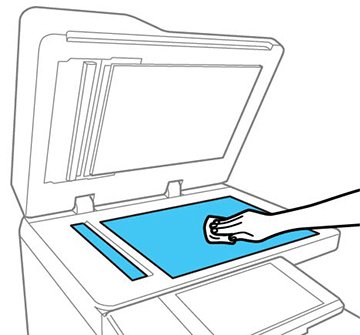
Spray a small amount of glass cleaner or distilled water onto your microfiber cloth (never directly onto the glass). Wipe the glass in gentle, circular motions. Start from one edge and work your way across. Pay special attention to the corners, where dust collects.
5. Clean The Edges And Corners
Dip a cotton swab in distilled water (squeeze out excess liquid) and use it to clean the corners and edges. These areas are easy to miss but often hold the most dirt.
6. Dry The Glass
Use a dry part of your microfiber cloth to buff the glass. Make sure there are no streaks or wet spots left. If you see any, repeat the wipe with a clean, dry cloth.
7. Check For Streaks
Look at the glass from different angles under good light. If you see streaks, wipe again with a dry cloth. Sometimes, using too much cleaner or water causes streaks.
8. Clean The Underside (if Possible)
Some scanners allow you to access the underside of the glass. If safe and your manual allows it, clean this area too. But never try to disassemble your scanner unless you’re sure you won’t void the warranty.
9. Close And Power On
Close the lid, plug the scanner back in, and power it on. Run a test scan to check for improvements.

Credit: www.bhphotovideo.com
Dealing With Stubborn Stains And Marks
Some marks are hard to remove with normal cleaning. These might include:
- Sticky tape residue
- Dried-on ink or correction fluid
- Grease from fingerprints
For these, use a bit more patience:
- Dampen a cotton swab with distilled water and gently rub the spot.
- For sticky residue, a drop of isopropyl alcohol (70% or less) on a cloth may help—but test on a small area first and avoid touching plastic parts.
- Never use sharp tools or scratch at the glass, as this can cause permanent damage.
If a stain refuses to come off, it’s better to leave it than to risk scratching the glass.
How Often Should You Clean Scanner Glass?
Frequency depends on your environment and usage:
- Heavy use (daily scans): Clean the glass once a week.
- Average use (few times a week): Clean every 2–4 weeks.
- Rare use: Clean before each scanning session.
If your scanner is in a dusty area or shared by many people, clean more often. Office scanners often need more frequent care than home units.
Preventing Scanner Glass From Getting Dirty
A few simple habits help keep your scanner glass cleaner for longer:
- Always wipe dust from documents before scanning.
- Don’t eat or drink near the scanner.
- Keep the scanner lid closed when not in use.
- Avoid placing sticky notes or labels on the glass.
- Store the scanner in a clean, dry area.
These steps prevent dirt, crumbs, and spills from reaching the glass in the first place.
Comparing Cleaning Methods
People use different methods to clean scanner glass. Here’s a quick comparison of the most common ones:
| Method | Effectiveness | Risk of Damage | Best For |
|---|---|---|---|
| Microfiber Cloth + Distilled Water | High | Very Low | General Cleaning |
| Glass Cleaner (Ammonia-Free) | High | Low (if used correctly) | Removing Smudges |
| Isopropyl Alcohol | Medium | Medium (if overused) | Sticky Residue |
| Paper Towels | Low | High (scratches, lint) | Not Recommended |
| Compressed Air | Medium | Low | Loose Dust |
The safest, most effective method is using a microfiber cloth with distilled water or a proper glass cleaner.
What About Automatic Document Feeders (adf)?
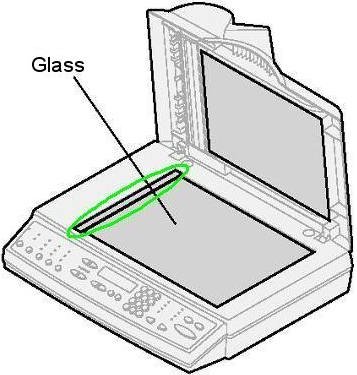
Many scanners have an Automatic Document Feeder (ADF) for scanning stacks of paper. The ADF uses its own narrow glass strip (called the ADF glass or ADF strip). This glass can get dirty quickly, leading to long streaks on every scanned page.
Cleaning the ADF glass is similar to cleaning the main scanner glass, but the strip is smaller and often harder to reach. Use a slightly damp microfiber cloth and a cotton swab for edges. Avoid using too much liquid, as the ADF has sensitive parts nearby.
Some ADFs also have rollers that touch every page. If you notice lines or marks only when scanning through the feeder (not on the flatbed), clean both the glass and rollers.
Scanner Glass Cleaning For Different Scanner Types
Not all scanners are the same. Here’s how cleaning may differ by type:
Flatbed Scanners
These are the most common. The glass is large and easy to access. Cleaning is straightforward, as described above.
All-in-one Printers
These combine printing, scanning, and copying. The scanner glass is usually easy to find under the lid. Some models have both a flatbed and ADF.
Sheet-fed Scanners
These pull paper through the scanner. The glass area is narrow, making cleaning tricky. Use a cotton swab and cloth for the best results.
Large Format Scanners
Used for blueprints or posters, these have wide glass surfaces. Cleaning requires more time and a larger cloth. Take care not to press too hard and avoid moving parts.
Photo And Film Scanners
These often have special coatings or sensitive parts. Only use recommended cleaning materials. Avoid sprays and use very little moisture.
Advanced Tips Most Beginners Miss
Many people clean their scanner glass but still get streaks or dust. Here are two advanced insights that help:
- Control humidity in your room. High humidity makes dust stick to glass, while very dry air creates static, attracting more dust. Keep your room at a moderate humidity (about 40–50%) for best results.
- Use anti-static wipes. These reduce static electricity, making it harder for dust to cling to the glass. They’re available at electronics stores and can make a big difference in dusty climates.
Another tip: always clean your scanner glass before scanning important documents or photos. Even if it looks clean, invisible smudges can show up in high-resolution scans.
When To Seek Professional Help
Most cleaning can be done at home, but there are times you should call a professional:
- If the glass is scratched or cracked
- If you see dust or marks under the glass that you can’t reach
- If cleaning doesn’t improve scan quality
- If your scanner is under warranty and you’re unsure about opening it
Professionals have tools to safely remove and clean internal parts. Attempting this yourself may void your warranty or cause damage.
Scanner Glass Cleaning: Cost And Time
You might wonder how much time and money to spend on cleaning. Here’s a quick overview:
| Cleaning Method | Time Required | Approximate Cost | Difficulty |
|---|---|---|---|
| Basic Surface Cleaning | 5–10 minutes | $5–$10 (for cloth and cleaner) | Easy |
| Deep Cleaning (with ADF) | 15–20 minutes | $10–$15 (extra tools) | Medium |
| Professional Cleaning | 1–2 days (including service time) | $30–$100 | Hard (not DIY) |
Basic cleaning is quick and affordable. Deep cleaning and professional service cost more but are sometimes necessary for best results.
Common Mistakes And How To Avoid Them
Many users make errors that can harm their scanner or make cleaning less effective. Here are some frequent mistakes:
- Using paper towels or tissues – These scratch the glass and leave lint behind.
- Spraying cleaner directly onto glass – Excess liquid can seep inside and damage electronics.
- Cleaning with the scanner powered on – This is unsafe and can cause short circuits.
- Using too much pressure – Pressing too hard can crack the glass or damage underlying sensors.
- Ignoring the ADF strip – Many marks come from the feeder, not the main glass.
To avoid these mistakes, always follow the steps above and use the right materials.
Credit: files.support.epson.com
Scanner Glass Cleaning And Digital Quality
A clean scanner glass does more than just make images look better. It improves digital workflows, especially for offices using OCR. Dirty glass can cause errors in converting scanned text into editable documents, leading to extra work or lost information.
If you scan photos, dirt or smudges are even more obvious. A speck of dust can ruin a family photo or important archive. That’s why museums and archives use strict glass cleaning protocols.
Environmental Impact: Safe Disposal Of Cleaning Materials
It’s important to clean safely and responsibly. Never pour leftover cleaning fluids down the drain, especially if they contain chemicals. Dispose of used cloths and cotton swabs in regular trash unless they are heavily soiled with hazardous cleaners.
Whenever possible, use eco-friendly cleaners and reusable microfiber cloths. These are better for the planet and often gentler on your scanner.
Professional Cleaning Services: When And Why
If your scanner glass is deeply scratched, foggy, or you see dust under the surface, professional help may be needed. Service centers have special tools to:
- Remove and re-seat the glass
- Clean hard-to-reach internal sensors
- Polish minor scratches (sometimes)
This is most common for high-end or large-format scanners. Professional cleaning can restore performance and extend the life of your device, but check the warranty before using third-party services.
Maintaining Scanner Glass: A Long-term Approach
To keep your scanner glass in good condition for years:
- Set a regular cleaning schedule (monthly is a good start).
- Keep the area around your scanner clean and dust-free.
- Store the scanner with a cover if not in use for long periods.
- Teach everyone who uses the scanner how to clean it properly.
These habits take only a few minutes but can save you from headaches down the road.
Frequently Asked Questions
How Do I Know If My Scanner Glass Needs Cleaning?
If your scans show streaks, lines, blurry patches, or spots that don’t appear on the original document, it’s time to clean the glass. You might also see dust or smudges on the glass itself under good light.
Can I Use Alcohol Wipes To Clean Scanner Glass?
Use alcohol wipes with caution. Only use isopropyl alcohol (70% or less) and avoid wipes with added fragrances or harsh chemicals. Always test on a small area first and never use on coated or specialty glass.
What Should I Do If My Scanner Glass Is Scratched?
Minor scratches can sometimes be polished out by professionals, but deep scratches often require glass replacement. Avoid using the scanner until it’s fixed, as scratches can affect scan quality and cause further damage.
Is It Safe To Use Window Cleaner On My Scanner Glass?
Only use ammonia-free window cleaners and never spray directly onto the glass. Check your scanner’s manual, as some models have special coatings that can be damaged by regular window cleaners.
How Can I Prevent Fingerprints On Scanner Glass?
Wear clean gloves when handling documents or cleaning the glass. Always use the edges of paper when placing it on the glass, and keep your hands clean and dry.
Regular scanner glass cleaning is a simple, low-cost way to protect your investment and ensure every scan is crisp and clear. With the right tools, knowledge, and habits, you’ll enjoy better digital documents and fewer scanning headaches. For more details on scanner maintenance and cleaning products, visit HP’s official guide for trusted advice.
