
MacBook laptops have set the standard for sleek design and high performance. But one feature that many users find especially useful is MagSafe charging. This technology, which first appeared in MacBooks in 2006, has made a strong comeback in recent models. Many people remember MagSafe as the charging cable that clicks into place with magnets and comes off easily when pulled, helping to prevent accidents. Today, MagSafe is more than just a cable—it’s a smart solution for safer, faster, and more reliable charging.
If you’re thinking about buying a new MacBook, upgrading your old one, or just curious about how MagSafe works, this guide will answer all your questions. You’ll learn about its history, how it compares to USB-C charging, what makes it special, and how you can get the best out of it.
Whether you’re a student, a creative professional, or a business user, understanding MagSafe charging for MacBook can help you work smarter and protect your investment.
What Is Magsafe Charging?
MagSafe is a magnetic charging connector designed by Apple. The main idea is simple: the charging cable attaches magnetically to the MacBook’s charging port. If you accidentally trip over the cable, it pulls away safely—without dragging your expensive laptop to the floor. The connector only attaches in the correct orientation, making it almost impossible to plug in the wrong way.
The most recent versions of MagSafe, like MagSafe 3, support fast charging and deliver more power than many traditional chargers. This technology is exclusive to Apple’s MacBook Air and MacBook Pro models, starting from 2021.
MagSafe also has smart features. It uses a built-in chip to manage power delivery, monitor battery health, and even show a charging status light—orange when charging, green when full.
A Brief History Of Magsafe
Apple introduced MagSafe in 2006 with the MacBook Pro. Users loved the magnetic connection for its convenience and safety. Over the years, MagSafe evolved, but in 2016, Apple removed it in favor of USB-C charging. This change disappointed many fans, as USB-C, while versatile, didn’t offer the same protection against accidents.
The story took another turn in 2021, when Apple brought MagSafe back with the redesigned MacBook Pro. Now known as MagSafe 3, this new version is thinner, delivers more power, and supports fast charging for the latest MacBooks. Its return was welcomed by both old fans and new users.
How Does Magsafe Charging Work?
The core of MagSafe is its magnetic connector. When you bring the cable close to the port, magnets guide it into place. This means you don’t have to fumble with plugging in the charger, especially in low light or tight spaces.
MagSafe also includes a charging status light on the connector. It glows amber while charging and turns green when the battery is full. This small touch helps you quickly check your MacBook’s charging status.
Inside the connector, there’s a tiny chip that communicates with your MacBook. It helps regulate power flow, prevent overheating, and protect against overcharging. The combination of magnetic design and smart technology makes MagSafe both safe and efficient.
Magsafe Vs. Usb-c Charging: What’s The Difference?
Many MacBook models support both MagSafe and USB-C charging. But they are not the same. Here’s a direct comparison to help you see the key differences:
| Feature | MagSafe Charging | USB-C Charging |
|---|---|---|
| Connection Type | Magnetic | Physical plug |
| Orientation | One way only | Reversible |
| Safety (Trip Protection) | Yes | No |
| Fast Charging | Supported on newer models | Varies by charger and cable |
| Port Flexibility | Charging only | Charging, data, video |
| Status Indicator | Yes (LED) | No |
| Wear & Tear | Reduced (no prongs) | Possible with repeated use |
MagSafe is safer and more user-friendly, especially in busy environments. USB-C is more versatile, supporting data transfer and video output. But for charging alone, MagSafe is often the better choice for MacBook users.
Advantages Of Magsafe Charging
MagSafe isn’t just about convenience—it offers real benefits that set it apart from other charging options.
1. Safety First
The biggest advantage is safety. If someone trips over your charging cable, MagSafe pops off instantly. This can save your laptop from a costly fall.
2. Fast Charging
Recent MacBooks with MagSafe 3 can charge up to 50% in about 30 minutes when paired with the right power adapter. This is especially useful for people who need a quick battery boost before heading out.
3. Led Status Light
The built-in LED indicator shows if your MacBook is charging or fully charged. This small feature means you don’t have to open your laptop just to check battery status.
4. Lower Wear And Tear
Since the connector attaches magnetically, there’s less stress on the port and cable. This can help your hardware last longer.
5. No Wrong Way To Plug In
The MagSafe connector only attaches in the correct orientation. You don’t have to worry about damaging the port by forcing the cable in the wrong way.
6. Frees Up Usb-c Ports
MagSafe uses a dedicated port, so you still have all your USB-C ports available for other devices.
Disadvantages And Limitations
While MagSafe has many strengths, it’s not perfect for every user or situation.
1. Charging Only
MagSafe is designed for charging only. Unlike USB-C, you can’t use it for data transfer, connecting monitors, or other devices.
2. Exclusive To Newer Models
Only recent MacBook Air and MacBook Pro models support MagSafe 3. Older models either use a different MagSafe version or USB-C only.
3. Proprietary Accessories
You need a MagSafe-compatible charger. Third-party options are limited compared to USB-C, and Apple’s official chargers can be expensive.
4. Compatibility Issues
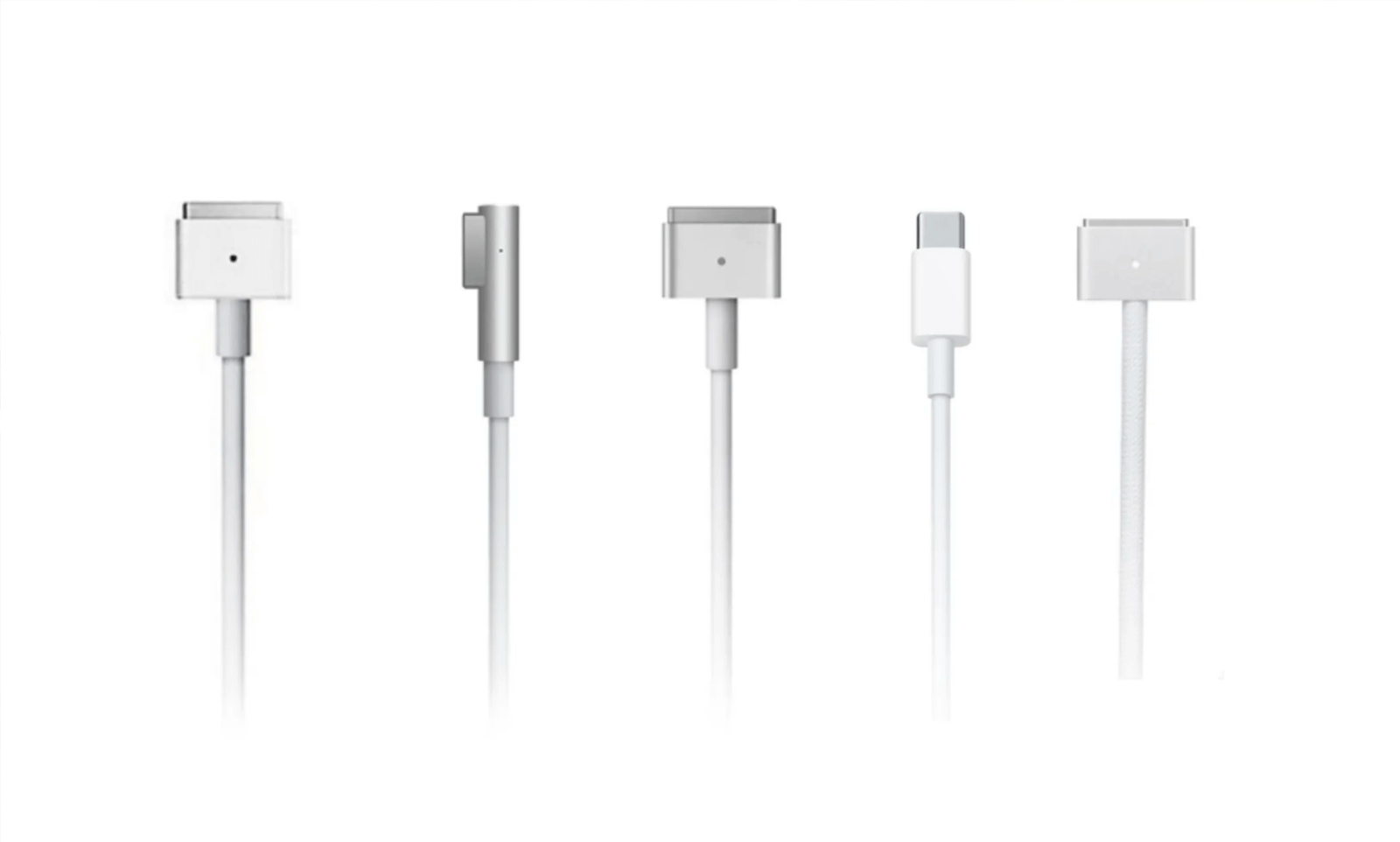
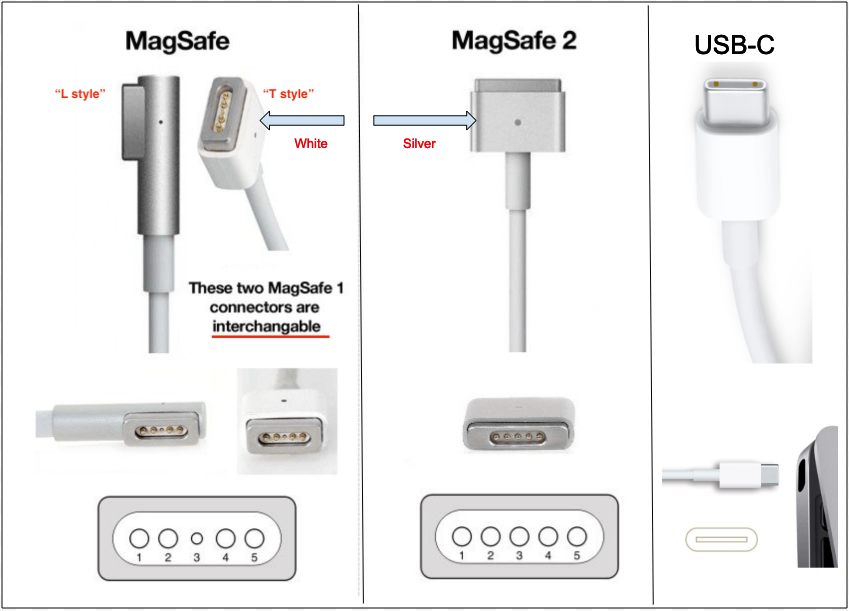
MagSafe 1, 2, and 3 are not cross-compatible. You can’t use a MagSafe 2 charger with a MagSafe 3 MacBook, for example.
5. Slightly Larger Connector
The magnetic connector is bigger than a USB-C plug, which might matter if you have a very thin laptop sleeve or case.
Which Macbook Models Support Magsafe Charging?
MagSafe has appeared in several versions over the years:
- MagSafe 1: Used in MacBooks from 2006 to 2012
- MagSafe 2: Used in MacBook Air and MacBook Pro (2012–2015)
- MagSafe 3: Introduced in 2021 for MacBook Pro (14-inch and 16-inch) and MacBook Air (2022 and later)
Here’s a quick overview of recent MacBook models and their charging options:
| MacBook Model | MagSafe Support | Alternative Charging |
|---|---|---|
| MacBook Pro (14-inch, 2021+) | MagSafe 3 | USB-C |
| MacBook Pro (16-inch, 2021+) | MagSafe 3 | USB-C |
| MacBook Air (M2, 2022+) | MagSafe 3 | USB-C |
| MacBook Air (M1, 2020) | No | USB-C |
| MacBook Pro (2016–2020) | No | USB-C |
| Older MacBooks (pre-2016) | MagSafe 1 or 2 | No |
If you’re buying a new MacBook, check the specifications to see if it supports MagSafe 3.
How To Use Magsafe Charging: Step-by-step
Using MagSafe charging is simple, but doing it correctly ensures the best performance and safety.
1. Plug The Power Adapter Into The Wall
Use the Apple adapter that came with your MacBook, or a certified replacement.
2. Connect The Magsafe Cable To The Adapter
The cable clicks into the adapter’s USB-C port.
3. Bring The Magsafe Connector Close To The Macbook
The magnets will pull it into place automatically.
4. Check The Status Light
Look for the amber or green LED to confirm charging.
5. Remove By Pulling The Connector, Not The Cable
When you’re done, gently pull the connector, not the cable itself.
6. Store The Cable Properly
Avoid wrapping the cable too tightly to prevent damage.

Credit: www.apple.com
Fast Charging With Magsafe: What You Need To Know
MagSafe 3 supports fast charging on some MacBook models. But to get the fastest speeds, you need the right combination of MacBook, MagSafe cable, and power adapter.
For example:
- The 14-inch MacBook Pro (2021+) supports fast charging up to 96W.
- The 16-inch MacBook Pro (2021+) supports fast charging up to 140W.
To unlock fast charging, you must use:
- The MagSafe 3 cable (included with your MacBook)
- Apple’s 67W, 96W, or 140W USB-C power adapter (depending on your model)
If you use a lower wattage adapter, charging will still work, but it will be slower.
Non-obvious insight: Many users don’t realize that using a third-party adapter, even if it matches the wattage, may not deliver the same fast charging performance as Apple’s official adapter. Always check compatibility before purchasing.
Caring For Your Magsafe Charger
MagSafe chargers are durable, but a little care goes a long way. Here are some practical tips to keep your charging gear in top shape:
- Avoid sharp bends: Repeatedly bending the cable near the connector can cause wear.
- Keep it clean: Dust and debris can weaken the magnetic connection. Use a soft cloth to clean the port and connector.
- Avoid liquids: Keep the connector dry to prevent corrosion.
- Store loosely: Don’t wrap the cable tightly around the adapter.
- Check for fraying: If you notice any wear, replace the cable promptly.
Pro tip: If you often use your MacBook in busy spaces (cafés, libraries), consider keeping a spare MagSafe cable in your bag. This way, you’re always prepared if your main cable gets damaged or lost.
Troubleshooting Magsafe Charging Issues
Most MagSafe charging problems are easy to solve, but knowing what to look for can save you time.
Common Problems And Solutions
- No Charging Light
- Check if the adapter is plugged in and the outlet is working.
- Inspect the connector for dust or debris.
- Try a different power adapter or cable.
- Intermittent Charging
- Ensure the connector is fully seated and the magnets are clean.
- Move away from any strong magnets or metal objects that could interfere.
- Charging Slowly
- Use the correct wattage adapter.
- Avoid using intensive apps while charging.
- Overheating
- Charging may slow down if your MacBook or adapter gets too hot. Use your MacBook on a hard, flat surface for better cooling.
- Cable Damage
- If you see fraying or exposed wires, stop using the cable immediately.
Less obvious insight: Some users notice “phantom” disconnects, where the MagSafe connector appears to come loose easily. This often happens if the charging port is dirty or if you’re using a non-Apple cable.
Magsafe Accessories: What’s Available?
Apple offers official MagSafe chargers and cables, but there are also third-party options. Here’s what you should know before buying accessories:
- Official Apple MagSafe 3 Cable: Best for compatibility and performance.
- Third-Party MagSafe Cables: Some work well, but always check reviews and certifications. Poorly made cables can lead to slow charging or even damage.
- Extra Power Adapters: Useful for travel or keeping a backup at work.
- Cable Organizers: Help keep your charging gear tidy.
If you’re considering a third-party product, look for certifications like “Made for MacBook” or similar. Always buy from trusted sellers.
Credit: www.hoxtonmacs.co.uk
Magsafe And Battery Health
Modern MacBooks use smart charging to protect battery health. MagSafe works with these systems to:
- Avoid overcharging by stopping when the battery is full
- Limit charging speed if the battery is too hot
- Learn your charging habits to slow down charging overnight
To get the most out of your battery:
- Plug in MagSafe when your battery drops below 30%
- Unplug once it’s charged to 80–100% if you don’t need to stay plugged in
- Use the “Battery Health Management” feature in macOS
Did you know? Charging your MacBook with MagSafe while using a high-wattage adapter actually keeps the battery cooler than using a low-wattage adapter. This helps extend battery lifespan in the long run.
Magsafe Charging In Real-world Scenarios
MagSafe is more than just a technical feature—it’s a practical solution in daily life.
In The Office
If you work in a busy office, it’s easy for someone to trip over a cable. MagSafe protects your MacBook and keeps you working with less stress.
On The Go
When you’re traveling, it’s easy to connect or disconnect your MacBook quickly with MagSafe. You don’t have to search for the port or worry about plugging it in the wrong way.
For Students
MagSafe is great for classrooms and libraries. If you need to move quickly, just pop off the connector and go.
At Home
Even at home, pets or kids can accidentally pull on cables. With MagSafe, your MacBook is less likely to fall and get damaged.
Credit: support.hesperiausd.org
Magsafe Charging: Common Myths
There are a few myths and misunderstandings about MagSafe. Let’s clear them up:
- Myth 1: MagSafe charges slower than USB-C.
Fact: With the right adapter, MagSafe 3 can charge just as fast, or even faster, than USB-C.
- Myth 2: You can use any MagSafe cable on any MacBook.
Fact: MagSafe 1, 2, and 3 are not cross-compatible.
- Myth 3: MagSafe is just a marketing gimmick.
Fact: The safety and convenience of MagSafe are real and have saved many MacBooks from damage.
Future Of Magsafe Charging
Apple continues to invest in MagSafe technology. As batteries and charging speeds improve, MagSafe could offer even faster and more efficient charging. There are rumors that future MacBooks may feature wireless MagSafe charging, similar to what is available on iPhones.
Smart accessories—like charging docks or stands—may also play a bigger role. For now, MagSafe 3 is one of the safest and most reliable ways to charge your MacBook.
For more on the history and technical details of MagSafe, visit the MagSafe Wikipedia page.
Frequently Asked Questions
How Do I Know If My Macbook Supports Magsafe Charging?
Check the year and model of your MacBook. MagSafe 3 is supported on MacBook Pro (14-inch and 16-inch, 2021 or later) and MacBook Air (M2, 2022 or later). Older models use MagSafe 1 or 2, or USB-C only.
Can I Use My Old Magsafe Charger With A New Macbook?
No, you cannot. MagSafe 1, 2, and 3 are physically different. Using the wrong charger can damage your MacBook or the charger.
Is Magsafe Charging Faster Than Usb-c?
With the right adapter, MagSafe 3 can charge at the same speed as, or sometimes faster than, USB-C. To get fast charging, you must use the recommended power adapter for your MacBook model.
What Should I Do If My Magsafe Charger Stops Working?
First, check the power source and cable for damage. Clean the connector and port. Try a different adapter if possible. If it still doesn’t work, contact Apple Support.
Are Third-party Magsafe Chargers Safe To Use?
Some third-party chargers are safe, but always check for certification and reviews. Using low-quality chargers can cause slow charging, overheating, or even damage to your MacBook.
MagSafe charging has become an essential feature for modern MacBooks, combining safety, speed, and convenience. By understanding how it works, which models support it, and how to care for your gear, you can enjoy a better charging experience—one that keeps your MacBook ready for anything.
