
A clean workspace often leads to a clearer mind and higher productivity. But while most people wipe their desks and declutter their shelves, the corner desk is often left out. Its unique shape can attract dust, tangled wires, and hidden messes. If you sit at a corner desk, you might notice crumbs in the cracks, dust in the far corner, and sticky marks under your monitor. Cleaning a corner desk may seem like a small job, but doing it right can improve your work environment, protect your equipment, and even boost your mood.
Many people avoid cleaning their corner desk because it feels awkward to reach every part. Wires, monitors, and accessories pile up, making some areas hard to access. But with the right steps, tools, and a clear plan, you can make your corner desk spotless—and keep it that way.
This guide will show you how to clean every inch of your corner desk, from the easy surfaces to those hidden trouble spots. You’ll also learn how to organize cables, what supplies to use, and how to avoid common mistakes.
Whether you use your corner desk for work, gaming, or studying, you’ll find practical tips here for a cleaner, more inviting space.
Understanding Your Corner Desk
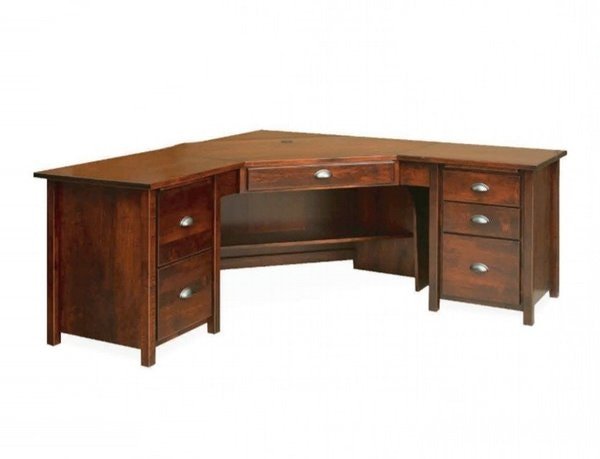
Before you start cleaning, it helps to understand the unique features of a corner desk. Unlike regular desks, corner desks have a V-shape or L-shape that fits into a room’s corner. This design saves space but also creates hard-to-reach areas. The far corners collect more dust, and wires or items can get stuck there. Some corner desks have shelves, built-in drawers, or a second level for monitors.
Knowing your desk’s material is important too. Most corner desks are made from:
- Wood (solid or engineered)
- Laminate
- Glass
- Metal
- Plastic
Each material needs different cleaning products and care. For example, wood scratches easily, glass shows fingerprints, and laminate can swell if it gets too wet.
Essential Cleaning Supplies
You don’t need fancy products to clean your corner desk, but having the right supplies makes a big difference. Here’s what you should gather before you start:
- Microfiber cloths: These pick up dust and dirt without scratching surfaces.
- Mild detergent or soap: Gentle enough for most surfaces.
- Disinfectant wipes or spray: For killing germs, especially if you eat at your desk.
- Compressed air can: Blows dust out from tight corners and keyboards.
- Small soft brush: An old toothbrush works for corners and crevices.
- Vacuum cleaner with a brush attachment: Removes crumbs and dust from the floor and under the desk.
- Cotton swabs: Cleans small gaps or buttons.
- Cable ties or Velcro straps: For organizing wires.
- Glass cleaner: For glass desks or monitor screens.
- Wood polish: If your desk is made of real wood.
- Trash bag: For disposing of old papers and clutter.
It’s easy to forget a tool or two, but starting with everything ready will save you time and frustration.
Preparation: Clearing Your Desk
Cleaning is easiest when your corner desk is empty. Take a few minutes to remove everything:
- Unplug electronics. Turn off and unplug computers, monitors, lamps, and chargers. This protects you from shocks and prevents liquids from damaging your gear.
- Take everything off the desk surface. Move monitors, keyboards, papers, cups, and personal items to another table or the floor.
- Remove items from drawers and shelves. If your desk has storage, empty it so you can clean inside.
- Sort your items as you go. Make piles for things to keep, throw away, or relocate. This is a good time to declutter.
It can be tempting to clean around your stuff, but emptying the desk lets you reach every spot. Plus, it’s a chance to find lost items or get rid of things you no longer need.
Deep Cleaning The Desk Surface
Once your desk is empty, it’s time to tackle the surface. The right method depends on your desk’s material:
For Wood Or Laminate
- Dust first with a dry microfiber cloth.
- Mix a small amount of mild detergent with warm water. Dampen a cloth—don’t soak it.
- Wipe the surface gently, especially in corners. Go with the grain for wood.
- Dry with a clean cloth to prevent water spots or swelling.
- Polish wood if you like a shiny finish, but avoid oil-based products on laminate.
For Glass
- Remove dust with a dry cloth.
- Spray a glass cleaner and wipe with a lint-free cloth.
- Check for streaks, especially in the corners.
For Metal Or Plastic
- Wipe with a damp cloth and mild soap.
- Dry right away to prevent rust (for metal).
Pro Tip: For sticky spots or tape residue, use a little rubbing alcohol on a cotton swab. Avoid harsh chemicals, especially on painted or laminated surfaces.
Getting Into The Corners And Hard-to-reach Areas
Corner desks attract dust and dirt in places your hand can’t easily reach. Here’s how to get them clean:
- Use a small brush or old toothbrush to loosen dust and debris in corners and seams.
- Compressed air is perfect for blowing out crumbs from tight spaces, especially behind monitors or in keyboard cracks.
- Cotton swabs help clean tiny gaps around screws, buttons, or USB ports.
- Vacuum the floor under the desk, especially in the deep corner where dust and cables collect.
A common mistake is skipping these spots. Over time, dust buildup in corners can lead to allergies and even damage electronics.
Cleaning Desk Accessories
Your desk is more than just a surface. Accessories like monitors, keyboards, mice, lamps, and organizers also need cleaning.
Monitor Screens
- Turn off and unplug the monitor.
- Wipe gently with a microfiber cloth.
- Use screen cleaner or a solution of water and a little vinegar. Never spray directly—apply to the cloth first.
- Avoid paper towels or rough cloths—they can scratch screens.
Keyboard And Mouse
- Turn off or unplug them.
- Shake upside down to remove crumbs.
- Blow compressed air between keys.
- Wipe keys and mouse with a disinfectant wipe or a damp cloth (not wet).
Other Items
- Lamp: Wipe with a damp cloth, replace bulbs if dusty.
- Organizer trays: Empty, dust, and wipe clean.
- Pens and office tools: Wipe down if sticky or dusty.
Regularly cleaning accessories prevents grime from spreading back onto your clean desk.
Organizing And Cleaning Cables
Corner desks often have more cables than straight desks, thanks to multiple monitors or gadgets. Messy cables collect dust and make cleaning harder. Here’s how to fix this:
- Unplug everything and untangle cords.
- Wipe each cable with a damp cloth. Dusty cables are a common cause of allergies and look messy.
- Bundle cables using cable ties or Velcro straps. Group similar cables together (e.g., monitor cables, chargers).
- Use cable management clips or a cable box to keep cords off the floor and out of sight.
- Label cables if you have many—this saves time later.
Non-obvious tip: Make a habit of dusting cables every time you clean the floor. Cables are magnets for dust but are often overlooked.
Cleaning Under The Desk
It’s easy to forget what’s under your corner desk, but this area collects dust bunnies, food crumbs, and even lost items. Here’s how to clean it thoroughly:
- Move out any drawers or rolling cabinets if possible.
- Vacuum the floor, paying attention to the deep corner.
- Wipe the legs and underside of the desk with a damp cloth.
- Check for cobwebs in the corner or along the wall.
- Pick up any small objects or trash that have fallen behind.
If your desk sits against a wall, check the baseboards for dust too. Keeping this area clean helps prevent pests and keeps your workspace fresh.
Disinfecting High-touch Areas
Especially if you share your desk or eat at it, disinfecting is important:
- Wipe down handles, drawer pulls, and armrests with disinfectant wipes.
- Clean your mouse and keyboard more often if you touch your face or eat at your desk.
- Phone screens and headsets should be wiped daily if used often.
A study by the University of Arizona found that the average desk has 400 times more germs than a toilet seat. Regular disinfecting can help prevent illness.
Decluttering And Organizing After Cleaning
Once your corner desk is spotless, take time to reorganize as you put things back. This helps keep the desk cleaner for longer:
- Only return items you use daily. Store or toss things you rarely need.
- Use desk organizers for pens, papers, and small gadgets.
- Keep the center of the desk clear for your main work area.
- Store cables and chargers in a drawer or cable box.
- Add a small trash can nearby to avoid clutter.
Non-obvious insight: Place a microfiber cloth in a drawer and use it for a quick daily wipe. This small habit keeps your desk cleaner all week.
Credit: www.dutchcrafters.com
Creating A Cleaning Routine
Cleaning your corner desk once is great, but regular upkeep makes it easier next time. Here’s a simple routine:
- Daily: Wipe crumbs and dust, put away stray items.
- Weekly: Dust the whole desk, clean accessories, vacuum under the desk.
- Monthly: Deep clean corners, disinfect, organize cables, declutter drawers.
Most people only clean their desk when it looks dirty, but scheduled cleaning keeps your space healthier and more productive.
Mistakes To Avoid When Cleaning A Corner Desk
Even with the best intentions, mistakes can make cleaning harder or damage your desk. Watch out for these common errors:
- Using too much water: Excess liquid can damage wood or seep into electronics.
- Spraying cleaners directly on electronics: Always spray onto a cloth first.
- Using rough sponges or paper towels: These can scratch surfaces, especially glass or plastic.
- Ignoring cables and corners: Dust in these areas quickly spreads back to the main desk.
- Putting dirty items back: Wipe everything before returning it to the desk.
One mistake beginners often make is using all-purpose cleaners without checking if they’re safe for their desk’s material. Always read labels.

Credit: www.ikea.com
Table: Cleaning Methods For Different Desk Materials
Here’s a quick reference for the safest way to clean various desk types.
| Material | Best Cleaning Method | What to Avoid |
|---|---|---|
| Wood | Microfiber cloth, mild soap, dry quickly, wood polish | Too much water, harsh chemicals |
| Laminate | Damp cloth, mild soap, dry after cleaning | Oil-based polish, abrasives |
| Glass | Glass cleaner, lint-free cloth | Paper towels, ammonia on tinted glass |
| Metal | Damp cloth, dry immediately | Leaving wet, rust-forming cleaners |
| Plastic | Mild soap, soft cloth | Abrasive scrubbers |
Table: Time Needed For Each Cleaning Task
Knowing how long each step takes helps you plan your cleaning session. Here’s a breakdown:
| Task | Approximate Time |
|---|---|
| Clearing the desk | 10 minutes |
| Surface cleaning | 10-15 minutes |
| Accessory cleaning | 10 minutes |
| Cable organizing | 15-20 minutes (if tangled) |
| Under desk cleaning | 10 minutes |
| Disinfecting | 5 minutes |
| Reorganizing | 10 minutes |
A full deep clean should take about an hour, but regular upkeep can cut this time in half.
Table: Common Desk Items And Cleaning Frequency
To keep your workspace healthy, some items need more frequent cleaning than others. Here’s a useful guide:
| Item | Recommended Cleaning Frequency |
|---|---|
| Desk surface | Weekly |
| Monitor screen | Every 2 weeks |
| Keyboard and mouse | Weekly (or more if eating at desk) |
| Cables | Monthly |
| Drawers/organizers | Monthly |
| Under desk area | Weekly |
Advanced Tips For A Cleaner Desk
If you want to take your cleaning routine to the next level, try these strategies:
- Use a desk mat: This protects the main surface from scratches and is easy to wipe clean.
- Install cable sleeves: These hide multiple wires in one neat tube.
- Set a reminder on your phone for weekly cleaning.
- Keep snacks and drinks on a tray to avoid spills on the desk.
- Rotate desk decorations seasonally to prompt decluttering.
A clean desk can also reduce stress. Studies show that cluttered workspaces lower productivity and increase anxiety. Even spending 5 minutes a day on quick cleaning can make a big difference.
When To Replace Or Repair Your Corner Desk
Sometimes, cleaning isn’t enough. If your desk is wobbly, stained, or damaged, it may be time for repairs or a replacement:
- Loose screws or joints: Tighten with a screwdriver or Allen key.
- Deep scratches or chips: Use wood filler or a repair kit.
- Swollen or warped surfaces (common with old laminate): Consider replacing the desk.
- Broken glass or sharp edges: Replace for safety.
If you’re considering a new desk, look for models with built-in cable management, easy-to-clean surfaces, and adjustable feet for stability. For more ideas on ergonomic desk design, check resources like OSHA Ergonomics.
Frequently Asked Questions
How Often Should I Deep Clean My Corner Desk?
For best results, do a deep clean once a month. Wipe the main surface and accessories weekly. If you eat at your desk or share it, clean more often.
Can I Use Disinfectant Wipes On All Desk Surfaces?
Disinfectant wipes are safe for most hard surfaces, but avoid them on unfinished wood or delicate finishes. Always test a small area first.
What Is The Best Way To Clean Cables And Prevent Dust Buildup?
Wipe cables with a damp microfiber cloth once a month. Use cable ties to keep them together and off the floor, where dust collects fastest.
How Do I Remove Stubborn Stains Or Sticky Residue From My Desk?
For sticky spots, use a little rubbing alcohol on a cotton swab. For tough stains, try a mild dish soap solution. Avoid abrasive cleaners, which can scratch the surface.
Why Does My Desk Get Dusty So Quickly, And How Can I Prevent It?
Desks near vents, windows, or heavy traffic collect dust faster. Regular dusting, using an air purifier, and keeping windows closed can help reduce dust buildup.
A spotless corner desk isn’t just about looks—it can change the way you work and feel. By following these steps and making cleaning a habit, you’ll enjoy a healthier, more organized, and more inviting workspace every day.

Credit: www.shutterstock.com
