
A headset is more than just a tool for music, gaming, or work calls. It rests on your ears, touches your skin, and sometimes even gets shared between people. But how often do you think about keeping it clean? Headset hygiene is not only about appearance—it’s about health, comfort, and even performance. Dirty headsets can cause skin problems, spread germs, and affect sound quality. In today’s world, where many people use headsets for hours each day, learning good headset hygiene is essential.
You may think a quick wipe is enough, but real cleanliness takes a little more. If you’ve ever noticed a buildup of dirt or felt itchiness after using your headset, this guide is for you. Whether you use a headset for work, gaming, or study, these detailed tips will help you keep your headset fresh, safe, and long-lasting.
You’ll also find practical insights that most beginners miss, like how humidity affects bacteria growth or why using the wrong cleaner can damage your device. Let’s dive deep into the world of headset hygiene and see how a few small habits can protect your health and improve your listening experience.
Why Headset Hygiene Matters
Before discussing cleaning tips, it’s important to understand why headset hygiene is so crucial. Many people don’t realize how quickly headsets can become a breeding ground for bacteria and fungus. Our ears produce sweat and oil, and these get trapped by the headset cushions.
Add heat, humidity, and regular contact with skin, and you have the perfect environment for germs.
A study by the University of Arizona found that shared headsets can carry more bacteria than a toilet seat. These germs can cause ear infections, acne, and even allergic reactions. For people with sensitive skin or allergies, poor hygiene can lead to ongoing discomfort.
Besides health, dirt and sweat can break down materials like leather, foam, or plastic, making your headset wear out faster. Sound quality can also suffer if dirt blocks the speakers or microphone.
Daily Headset Hygiene Habits
Small daily steps can keep your headset fresh and safe. These habits take only a minute or two but make a big difference over time.
- Wipe Down After Every Use: Use a soft, dry microfiber cloth to gently wipe the ear pads, headband, and microphone. This removes sweat, oil, and dust before they can build up.
- Wash Your Hands: Always clean your hands before putting on your headset. This reduces the transfer of bacteria and dirt.
- Air Out Your Headset: After use, let your headset rest in an open, dry place. Don’t put it back in a bag or drawer while it’s still warm and damp from your skin.
- Avoid Sharing When Possible: Sharing headsets spreads germs quickly. If you must share, wipe the device before and after each use.
- Check for Visible Dirt: Make it a habit to look for dust, hair, or earwax on your headset. Catching these early prevents buildup.
These simple routines are easy to forget, but they are your first line of defense against germs and wear.
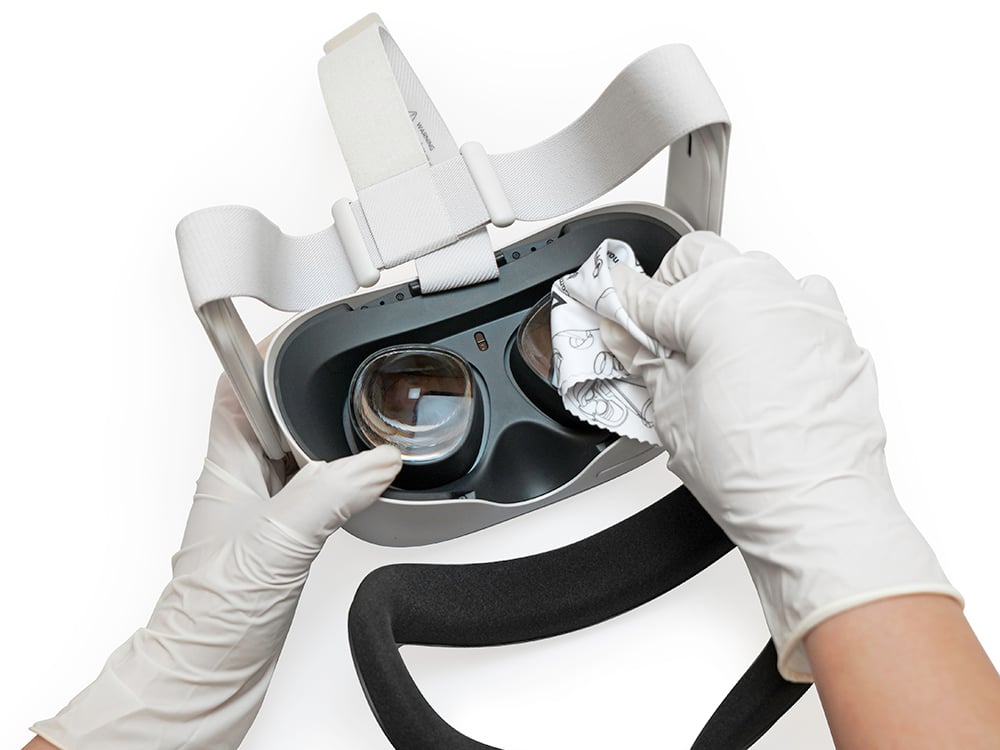
Credit: vrcover.com
Deep Cleaning Your Headset
Even with good daily habits, headsets need a deep clean regularly. The frequency depends on how often you use them, but once a week is a good target for daily users.
Step-by-step Deep Cleaning
- Unplug and Power Off: Always disconnect your headset from devices and turn it off before cleaning.
- Remove Ear Pads and Covers: Most quality headsets have removable ear pads. Take them off gently according to the manufacturer’s instructions.
- Clean Ear Pads Separately:
- For leather or faux leather: Wipe with a slightly damp microfiber cloth. Use a mix of water and mild soap if needed.
- For fabric or foam: Use a small brush to loosen dust. If washable, soak briefly in warm, soapy water, then air dry completely.
- Sanitize Surfaces: Use an alcohol wipe or a soft cloth sprayed with isopropyl alcohol (at least 70%) to gently clean the headband, exterior, and microphone. Avoid soaking any part.
- Clean Speaker Grills and Microphone: Use a dry, soft brush or compressed air to remove dust from small openings. Never use liquids on these areas.
- Dry Fully Before Reassembling: Let all parts air dry fully before putting your headset back together. Moisture can damage electronics and attract more germs.
- Reassemble Carefully: Once dry, put everything back in place. Check for a snug fit to avoid rattling or discomfort.
Pro tip: Always check the manual before cleaning, as some brands have special care instructions.
Cleaning Frequency: How Often Is Enough?
How often should you clean your headset? There’s no one-size-fits-all answer, but here are some useful guidelines:
| Usage Type | Recommended Cleaning Frequency | Reason |
|---|---|---|
| Daily, Heavy Use | Wipe after every use, deep clean weekly | More sweat, oil, and dust buildup |
| Occasional Use | Wipe after use, deep clean monthly | Less frequent contact, slower buildup |
| Shared Headsets | Sanitize before and after each use | Reduces risk of cross-contamination |
| Gym/Outdoor Use | Wipe after every use, deep clean twice a week | Sweat and outdoor dirt increase bacteria growth |
These recommendations are a starting point. If you notice odor, discomfort, or visible dirt, clean your headset right away.
Common Mistakes People Make
Many people try to keep their headsets clean but still make mistakes that can cause damage or leave germs behind. Here are some of the most common errors and how to avoid them:
- Using the Wrong Cleaners: Strong chemicals like bleach or window cleaner can damage materials. Always use mild soap, water, or isopropyl alcohol.
- Soaking Headsets in Water: Electronics and water do not mix. Never submerge your headset or let water get inside the speaker grills or microphone.
- Skipping the Drying Step: Reassembling your headset while parts are still damp can trap moisture and encourage mold or rust.
- Ignoring Small Areas: Places like the microphone mesh, headband padding, or inside creases often hide dirt. Use a soft brush or cotton swab for these spots.
- Forgetting to Clean Storage Cases: If your headset lives in a carrying case, clean that too. Otherwise, germs and dust will transfer back to your headset.
- Using Paper Towels: Paper towels can leave lint and scratch surfaces. Always choose a microfiber or soft cotton cloth.
- Not Checking the Manual: Some headsets have special materials or coatings. Always check for brand-specific cleaning advice.
Avoiding these mistakes will help your headset last longer and keep you healthier.
Special Tips For Different Types Of Headsets
Not all headsets are built the same. Each type—over-ear, on-ear, in-ear, or gaming—has unique needs.
Over-ear And On-ear Headsets
These are the most common for work and gaming. They have large ear pads that absorb sweat and oil.
- Replace ear pads every 6-12 months, or sooner if they show cracks, odor, or loss of comfort.
- Use protective covers if you sweat a lot or share your headset. These covers are washable and add a barrier.
- Adjust headband tension regularly to avoid pressure spots, which can collect more sweat.
In-ear And Earbuds
These go inside the ear canal, so hygiene is even more important.
- Clean silicone tips after every use with warm, soapy water. Dry fully before reattaching.
- Disinfect hard plastic parts with an alcohol wipe.
- Store in a clean case to keep dust and lint out.
- Never share in-ear devices to avoid ear infections.
Gaming Headsets
Gamers often use their headsets for hours, sometimes while sweating.
- Wipe down after every session to remove sweat, especially if you play for long periods.
- Watch for microphone buildup; food particles, spit, and dust can collect here.
- Use anti-bacterial wipes on surfaces, but avoid the speaker mesh.
Wireless And Bluetooth Headsets
These often have more sensitive electronics.
- Never use excess water; a lightly damp cloth is enough.
- Clean charging ports with a dry brush to avoid moisture or corrosion.
- Check for software updates that can improve battery life and signal quality—clean connections work better.
Headset Hygiene For Shared Environments
In offices, call centers, schools, or gaming cafes, sharing headsets is common. This creates extra hygiene challenges.
- Assign personal ear covers or disposable sleeves to each user.
- Sanitize between uses with alcohol wipes or UV sanitizers.
- Label headsets to avoid mix-ups.
- Train staff or users on cleaning protocols—post instructions in visible places.
- Store headsets on hooks or stands instead of drawers, which trap moisture.
Non-obvious tip: If you must share, consider headsets with smooth, non-porous surfaces. They’re much easier to clean than fabric or foam.
How Humidity And Climate Affect Headset Hygiene
Many people don’t realize that your local climate changes how often you should clean your headset.
- In hot, humid areas, sweat and bacteria multiply faster. Clean more often, and choose headsets with breathable materials.
- In cold or dry climates, you may see less sweat but more skin flakes and dust. Focus on wiping and brushing.
- Travelers should pack a small cleaning kit, as hotel rooms and airports can be full of germs.
Expert insight: Using silica gel packs in your headset case can reduce moisture and prevent mold, especially in humid regions.
Protecting Your Headset Between Uses
How you store your headset matters as much as how you clean it.
- Use a Hard Case: A rigid case keeps dust, dirt, and moisture away.
- Let It Breathe: If using a soft pouch, make sure your headset is dry before storing.
- Keep Away from Sunlight: UV rays can break down plastic and leather, causing cracks.
- Avoid Extreme Temperatures: Don’t leave your headset in a hot car or in freezing weather. This can warp parts and weaken batteries.
- Don’t Wrap Cords Tightly: For wired headsets, wrapping cables too tightly can cause internal breakage.
Headset Hygiene And Health: Real Risks
Ignoring headset hygiene isn’t just about smells or looks. It can have real effects on your health.
- Ear infections: Bacteria and fungi can get trapped in your ear canal, especially with in-ear devices.
- Allergic reactions: Some people react to dirty foam, dust, or cleaning chemicals.
- Skin breakouts: Sweat, oil, and dirt cause pimples or rashes around your ears and jawline.
- Worsening eczema or dermatitis: Sensitive skin can flare up with dirty headsets.
A study from the Journal of Laryngology and Otology found that frequent headset use, especially in hot climates, increased the risk of external ear infections by up to 40%. That’s a risk not worth taking.
Choosing Headsets That Are Easy To Clean
If you’re buying a new headset, hygiene should be part of your decision.
| Feature | Why It Matters for Hygiene | What to Look For |
|---|---|---|
| Removable Ear Pads | Easy to wash or replace | Snap-on or zip-off designs |
| Smooth Surfaces | Less dirt trapped, easier to wipe | Leather, metal, or coated plastic |
| Washable Covers | Protect main parts, simple to clean | Machine-washable fabric sleeves |
| Water Resistance | Survives sweat and light cleaning | IPX4 or higher rating |
| Antimicrobial Coatings | Reduces bacteria growth | Special mention in specifications |
Non-obvious insight: Some high-end headsets have silver or copper-infused fabrics, which naturally fight bacteria. These options cost more but are worth it for heavy users.
Eco-friendly Cleaning Options
Many people want to avoid harsh chemicals for their health and the environment. Here are safe, eco-friendly ways to keep your headset clean:
- White vinegar and water (1: 1): Good for cleaning hard surfaces, but don’t use on electronics or foam.
- Baking soda paste: Removes odors from ear pads (apply, let sit, then brush off).
- Mild plant-based soap: Safe for most materials and gentle on skin.
- Reusable microfiber cloths: Reduce waste from paper towels or wipes.
Always test cleaning solutions on a small area first, especially with colored materials.
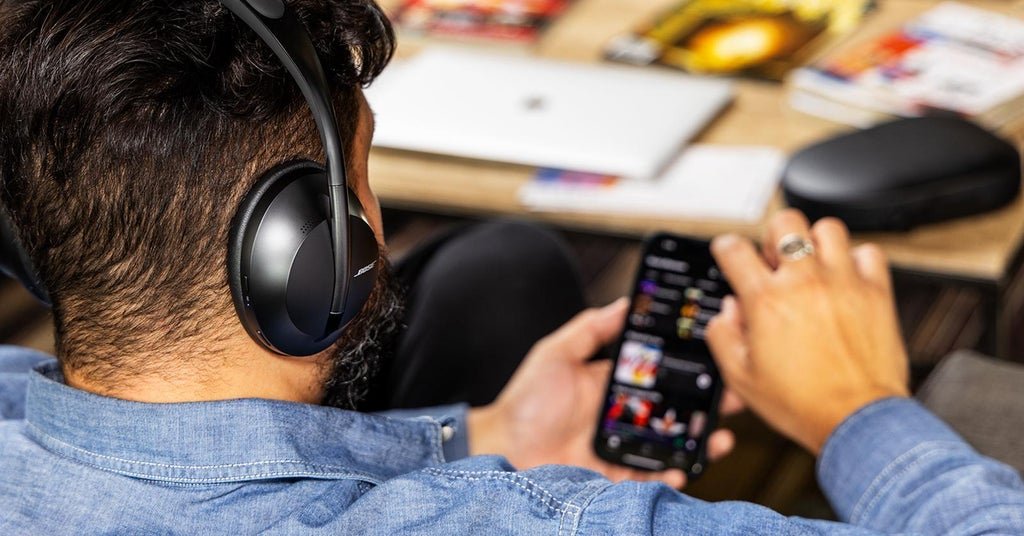
Credit: www.sweetwater.com
When To Replace Headset Parts
Even with the best care, some parts wear out and become impossible to clean fully.
- Ear pads: Replace every 6–12 months, or at the first sign of cracks, smells, or loss of cushion.
- Microphone foam covers: Change if they look torn, lose shape, or if you’ve been sick.
- Cables: If you see fraying, exposed wires, or kinks that don’t straighten, it’s time for a new cable.
- Plastic parts: If they feel sticky or change color, they may be breaking down.
Using worn-out parts increases the risk of irritation and infection. Replacement parts are available for most major brands.
Travel And On-the-go Hygiene
People who travel with headsets face extra challenges. Here’s how to keep things clean on the move:
- Carry a mini cleaning kit: Include alcohol wipes, a soft brush, and a spare set of ear pads or tips.
- Wipe before and after flights: Airplane seats and trays are full of germs. Clean your headset after using it in public spaces.
- Never set your headset on public tables: Use a case or hang it from your bag.
- Watch for condensation: Moving between hot and cold places can cause sweat to collect inside ear pads. Let them air dry as soon as possible.
Credit: brittanywashburn.com
The Role Of Uv Sanitizers
A newer, high-tech way to clean headsets is with UV-C sanitizers. These devices use ultraviolet light to kill bacteria and viruses on surfaces. They are especially helpful for shared environments or people with sensitive skin.
- How to use: Place your headset in the sanitizer box for 5–10 minutes after use.
- Benefits: No chemicals, no moisture, and effective against most germs.
- Downsides: Higher cost and not suitable for deep cleaning dirt or grime.
Research from the Centers for Disease Control and Prevention shows UV-C light can kill up to 99.9% of bacteria on non-porous surfaces, making it a powerful tool for headset hygiene. For more details, visit the CDC’s disinfection guidelines.
Frequently Asked Questions
How Often Should I Clean My Headset?
For most people, a quick wipe-down after every use and a deep clean once a week is enough. If you sweat a lot, share your headset, or use it in public spaces, clean more often.
Can I Use Alcohol Wipes On All Parts Of My Headset?
Alcohol wipes are safe for most hard surfaces, but avoid using them on foam or fabric ear pads. Always check your manufacturer’s instructions before using any cleaner.
What Should I Do If My Headset Smells Bad?
A bad odor means bacteria or mold are growing. Remove and wash ear pads or tips, wipe down all surfaces, and let everything dry fully. If the smell returns, replace the parts.
Are Disposable Covers Effective For Headset Hygiene?
Yes, disposable covers add a protective layer and are very helpful in shared environments. They’re not a replacement for cleaning, but they reduce the risk of spreading germs.
How Do I Clean The Microphone On My Headset?
Use a dry, soft brush to remove dust from the mesh. For foam covers, remove and wash them with mild soap and water, then air dry. Never use liquids directly on the microphone.
Headset hygiene is more than a quick wipe—it’s a habit that protects your health, keeps your gear working longer, and makes every call, game, or song more enjoyable. By following these tips, you can enjoy your headset with peace of mind, knowing you’re doing it the safe, smart way.
