
When the power goes out, people depend on Uninterruptible Power Supplies (UPS) to keep their devices running smoothly. But not all UPS systems are the same. The most important difference is in the kind of waveform they produce: pure sine wave and simulated sine wave (sometimes called stepped or modified sine wave). Understanding these types is crucial if you want your electronics to work safely and efficiently during a blackout.
Many buyers are confused by the technical terms and marketing claims. Some pay more for features they don’t need, while others choose the wrong UPS and risk damaging their equipment. This guide will help you make sense of pure sine wave vs simulated sine UPSs, so you can pick the right system for your needs—and your budget.
What Is A Ups And Why Does Waveform Matter?
A UPS is a device that provides backup power when the main electricity supply fails. It helps prevent data loss, hardware damage, and interruptions in critical work. The waveform is the shape of the electrical signal the UPS sends to your devices. Most home and office power is a clean, smooth wave, called a sine wave.
However, not all UPS units create this same clean wave. Some make a rough or stepped version. This difference affects how your devices perform when running on backup power.
Types Of Devices Sensitive To Waveform
Not all electronics care about the waveform. Simple devices like lamps or fans often work fine with a simulated sine wave. But sensitive electronics—like computers, servers, medical devices, and high-end audio equipment—can behave badly or even get damaged if they don’t get a pure sine wave.
What Is A Pure Sine Wave Ups?
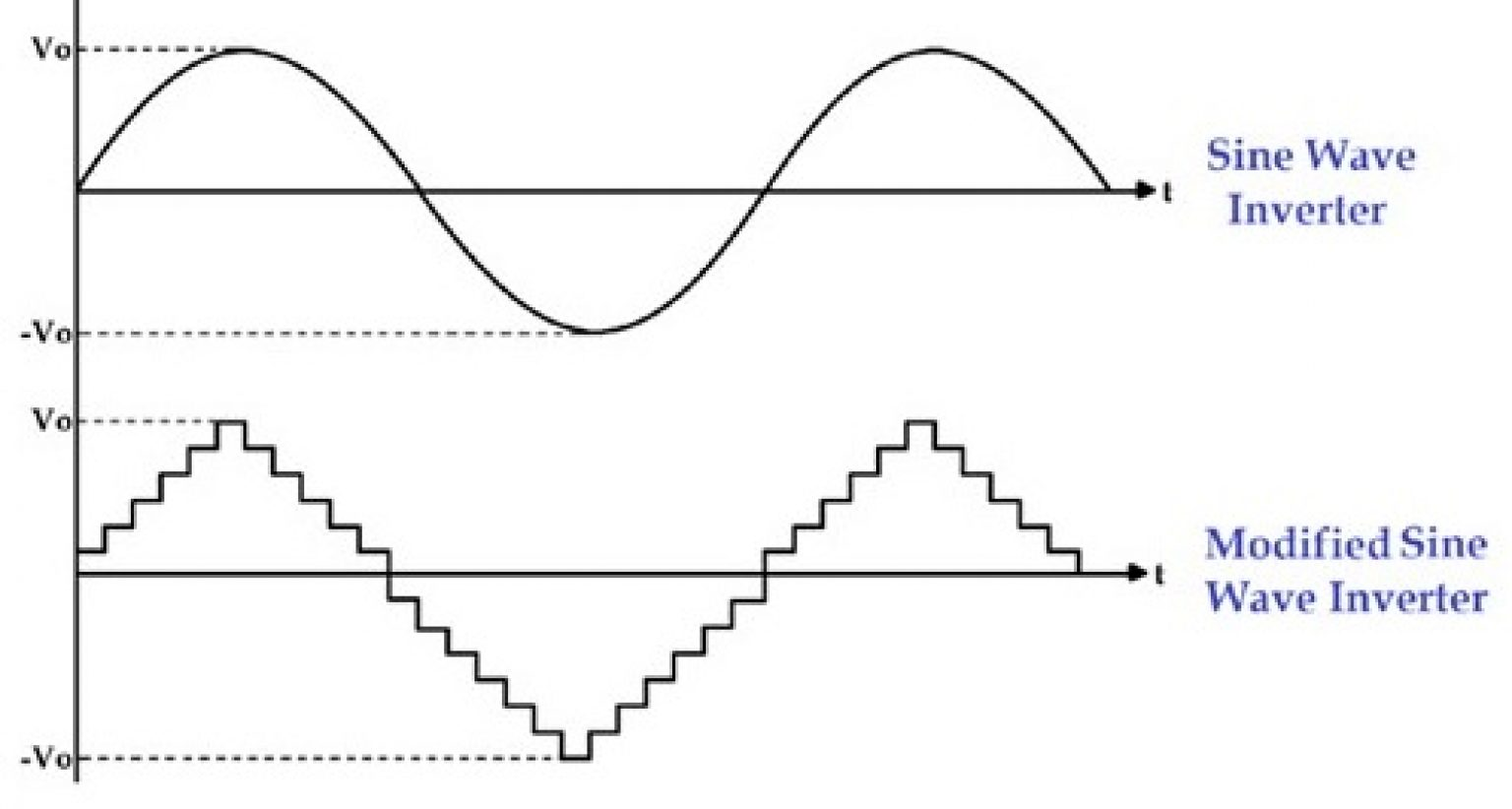
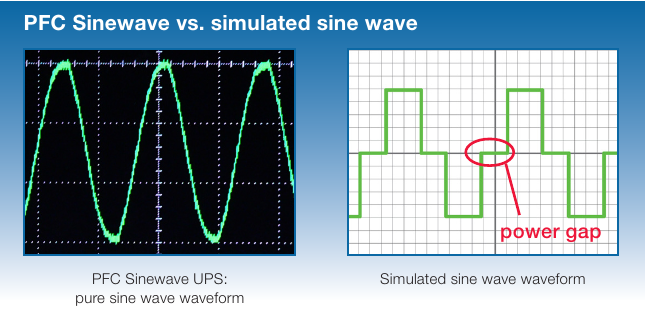
A pure sine wave UPS produces a smooth, continuous wave like the power from your wall outlet. This type of UPS uses advanced electronics to closely mimic the electricity you get from the grid.
Key Features Of Pure Sine Wave Ups
- Clean power output: The wave is smooth and consistent, which means less electrical noise and fewer problems for sensitive devices.
- Compatibility: Works with all types of electronics, including those with active power factor correction (PFC) power supplies.
- Higher price: More complex technology makes these units more expensive.
Advantages
- Prevents device malfunctions: Many modern computers and networking gear require a pure sine wave to avoid crashing or rebooting during a power cut.
- Reduces noise and heat: Audio equipment and motor-driven devices run more quietly and efficiently.
- Protects sensitive devices: Medical machines and lab instruments need stable power to work safely.
When Pure Sine Wave Ups Is Essential
- Servers and data centers
- Medical equipment
- High-end audio/visual systems
- Workstations with PFC power supplies
- Network switches and routers for business

Credit: www.kstar.com
What Is A Simulated Sine Wave Ups?
A simulated sine wave UPS (also called “stepped,” “modified,” or “square wave” UPS) creates a power wave that is not smooth. Instead, it looks more like a staircase, with sharp steps instead of a curve.
Key Features Of Simulated Sine Wave Ups
- Basic power output: The wave is rough, but most simple electronics can use it without problems.
- Lower cost: Simpler technology means these units are much cheaper.
- Limited compatibility: Some modern electronics may not accept simulated sine waves, especially under heavy load.
Advantages
- Budget-friendly: Costs much less than pure sine wave models.
- Good for basic devices: Works well for lamps, fans, and older computers.
- Lower repair costs: Fewer parts can mean less to break.
Where Simulated Sine Wave Ups Is Acceptable
- Home entertainment systems (not high-end)
- Basic desktop computers (pre-2010 models)
- Printers, scanners, and basic networking gear
Pure Sine Wave Vs Simulated Sine Ups: Side-by-side Comparison
To help you understand the differences, here’s a clear comparison:
| Feature | Pure Sine Wave UPS | Simulated Sine Wave UPS |
|---|---|---|
| Output Waveform | Smooth, continuous | Stepped, blocky |
| Price | Higher | Lower |
| Device Compatibility | All devices | Basic electronics only |
| Noise & Heat | Minimal | Can increase |
| Power Efficiency | Better for sensitive devices | May cause inefficiency |
| Best For | Servers, medical, PFC computers | Lamps, fans, old PCs |
How Each Ups Type Affects Modern Electronics
Many newer computers, especially those with active PFC power supplies, need a pure sine wave. If you use a simulated sine wave UPS with these, you might see:
- Unexpected shutdowns during a power cut
- Error messages or warning beeps
- Overheating or short device life
For less sensitive devices (like basic routers or low-end PCs), a simulated sine wave UPS is often enough. But with expensive or mission-critical electronics, the risks aren’t worth the savings.
Example: Computer Power Supplies
Modern gaming computers and workstations often use active PFC. These systems draw power in a special way that needs a pure sine wave. If you use a simulated sine wave UPS, your computer might shut off suddenly, even when the UPS battery is full.
Real-world Performance: Test Results
Independent tests show that pure sine wave UPS units keep sensitive equipment running with zero errors during blackouts. In contrast, simulated sine wave UPSs sometimes cause:
- Audio hum in sound equipment
- Glitches in Wi-Fi routers
- Screen flicker in monitors
For example, a test by APC by Schneider Electric found that computers with active PFC power supplies only worked correctly with a pure sine wave UPS.
Credit: www.deliesn.com
Cost Comparison: Is Pure Sine Wave Worth The Money?
You might wonder if the higher price is justified. Here’s a typical price range for both types (as of 2024):
| UPS Type | Typical Price Range (USD) | Capacity Range (VA/Watts) |
|---|---|---|
| Pure Sine Wave | $150–$400+ | 600–2000 VA |
| Simulated Sine Wave | $50–$150 | 400–1500 VA |
If your devices need pure sine wave, it is worth paying more to avoid repairs or replacement costs later. If you only need backup for simple gear, a simulated sine wave UPS can save you money.
How To Choose: Questions To Ask Before Buying
To make the right choice, answer these questions:
- What devices will you connect?
- If you use servers, gaming PCs, or medical devices, pure sine wave is safer.
- What’s your budget?
- For basic home use, simulated sine wave is often enough.
- Do your devices have active PFC?
- Check your computer’s specs. If yes, go for pure sine wave.
- How important is silence and efficiency?
- Pure sine wave UPSs usually run cooler and quieter.
Common Buyer Mistakes
- Choosing only by price: The cheapest UPS may not protect your expensive gear.
- Ignoring device specs: Not all UPSs work with modern computers.
- Overestimating needs: Don’t pay for pure sine wave unless you need it.
Non-obvious Insights Many Miss
- Not all “sensitive” devices are the same. Some printers or external drives work fine with simulated sine waves, but others—especially if they have motors or advanced chips—can act up or overheat. Always check the device manual, not just the UPS label.
- Battery life and replacement costs can add up. Pure sine wave UPS units sometimes come with higher-quality batteries, which last longer and cost less to replace over time. This can make the total cost of ownership closer than it looks at first.
Practical Scenarios And Recommendations
- Home office with a modern PC: Use a pure sine wave UPS, especially if your PC has active PFC. It prevents sudden shutdowns and data loss.
- Simple router and modem backup: A simulated sine wave UPS is usually enough.
- Home theater setup: If you have high-end audio or video gear, use pure sine wave to avoid hum or flicker.
- Small business server room: Always use pure sine wave for reliability and safety.
Credit: superuser.com
Table: Which Ups Type For Which Device?
Here’s a quick guide for common devices:
| Device Type | Recommended UPS Type | Reason |
|---|---|---|
| Modern desktop PC (active PFC) | Pure Sine Wave | Prevents shutdowns, safe for hardware |
| Old desktop PC (pre-2010) | Simulated Sine Wave | Usually compatible, cheaper option |
| LED/LCD TV | Simulated Sine Wave (if not high-end) | Most work fine, check manual |
| Home theater system | Pure Sine Wave | Prevents audio/video noise |
| Modem/Router | Simulated Sine Wave | Low power, not sensitive |
| Medical equipment | Pure Sine Wave | Critical safety, needs clean power |
Frequently Asked Questions
What Is The Main Difference Between Pure Sine Wave And Simulated Sine Wave Ups?
Pure sine wave UPS provides a smooth, continuous power wave similar to what comes from the wall outlet. Simulated sine wave UPS produces a rough, stepped waveform that is less compatible with sensitive electronics.
Can I Use A Simulated Sine Wave Ups For My Gaming Pc?
If your gaming PC has an active PFC power supply, you should use a pure sine wave UPS to avoid crashes or hardware issues. Check your computer’s power supply specs to be sure.
Why Is A Pure Sine Wave Ups More Expensive?
Pure sine wave units use advanced electronics to create a clean, smooth output. This technology costs more to manufacture, which raises the price. However, it offers better protection for valuable equipment.
Will A Pure Sine Wave Ups Save Energy Compared To A Simulated Sine Wave Ups?
For most users, energy savings are small. The main benefit is reliable operation and device safety, not lower electricity bills.
How Can I Tell If My Device Needs A Pure Sine Wave Ups?
Check your device’s manual or look for mention of active PFC, “sensitive electronics,” or “medical use.” If any of these apply, use a pure sine wave UPS for best results.
Choosing between pure sine wave and simulated sine wave UPS is not just about price—it’s about keeping your important devices safe and working smoothly. By understanding the differences, checking your equipment, and thinking about your real needs, you’ll make a smart choice that pays off every time the power goes out.
Related Office Guides
Continue with these related workspace guides:
