
Testing a UPS (Uninterruptible Power Supply) battery is one of those tasks that seems simple but often reveals hidden problems. A UPS battery is your safety net during power outages—if it fails, you risk data loss or hardware damage. Many users just trust the “replace battery” warning light, but by then, it could be too late.
Learning how to test your UPS battery properly helps you avoid surprises and keeps your devices safe.
Why Testing Your Ups Battery Matters
A UPS battery does not last forever. Most batteries work well for 2 to 5 years, but heat, heavy loads, and frequent power cuts can shorten their life. Sometimes, a battery may show a full charge but fail to give backup during an outage. That’s why regular testing is important.
If you manage servers, medical equipment, or even a home office, knowing your battery’s true condition means you can plan ahead. A failed battery is not just an inconvenience—it can result in lost files, server crashes, or even equipment damage.
Basic Concepts: How A Ups Battery Works
Before you start testing, it’s helpful to know the basics. Most UPS units use sealed lead-acid (SLA) batteries. These batteries store energy and release it when power fails. Over time, they lose capacity, even if they look fine from the outside.
A UPS has a built-in charger and circuit to monitor battery voltage. However, these built-in tests are not always enough. Manual testing gives you a clearer picture.
Types Of Ups Batteries
Understanding your battery type helps you test it the right way. Here are the common types:
| Battery Type | Common Usage | Typical Lifespan |
|---|---|---|
| Sealed Lead Acid (SLA) | Most office/home UPS | 3–5 years |
| Lithium-ion | Some high-end UPS | 7–10 years |
| Nickel-Cadmium (NiCd) | Industrial, rare in UPS | 8–15 years |
Most users will have an SLA battery, which is the most cost-effective but needs more frequent replacement.
Safety Precautions Before Testing
Testing a UPS battery is not dangerous, but you should follow some basic safety steps:
- Turn off and unplug your UPS before opening it.
- Wear insulated gloves if you need to handle battery terminals.
- Keep metal tools away from the battery to avoid short circuits.
- If the battery is swollen or leaking, do not test it—replace it immediately.
Remember, batteries hold a charge even when unplugged. Handle with care.
Tools Needed For Ups Battery Testing
You do not need expensive equipment to test your UPS battery. Here’s what helps:
- Multimeter (for voltage and resistance measurement)
- Load tester (optional, for advanced users)
- Stopwatch or timer
- Notebook for recording results
- Flashlight (in case you lose power during testing)
A multimeter is enough for most home users. Load testers are used for deep-cycle or industrial batteries.
Visual Inspection: The First Step
Before using any tools, always look at the battery.
- Check for bulging, cracks, or leaks.
- Inspect for corroded or loose terminals.
- Note any unusual smells (like rotten eggs), which can mean internal failure.
If you see any of these issues, replace the battery instead of testing it further.
Method 1: Using The Ups Self-test Feature
Most modern UPS units have a built-in self-test feature. Here’s how to use it:
- Read your UPS manual for the self-test instructions. Usually, it’s a button press or a software command.
- Run the self-test. The UPS will simulate a power outage.
- Watch the indicators. If the battery is weak, you may see a warning light or hear a beep.
- Note the backup time. If your UPS shuts down quickly, the battery is weak.
While this method is quick, it’s not always accurate. Some batteries pass the self-test but fail under real load.
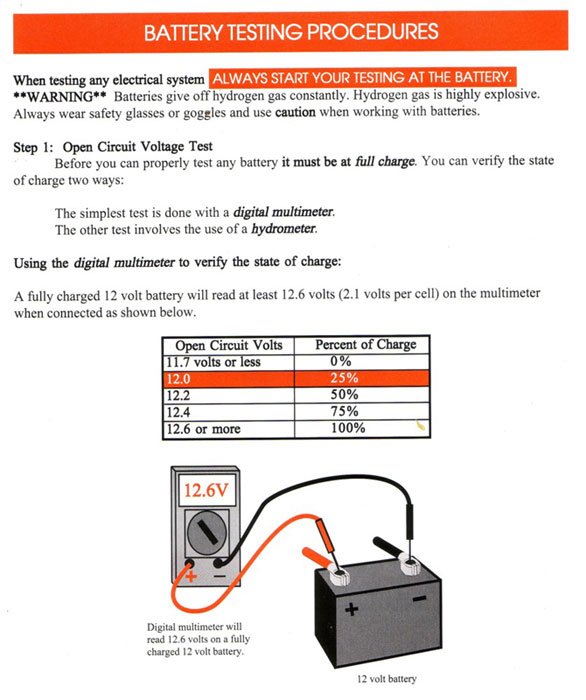
Method 2: Checking Voltage With A Multimeter
Measuring the battery voltage is a practical way to test health.
- Unplug the UPS and let it cool for 10–15 minutes.
- Open the UPS case carefully (if your model allows).
- Set your multimeter to DC voltage.
- Connect the probes: Red to positive, black to negative.
- Read the voltage.
A healthy 12V SLA battery should show 12.6 to 13.0 volts when fully charged.
If the voltage is below 12. 0V, the battery is likely weak. Anything below 11. 5V usually means it’s time to replace.
| Voltage Reading | Battery Status |
|---|---|
| 12.6 – 13.0 V | Fully charged, healthy |
| 12.0 – 12.5 V | Acceptable, but aging |
| 11.5 – 11.9 V | Weak, replace soon |
| < 11.5 V | Dead or defective |
Insight: A battery can show 12.6V at rest and still fail under load. That’s why a load test gives more information.
Method 3: Performing A Load Test
A load test checks how the battery behaves when supplying power.
- Fully charge the UPS battery first.
- Plug a known load into the UPS (for example, a 60W light bulb or a small fan).
- Unplug the UPS from the wall to force it onto battery power.
- Time how long the UPS runs before shutting down.
- Compare the time to your UPS’s rated backup time (check the manual).
If your UPS is supposed to run for 10 minutes and only lasts 2, the battery is weak.
Example: If you have a 600VA UPS rated for 15 minutes with a 60W bulb, but it only runs for 4 minutes, the battery has lost most of its capacity.
Non-obvious tip: Some batteries fail suddenly under load, even if they show a normal voltage with a multimeter. That’s why load testing is important for mission-critical systems.
Method 4: Advanced Testing With A Battery Analyzer
If you manage many UPS units or have mission-critical needs, a battery analyzer gives the most accurate results. These devices test internal resistance and capacity.
- Connect the analyzer to the battery.
- Run the test (follow the analyzer’s instructions).
- Check the results: High internal resistance means the battery is aging, even if voltage is normal.
Battery analyzers are expensive, so most home users don’t need them. But in data centers, they can spot weak batteries before failure.

Credit: www.youtube.com
Testing Battery Runtime With Software
Many UPS brands offer software that can run battery tests and show runtime estimation. Examples include APC PowerChute or Eaton UPS Companion.
- Install the software on your computer.
- Connect the UPS via USB or serial cable.
- Run the battery test using the software.
- Check the estimated runtime and battery health status.
This approach is less hands-on but useful for busy environments.
Insight: Software-based tests depend on the UPS’s internal sensors, which can sometimes be inaccurate if the sensors are faulty. Combine software checks with manual tests for best results.
Common Signs Your Ups Battery Needs Replacement
Sometimes, you do not need to test—the symptoms are obvious:
- The UPS beeps constantly or shows a battery warning light.
- Short runtime: Devices shut down quickly during an outage.
- The battery is older than 3–5 years (for SLA types).
- Physical damage to the battery.
Do not wait for total failure. A weak battery can cause more harm than good, especially if you rely on your UPS for important equipment.
How Often Should You Test Ups Batteries?
Regular testing prevents surprises. Here’s a simple schedule:
- Test every 3–6 months for home/office UPS.
- Test monthly for critical systems or data centers.
- Replace batteries every 3–5 years for SLA, or as soon as they show weakness.
If your area has frequent power outages or high temperatures, test more often.
Mistakes To Avoid When Testing Ups Batteries
Beginners often make these mistakes:
- Testing while charging: Always test after a full charge cycle and rest period.
- Ignoring load tests: Voltage tests alone do not tell the full story.
- Not recording results: Track your test data over time to spot battery decline.
- Forgetting safety steps: Always unplug and use protective gear if handling batteries.
Avoid these errors to get reliable results and stay safe.
Replacing A Weak Ups Battery
If your tests show the battery is weak, replace it as soon as possible:
- Buy the correct type and size (check the model and voltage).
- Follow the UPS manufacturer’s instructions for battery replacement.
- Dispose of old batteries safely at a recycling center—do not throw in the trash.
Installing a new battery restores your UPS’s performance and peace of mind.
Quick Comparison: Manual Vs. Software Testing
To help you choose the right method, see this comparison:
| Testing Method | Pros | Cons |
|---|---|---|
| Manual (multimeter, load test) | Accurate, works for all UPS | Requires opening UPS, basic skills |
| Software-based | Easy, safe, quick | May miss weak batteries, needs compatible UPS |
| Self-test (on UPS) | Very quick, no tools | Not always reliable, basic result |
Real-world Example
Let’s say you have a 900VA UPS that’s three years old. You notice it used to give 20 minutes backup but now only gives 8. You check the voltage: 12.2V (acceptable, but not great). You run a load test with a 60W bulb, and it shuts off after 4 minutes. This shows the battery has lost most of its capacity, even though the voltage looks fine. Replacement is the best option.
Best Practices For Ups Battery Maintenance
Testing is only part of the story. To extend your UPS battery life:
- Keep the UPS in a cool, dry place.
- Do not overload the UPS.
- Charge batteries regularly, even if you do not use the UPS often.
- Clean terminals to prevent corrosion.
- Update UPS firmware/software if updates are available.
These simple steps help your battery last longer and work better when you need it most.

Credit: unifiedpowerusa.com
Where To Learn More
For more details on battery types and UPS maintenance, you can visit the Wikipedia page on Uninterruptible Power Supplies.
Frequently Asked Questions
How Long Does A Typical Ups Battery Last?
A standard sealed lead-acid (SLA) UPS battery lasts 3 to 5 years under normal conditions. High temperatures or frequent discharges can shorten this lifespan.
Can I Test A Ups Battery Without Removing It From The Ups?
Yes, you can test battery voltage through the UPS terminals and use the self-test or software methods without removing the battery. For a load test or visual inspection, you may need to open the case.
What Happens If I Do Not Replace A Weak Ups Battery?
A weak battery will not provide backup during a power cut. In some cases, it may cause the UPS to shut down suddenly, risking data loss or equipment damage.
Is It Safe To Use A Third-party Battery In My Ups?
It is usually safe if the battery matches the voltage, size, and connector type. However, using the manufacturer’s recommended battery is best for performance and warranty.
How Do I Dispose Of An Old Ups Battery?
Take old UPS batteries to a battery recycling center or hazardous waste facility. Do not throw them in the regular trash, as they contain chemicals harmful to the environment.
Testing your UPS battery is not hard, but it does require careful steps. By checking your battery regularly, you can avoid unexpected failures and keep your equipment safe. Take the time to test and maintain your UPS—it’s a small effort for big peace of mind.
Credit: blog.upsbatterycenter.com
Related Office Guides
Continue with these related workspace guides:
