
A clean desk fan does more than just move air. It helps you breathe better, keeps your workspace comfortable, and can even make your fan last longer. But many people ignore their fans, letting dust and dirt build up over time.
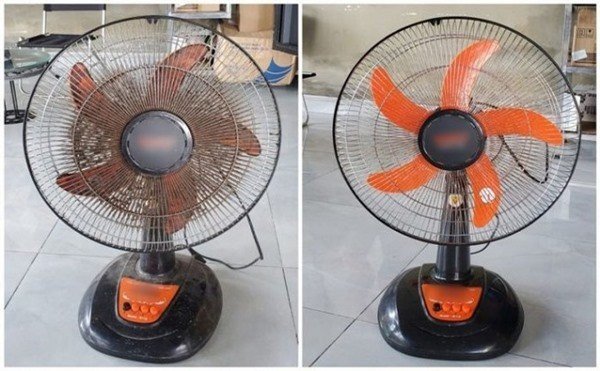
This not only makes the fan work less effectively but can also spread dust and allergens into the air you breathe. If you’ve looked at your desk fan lately and noticed it’s looking a little gray and grimy, it’s time for a good cleaning.
The good news? Cleaning a desk fan isn’t hard if you know the right steps. With some simple tools and a bit of time, you can keep your fan running well and your air fresh.
This guide will show you everything you need to know about cleaning a desk fan. You’ll learn why it matters, what tools you need, how to clean it safely, and how often you should do it. Along the way, you’ll get practical tips and answers to common questions—so even if you’re new to cleaning fans, you’ll feel confident.
Let’s get started and help your fan work like new again.
Why Cleaning Your Desk Fan Matters
Many people don’t realize how quickly dust and dirt can collect on a desk fan. Every time your fan runs, it pulls in tiny particles from the air. Over days and weeks, these particles stick to the blades and grill. Here’s why it’s important to keep your fan clean:
- Better Air Quality: A dusty fan can blow dust, pollen, and even mold into the air. This can be a problem for people with allergies or asthma.
- Improved Efficiency: When dust builds up, the fan blades can’t move air as well. A clean fan works better and cools your space more efficiently.
- Longer Lifespan: Dirt can get into the fan’s motor, causing it to wear out faster. Cleaning your fan helps it last longer.
- Quieter Operation: Dusty fans often make more noise. Cleaning can reduce rattles and humming sounds.
- Prevents Bad Odors: Sometimes, a dirty fan can start to smell. Cleaning removes the source of these odors.
Most people only clean their fan when it looks very dirty. But by then, it’s already spreading dust into your room. Regular cleaning is a simple way to keep your air clean and your fan working well.
Tools And Supplies You’ll Need
You don’t need any special skills or expensive products to clean a desk fan. Most of the items you need are probably already in your home or office. Here’s a list of what you’ll want to have ready:
- Soft cloths or microfiber towels (for wiping surfaces)
- Screwdriver (often Phillips or flat-head, depending on your fan)
- Mild dish soap (gentle and safe for most plastics and metals)
- Small brush (such as a toothbrush or paintbrush)
- Vacuum with brush attachment (for removing loose dust)
- Compressed air can (optional, for hard-to-reach places)
- Cotton swabs (for small crevices)
- Bowl or bucket (for soapy water)
- Towel or drying rack (for drying parts after washing)
If you don’t have a vacuum or compressed air, don’t worry. You can still get your fan clean using just a brush and cloth. The most important things are a gentle cleaning tool and a way to wash and dry the fan parts.
Safety First: Preparing To Clean Your Fan
Before you touch your fan, it’s important to turn it off and unplug it. Never clean a fan while it’s plugged in, even if it’s turned off, because you could get an electric shock. Wait until the blades stop spinning completely. If you’ve been using the fan for a long time, let it cool down before you start.
If your fan has been running in a greasy or smoky area (like a kitchen), you might want to wear rubber gloves. This will keep your hands clean and protect your skin from any chemicals or grime.
Some fans have removable grills or blades, while others are sealed. Check your user manual if you’re not sure how your fan comes apart. If you’ve lost the manual, you can often find a copy online by searching for your fan’s model number.
Step-by-step: How To Clean Your Desk Fan
Cleaning a desk fan can take anywhere from 15 to 45 minutes, depending on how dirty it is and how easy it is to take apart. Here’s how to do it, step by step.
1. Unplug The Fan
This step is simple but crucial. Always unplug the fan before you begin. Even if you’re just dusting the outside, unplugging keeps you safe.
2. Remove The Grill
Most desk fans have a front grill that keeps fingers away from the blades. Look for screws or clips holding the grill in place. Use your screwdriver to remove the screws, or gently press the clips to release the grill.
If your fan’s grill is glued or sealed, you may not be able to remove it. In this case, focus on cleaning the outside as best you can.
3. Take Off The Blades
Once the grill is off, you should see the fan blades. Many blades slide off easily, but some are held in place by a small cap or nut. Loosen this part by hand or with a tool, and then gently pull the blades off the motor shaft.
Be careful not to bend or break the blades—they are often made of lightweight plastic or thin metal.
4. Dust And Vacuum Loose Dirt
Start by removing as much loose dust as possible. Use a vacuum with a brush attachment to gently go over the grill, blades, and motor housing. You can also use a can of compressed air to blow dust out of hard-to-reach spots.
A small paintbrush or old toothbrush is also great for brushing dust out of corners.
5. Wash The Grill And Blades
Fill your bowl or bucket with warm, soapy water. Dip a cloth or sponge into the water and gently scrub the grill and blades. For heavy dirt, you can soak these parts for a few minutes.
- Never put electrical parts in water. Only wash the grill and blades if they are removable and have no wires attached.
- Use a toothbrush or cotton swab to get into small spaces.
Rinse with clean water and dry with a towel. Lay the parts out on a rack or towel and let them dry completely. Moisture in your fan can cause rust or electric problems.
6. Clean The Motor Housing
The motor housing (the main body of the fan) should never be soaked or put in water. Instead, use a slightly damp cloth to wipe away dust and grime. For small spaces, use cotton swabs.
If there are stubborn spots, a very light spray of cleaner on your cloth (not directly on the fan) can help. Make sure everything is dry before you reassemble the fan.
7. Reassemble The Fan
Once all parts are completely dry, put the fan back together. Slide the blades onto the shaft, tighten any caps or nuts, and reattach the grill with screws or clips.
Check that everything is secure and spins freely. Plug the fan in and turn it on briefly to make sure it works and doesn’t make any strange noises.
8. Wipe Down The Cord And Base
Don’t forget the cord and base of your fan. Dust and dirt often collect here too. Wipe them with a damp cloth and dry them well.
How Often Should You Clean Your Desk Fan?
How often you need to clean your fan depends on where you use it. In a dusty or busy area, you might need to clean it every month. In a cleaner space, every three to four months is usually enough.
Here’s a quick guide for when to clean:
| Environment | Recommended Cleaning Frequency |
|---|---|
| Office/Home (low dust) | Every 3-4 months |
| Kitchen or Workshop | Every 1-2 months |
| Allergy-prone areas | Monthly |
| Pet-friendly homes | Every 1-2 months |
If you see visible dust or the fan starts making noise or blowing less air, it’s time to clean it—no matter how long it’s been.
Desk Fan Cleaning: Types Of Fans And Their Differences
Not all desk fans are the same. Some are small and simple, while others are larger or have special features. Here’s a look at different types and what you should know about cleaning each one.
Basic Desk Fans
These are the most common, with a plastic or metal grill and plastic blades. They are usually easy to take apart and clean.
Usb Desk Fans
These fans are smaller and often don’t come apart easily. You may only be able to clean the outside grill and blades with a brush or compressed air.
Tower Fans
Some desk fans have a tower design, with vertical blades inside a tall case. These are harder to open. You might need to rely on a vacuum and compressed air to remove dust.
Clip-on Fans
These fans clip onto desks or shelves. They are usually small and may have grills that snap on and off for easy cleaning.
Fans With Filters
A few modern desk fans have built-in filters to catch dust or pollen. The filter needs regular cleaning or replacement. Check your manual for specific instructions.
Here’s a comparison of how easy it is to clean different types of desk fans:
| Fan Type | Ease of Disassembly | Best Cleaning Method |
|---|---|---|
| Standard Desk Fan | Easy | Disassemble & Wash |
| USB Mini Fan | Difficult | Brush & Air Only |
| Tower Desk Fan | Moderate | Vacuum & Air |
| Clip-On Fan | Easy | Disassemble & Wipe |
| Fan with Filter | Easy to Moderate | Clean/Replace Filter |
Knowing your fan type helps you pick the best cleaning approach. If you’re unsure, look for your fan’s model online for a cleaning guide.
Credit: tranphat.net.vn
Common Mistakes To Avoid
Many people make small errors when cleaning their desk fans. Here are some mistakes and how to avoid them:
- Forgetting to unplug: Always unplug before cleaning to avoid shock.
- Using too much water: Never soak the motor or electrical parts.
- Not drying parts fully: Wet parts can cause rust or short circuits. Let everything dry completely.
- Losing screws or clips: Keep small parts in a bowl or cup as you work.
- Bending the fan blades: Handle gently; bent blades make the fan noisy or unbalanced.
- Ignoring the manual: Each fan is different. Check your manual for any special advice.
- Using harsh chemicals: Stick with mild soap. Strong cleaners can damage plastic or paint.
- Forcing parts apart: If something won’t come off, don’t force it. You might break the fan.
One tip that many people miss: label the screws or take a photo of your fan before taking it apart. This makes reassembly much easier, especially if your fan has multiple types of screws or clips.
Extra Tips For A Cleaner, Longer-lasting Fan
Keeping your fan clean is about more than just washing it once in a while. Here are some extra tips to keep your desk fan in top shape:
- Dust around your fan regularly. Less dust in your room means less dust on your fan.
- Store your fan properly when not in use. Cover it with a plastic bag or cloth to prevent dust buildup.
- Check the cord for damage every time you clean. A frayed cord can be dangerous.
- Oil the motor if your fan is older and the manual suggests it. A drop of light machine oil can keep the fan running smoothly.
- Replace filters (if your fan has them) according to the instructions.
- Use your fan at a lower speed when possible. High speeds collect dust faster.
- Avoid spraying air fresheners or cleaners near the fan while it’s running. These can stick to the blades and grill, attracting more dirt.
Here’s a data table showing the impact of regular cleaning on fan performance:
| Condition | Airflow Output | Noise Level | Expected Lifespan |
|---|---|---|---|
| Cleaned Monthly | 100% | Low | 5+ years |
| Cleaned Every 6 Months | 85% | Moderate | 3-4 years |
| Rarely Cleaned | 60% | High | 1-2 years |
As you can see, regular cleaning helps your fan work better, stay quieter, and last longer.
:max_bytes(150000):strip_icc()/how-to-clean-a-fan-4846973-05-885948fd8a08438586d57e3de6bc5337.jpg)
Credit: www.thespruce.com
Eco-friendly And Safe Cleaning Choices
If you care about the environment, you might want to use eco-friendly cleaning products. Mild dish soap is usually safe, but you can also make a cleaning solution with water and white vinegar (half and half). Avoid strong chemicals, which can pollute water and damage your fan.
When you’re finished cleaning, pour dirty water down the drain, not outside. Dry your fan parts with a towel or air dry them in a well-ventilated area.
If your fan is old and not working after cleaning, don’t throw it in the trash. Many cities have electronic recycling programs. Check your local rules or visit the EPA’s electronics recycling page for more information.
When To Replace Instead Of Clean
Sometimes, cleaning isn’t enough. If your fan is very noisy, the blades wobble, or it doesn’t blow air even after a good cleaning, it might be time for a new one. Here are signs you should replace your fan:
- Cracked or broken blades
- Burnt smell from the motor
- Fan doesn’t turn on or only works sometimes
- Cord is damaged or frayed
- Fan is more than 5-7 years old and has lost power
Modern desk fans are often more energy-efficient and quieter than old models. Upgrading can mean better air flow and less noise.
/how-to-clean-a-fan-4846973-03-03ad8f27038c4bc2b1d642e3410668ff.jpg)
Credit: www.thespruce.com
Frequently Asked Questions
How Can I Clean My Desk Fan If The Grill Does Not Come Off?
If the grill doesn’t come off, use a vacuum with a brush attachment or a can of compressed air to blow dust out of the blades and grill. You can also use a small brush to reach through the grill gaps. Wipe the outside with a damp cloth. Be gentle to avoid bending the grill or blades.
Is It Safe To Use Water To Clean My Desk Fan?
Yes, but never use water on the electrical parts or motor. Only wash the removable grill and blades. Always let them dry completely before putting the fan back together. Use a damp (not wet) cloth for the main body.
Can I Use Any Cleaning Product On My Desk Fan?
It’s best to use mild dish soap or diluted vinegar. Avoid bleach, ammonia, or harsh chemicals—they can damage the plastic and paint, and leave harmful residues. If you want to be extra safe, stick with products labeled as safe for electronics or appliances.
How Do I Stop My Fan From Getting Dusty So Quickly?
Keep the area around your fan clean by dusting and vacuuming regularly. Using an air purifier in the room can also help reduce airborne dust. Cover your fan when not in use, and avoid placing it in high-traffic or dusty areas.
Why Does My Fan Make Noise After Cleaning?
Noise after cleaning is usually caused by incorrect reassembly, wet parts, or a bent blade. Make sure all screws and clips are tight, blades are straight, and everything is dry. If the noise continues, check for any small parts you might have missed or consult your fan’s manual.
Cleaning your desk fan may seem like a small chore, but it makes a big difference for your comfort, health, and the life of your fan. With the right tools and these simple steps, you’ll enjoy cleaner air and a cooler workspace all year round.
Related Office Guides
Continue with these related workspace guides:
