
Every busy office depends on its tools to keep work flowing smoothly. Computers, printers, copiers, desks, and even simple items like staplers seem almost invisible—until something goes wrong. When a printer jams during an important deadline or a computer crashes in the middle of a presentation, office productivity drops fast. This is where preventive maintenance office tools come in. Instead of waiting for tools to break, preventive maintenance means taking care of them before problems start. This approach saves time, money, and stress. Many businesses overlook this simple routine, but those who practice it see fewer emergencies and longer-lasting equipment.
In the office world, small actions can make a big difference. Cleaning a computer fan, checking a power cord, or oiling a paper shredder all sound minor, but together they prevent major breakdowns. Preventive maintenance is not just for big machines.
It covers everything from large copiers to the humble pencil sharpener. This article explains preventive maintenance for office tools in detail, offers practical steps, and provides insights that most beginners miss. Whether you’re a facility manager, business owner, or just want a smoother workday, these strategies can help you build a more reliable office environment.
What Is Preventive Maintenance For Office Tools?
Preventive maintenance means regular checks, cleaning, and small repairs done before equipment fails. For office tools, this includes computers, printers, copiers, telephones, projectors, desks, and even everyday supplies. The goal is to catch issues early, so you avoid sudden breakdowns that can cause lost work or expensive repairs.
Most people only think about fixing tools when they stop working. However, by then, the damage is often bigger and more costly. Preventive maintenance is about being proactive, not reactive. It’s like going to the dentist for regular cleanings instead of waiting for a toothache.
Key elements of preventive maintenance include:
- Regular cleaning (dusting, wiping, de-clogging)
- Inspections for wear, damage, or loose parts
- Lubricating moving parts (like paper shredders)
- Updating software and hardware
- Replacing worn-out items before they break
This process is ongoing—not a one-time task. It should become part of your office routine to keep everything running smoothly.
Why Preventive Maintenance Matters In The Office
Many offices run on tight schedules and rely heavily on their tools. Even a minor breakdown can lead to missed deadlines, frustrated staff, or unhappy clients. Preventive maintenance helps reduce these risks. Here’s why it’s essential:
- Reduces Downtime: When tools are regularly maintained, they are less likely to break unexpectedly. This keeps work moving and prevents disruption.
- Saves Money: Emergency repairs and last-minute replacements are usually more expensive than regular upkeep. Preventive care helps avoid big bills.
- Increases Tool Lifespan: Well-maintained equipment lasts longer, so you won’t need to buy new tools as often.
- Improves Safety: Broken tools can cause accidents—like a frayed power cord sparking a fire. Preventive checks keep the office safe.
- Boosts Productivity: Staff can focus on work, not on solving equipment problems.
A study by the International Facility Management Association found that preventive maintenance can cut equipment breakdowns by up to 60%. That’s a significant boost for any office.
Credit: www.wps.com
Common Office Tools That Need Preventive Maintenance
Every office is different, but most rely on a few core tools. Here are the main types of office equipment that benefit from regular preventive care:
- Computers and Laptops
- Printers and Copiers
- Telephones and Communication Devices
- Projectors and Presentation Tools
- Paper Shredders
- Desks, Chairs, and Furniture
- Lighting and Power Strips
- Air Conditioners and Fans
- Stationery Tools (Staplers, Punches, etc.)
- Networking Equipment (Routers, Switches)
Each tool has its own maintenance needs. Ignoring even small items can lead to bigger office problems.
Preventive Maintenance Steps For Key Office Tools
Let’s look at practical steps for maintaining the most common office tools.
Computers And Laptops
Computers are the heart of most offices. A sudden crash or virus can halt all work. Preventive maintenance includes:
- Regular dust cleaning: Dust can clog fans and overheat hardware. Clean vents and fans every few months using compressed air.
- Update software: Keep operating systems, antivirus, and applications up to date.
- Check for malware: Run antivirus scans weekly.
- Backup data: Schedule automatic backups to protect against data loss.
- Inspect cables and plugs: Replace fraying cords.
- Monitor performance: Slow computers may need disk cleanup or more memory.
Non-obvious insight: Many people forget to clean under laptop keyboards. Dust, crumbs, and hair can cause keys to stop working. Use a small vacuum or compressed air for this.
Printers And Copiers
A paper jam can waste a lot of time, especially during busy hours. Preventive steps:
- Clean rollers and trays: Dust and paper bits build up and cause jams.
- Replace toner and ink: Don’t wait until the cartridge is completely empty.
- Update firmware: New updates can fix bugs and improve performance.
- Check alignment: Misaligned parts increase wear and paper jams.
- Run self-clean cycles: Most devices have built-in cleaning modes.
Non-obvious insight: Store paper in a dry place. Humidity makes paper stick together, causing more jams and feeding problems.
Telephones And Communication Devices
Clear communication is vital. Maintain office phones by:
- Cleaning handsets and buttons: Use alcohol wipes to kill germs.
- Checking cords for wear: Replace cracked or twisted cords.
- Testing connections: Make sure all phones can call out and receive calls.
- Updating contact lists: Remove old or wrong numbers.
Projectors And Presentation Tools
Presentations look unprofessional if the projector flickers or fails.
- Clean lenses regularly: Dust affects image quality.
- Check bulbs: Replace dim or flickering bulbs early.
- Test remote controls: Change batteries before important meetings.
- Inspect cables and ports: Loose connections cause interruptions.
Paper Shredders
Sensitive information must be destroyed safely. Preventive care for shredders:
- Oil blades monthly: This keeps cutting smooth and prevents jams.
- Empty bins before they’re full: Overfilled bins stress the motor.
- Remove paper clips and staples: These can damage blades.
- Clean the exterior: Dust and debris can enter moving parts.
Desks, Chairs, And Furniture
Comfort and ergonomics matter. Maintenance includes:
- Tighten screws and bolts: Loose parts can break or cause injuries.
- Clean surfaces: Wipe desks, especially shared spaces.
- Check for splinters or cracks: Repair or replace damaged items.
- Adjust chair height and backrest: Prevents strain and injuries.
Lighting And Power Strips
Good lighting and safe power are essential.
- Replace burnt-out bulbs: Dim lights cause eye strain.
- Clean fixtures and covers: Dust reduces brightness.
- Check power strips: Make sure they’re not overloaded.
- Inspect cords for damage: Replace any with exposed wires.
Air Conditioners And Fans
A comfortable office keeps people focused.
- Clean filters monthly: Dirty filters reduce air quality and efficiency.
- Check for leaks or water buildup: Fix early to avoid mold.
- Test all settings: Make sure they heat, cool, and oscillate as needed.
Stationery Tools (staplers, Punches, Etc.)
Small tools, big problems if they break.
- Oil moving parts: Staples and punches last longer with a drop of oil.
- Clear jams quickly: Don’t force stuck staples.
- Replace worn parts: Springs and blades wear out with use.
Networking Equipment (routers, Switches)
Slow or failing internet is a major headache.
- Dust devices: Overheating reduces lifespan.
- Check cable connections: Loose wires cause dropped signals.
- Update firmware: Security and performance depend on up-to-date software.
- Reboot regularly: Keeps systems running efficiently.
How To Create A Preventive Maintenance Schedule
A schedule keeps maintenance from being forgotten. Here’s how to build a solid plan for your office:
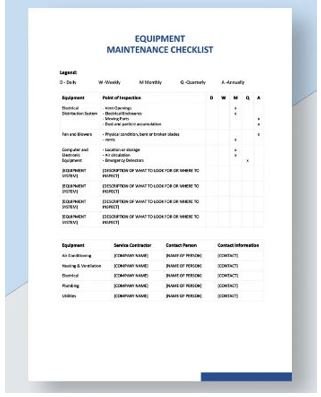
- List all equipment: Walk through the office and write down every tool.
- Check manufacturer recommendations: Most tools come with maintenance guides.
- Assign responsibilities: Decide who will do each task. For big equipment, consider hiring professionals.
- Set frequencies: Some tasks (like dusting computers) should happen monthly. Others (like oiling shredders) may be quarterly.
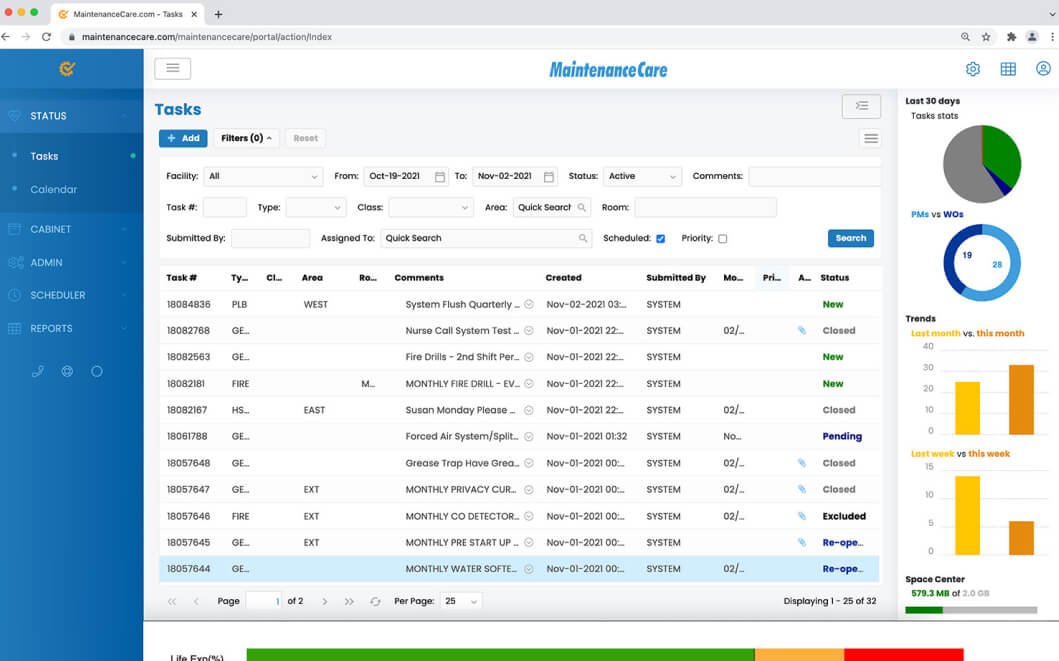
- Use reminders: Calendar alerts, spreadsheets, or maintenance apps help keep you on track.
- Keep records: Track each maintenance activity. This helps spot patterns and proves care if you need warranty service.
Example Maintenance Schedule (monthly)
| Tool | Task | Who | Frequency |
|---|---|---|---|
| Computers | Dust fans, run antivirus | IT Staff | Monthly |
| Printers | Clean rollers, check ink | Admin | Monthly |
| Chairs | Tighten screws | Office Assistant | Quarterly |
| Paper Shredder | Oil blades, empty bin | Admin | Monthly |
Practical Tips For Effective Preventive Maintenance
While most maintenance is simple, a few strategies can make it even more effective.
Involve The Whole Team
Don’t leave maintenance to just one person. Train staff to spot and report problems early—like wobbly chairs or flickering lights. This helps catch issues before they grow.
Use The Right Cleaning Products
Never use water on electronics. Choose isopropyl alcohol for electronics, microfiber cloths for screens, and gentle cleansers for furniture.
Label Maintenance Dates
Place small stickers or tags showing the last service date. This makes it easy to see what needs attention.
Replace, Don’t Just Repair
Sometimes it’s cheaper and safer to replace old tools instead of patching them up again and again.
Outsource When Needed
Complex tools like big copiers or HVAC systems are best serviced by professionals. Don’t risk expensive mistakes.
Credit: www.maintenancecare.com
Common Preventive Maintenance Mistakes
Many offices try preventive maintenance but make simple errors that reduce its effectiveness. Watch out for these:
- Inconsistent schedules: Skipping checks leads to surprise breakdowns.
- Ignoring small tools: Broken staplers or sticky tape dispensers still slow down work.
- Using the wrong cleaners: Water or harsh chemicals can damage devices.
- Not tracking tasks: Without records, you won’t know what’s been done.
- Delaying repairs: Waiting “just one more week” often causes bigger problems.
Non-obvious insight: Always unplug devices before cleaning. This reduces the risk of electric shock or short-circuiting sensitive parts.
Measuring The Impact Of Preventive Maintenance
How do you know preventive maintenance is working? Track these results:
- Fewer breakdowns: Count how often equipment fails after starting your routine.
- Longer equipment life: Compare replacement rates to previous years.
- Lower repair costs: Maintenance should reduce emergency spending.
- Higher staff satisfaction: People notice when work runs smoothly.
Example Data Comparison
Here’s a simple comparison between offices with and without preventive maintenance over a year.
| Office Type | Breakdowns/Year | Avg. Repair Cost ($) | Equipment Replacement |
|---|---|---|---|
| With Preventive Maintenance | 6 | 1,200 | 2 devices |
| Without Preventive Maintenance | 14 | 3,800 | 6 devices |
Cost-benefit Analysis Of Preventive Maintenance
Some managers worry about the time and money spent on maintenance. However, studies show the savings are real.
- Typical cost of emergency printer repair: $200–$600
- Average cost of regular maintenance: $30–$60 per device per year
- Potential productivity loss per breakdown: 2–6 hours per team
When you multiply these small savings across every tool and every month, the numbers add up quickly.
Cost Comparison Table
| Maintenance Type | Annual Cost per Device | Downtime (hours/year) | Replacement Rate |
|---|---|---|---|
| Preventive Maintenance | $50 | 3 | Low |
| Reactive Repairs | $350 | 15 | High |
Building A Preventive Maintenance Culture
Having a schedule is important, but building a maintenance culture makes the process sustainable. Encourage staff to take pride in their tools. Offer short training sessions on how to care for computers, clean desks, or report problems.
Recognize and reward teams that keep their workspaces in top shape. Even small incentives—like a team lunch or a thank-you note—make a difference.
Credit: www.qwikresume.com
Technologies That Support Preventive Maintenance
Modern offices use technology to make preventive maintenance easier.
- Maintenance software: Tools like UpKeep or Fiix help track tasks and set reminders.
- Smart sensors: Some new office devices send alerts when they need service.
- Barcode systems: Label equipment for easy tracking and history.
These tools are especially useful for large offices or those with multiple locations.
For more on how preventive maintenance impacts business productivity, check out this Maintenance Technology article.
Frequently Asked Questions
What Is The Main Goal Of Preventive Maintenance For Office Tools?
The main goal is to keep equipment working well by fixing small problems before they become big ones. This helps avoid sudden breakdowns, reduces repair costs, and keeps the office running smoothly.
How Often Should Office Tools Be Maintained?
Most tools need monthly checks, but some require weekly or quarterly attention. For example, computers and printers benefit from monthly cleaning, while air conditioners may need filter changes every three months. Always follow the manufacturer’s guidelines.
Who Should Be Responsible For Preventive Maintenance In An Office?
It depends on the office size. In small offices, an admin or office manager can handle most tasks. In larger offices, IT or facilities staff take the lead. Some jobs, like big copier repairs, are best left to professionals.
What Are The Risks Of Skipping Preventive Maintenance?
Skipping maintenance leads to more breakdowns, higher costs, lost work time, and possible safety hazards. Over time, equipment wears out faster, and replacements become more frequent and expensive.
Can Preventive Maintenance Increase Office Safety?
Yes. Regular checks catch hazards like frayed cords, broken chairs, or overloaded power strips. This reduces the risk of accidents, injuries, or even fires, making the office safer for everyone.
A well-organized office is a productive and safe space. Preventive maintenance is a smart investment that saves money, reduces stress, and helps every tool last longer. By making it part of your routine, you ensure your office runs efficiently year after year.
