
Wearing a headset with a boom arm might seem simple. Yet, small changes in the boom arm position can make a big difference in sound quality, comfort, and even your health. Whether you are a gamer, call center agent, online teacher, or just love good audio, learning how to position your headset boom arm is more important than you might think. Many people don’t realize their voice can sound unclear or muffled just because the microphone is in the wrong place. Others may get distracted or even develop pain from poor setup. This article will help you understand everything about headset boom arm position—from basics to advanced tips—so your voice is clear and your comfort is top notch.
Why Boom Arm Position Matters
The boom arm is the part of the headset that holds the microphone close to your mouth. Its position decides how well your voice is picked up. If the boom is too far or too close, the microphone may not catch your voice properly. You might sound too quiet, too loud, or have unwanted breathing noises. Poor position can also pick up background noise, making communication difficult.
Another key factor is comfort. A badly positioned boom arm can touch your face, distract you, or force you to hold your head in an awkward way. Over long periods, this can even cause discomfort or pain. For professionals, especially those who use headsets for hours, this is a major concern.
The Ideal Boom Arm Position
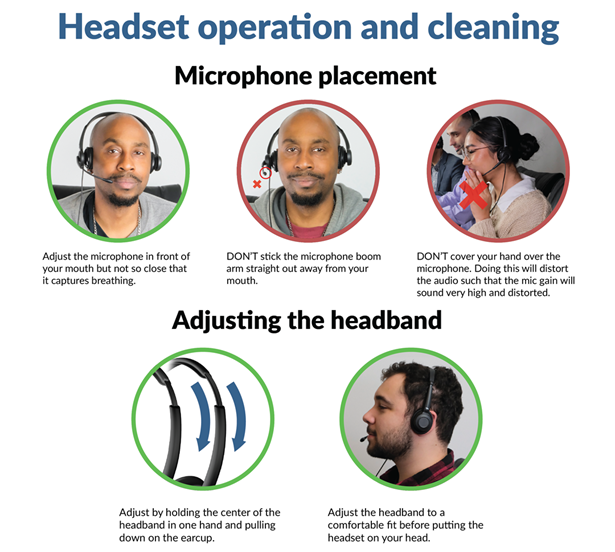
Most audio experts agree that the best position for a headset boom arm is about 2 centimeters (about 1 inch) away from the corner of your mouth. The microphone should sit at the side, not directly in front of your lips. This angle reduces the chance of breathing or popping sounds while keeping your voice clear.
Here’s what you should look for:
- The microphone is close to your mouth, but not touching it.
- The boom arm is not in front of your lips.
- The microphone is slightly below or to the side of your mouth.
- There are no objects (like clothing or hair) touching the microphone.

Credit: www.lumi.cn
Step-by-step Guide To Adjusting Boom Arm Position
Finding the right spot for your boom arm is easy if you follow these steps:
- Wear your headset normally. Make sure it feels comfortable on your head and ears.
- Adjust the headband so the ear cups cover your ears fully.
- Move the boom arm so the microphone sits about two fingers (2 cm) away from the corner of your mouth.
- Angle the boom slightly below your lips, not directly in front.
- Speak at a normal volume and listen to your voice (many headsets have a monitoring feature).
- Check for breathing sounds or popping. If you hear them, move the boom a bit further away or lower.
- Lock the boom arm in place, if your headset allows.
If your headset does not have a flexible boom arm, do your best to get close to these recommendations.
Common Mistakes And How To Avoid Them
Even experienced users make mistakes with boom arm position. Here are the most common issues and ways to fix them:
- Microphone too close: This can cause loud breathing noises, distortion, or “popping” sounds when you say words with ‘P’ or ‘B’. Move the boom slightly away.
- Microphone too far: Your voice may sound quiet or distant. Bring the boom arm closer to your mouth.
- Boom in front of lips: Causes breathing and wind noises. Shift the boom to the side.
- Boom touching the face: This creates unwanted noise from movement. Adjust the angle so it floats near your mouth.
- Not checking audio: Always listen to your own recording or ask someone for feedback.
Differences Between Headset Types
Not all headsets have the same boom arm design. Some are flexible, others are fixed. Some have noise-canceling microphones, while others do not. These differences matter for boom arm position.
| Headset Type | Boom Arm Style | Positioning Difficulty | Best Use Case |
|---|---|---|---|
| Gaming Headset | Flexible, long | Easy to adjust | Streaming, multiplayer games |
| Office Headset | Short, semi-flexible | Medium | Calls, meetings |
| Budget Headset | Fixed, short | Hard to adjust | Basic calls, entry-level use |
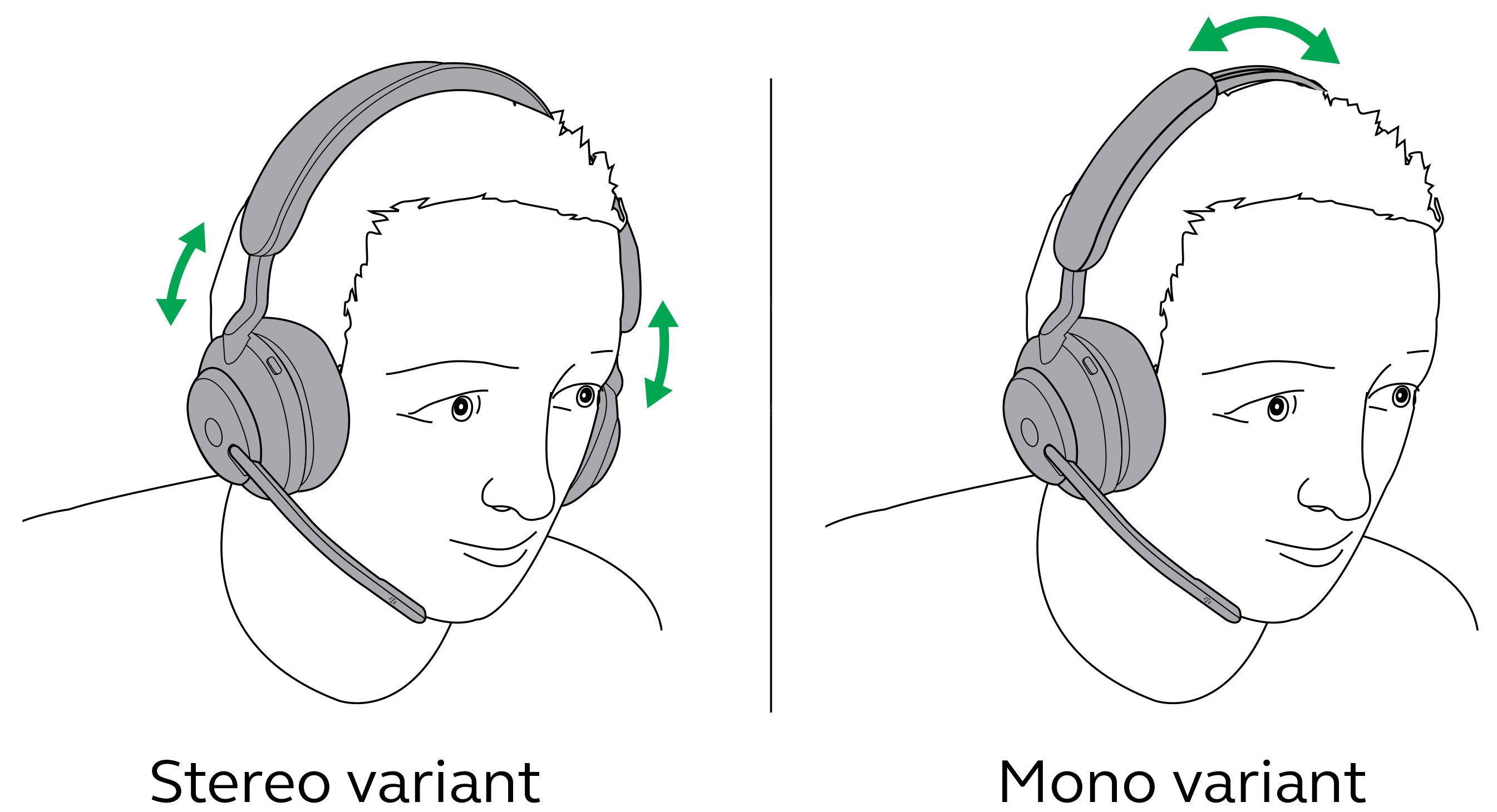
Flexible boom arms offer the best control. If you use a headset with a fixed boom, you may need to adjust the angle of the entire headset for the best result.
The Role Of Noise Cancellation
Some microphones have noise-canceling technology. These mics are more sensitive to direction. For these, the boom arm must be in the correct spot; otherwise, your voice may sound weak. If your headset has a noise-canceling mic, follow the maker’s instructions closely. Usually, the microphone should be very close to the mouth but still off to the side.
Comparing Boom Arm Position: Gaming Vs. Work
Let’s look at how boom arm position matters in different environments.
| Use Case | Ideal Boom Position | Common Issue if Incorrect |
|---|---|---|
| Gaming | 2 cm from mouth, side angle | Loud breathing, teammates complain |
| Call Center | Close, off to side, stable | Background noise, unclear speech |
| Podcasting | Very close, foam windscreen needed | Plosives, inconsistent audio |
Gamers need to avoid distracting teammates with noise. Call center workers need clear voice and less background noise. Podcasters often use foam covers and position the boom even closer for rich sound.
How Boom Arm Position Affects Voice Quality
The way you set your boom arm changes how people hear you. If the microphone is too close, your voice can sound “boomy” or distorted. Too far, and you may sound weak. The right position gives you a natural, strong sound.
A good test is to record yourself reading a few sentences at different positions. Listen for clarity, loudness, and background noise. Most people are surprised how much the sound changes with just a small move of the boom.
Credit: www.cyberacoustics.com
Health And Comfort Considerations
Wearing a headset for many hours can cause pain if the boom arm is not in a good place. You may press your jaw or cheek against the microphone, which can lead to soreness. Adjust the boom arm so it never touches your face.
Also, make sure the headset is not too tight. If you feel pain, take a break or change the position.
For people with glasses, make sure the boom arm does not push your glasses frame. This can cause headaches or marks on the skin. Comfort is just as important as audio quality.
Adjusting For Different Voices
Not everyone’s voice is the same. People with a soft voice may need the microphone closer. Those with a loud voice might move the boom arm further away to avoid distortion. If you have a high-pitched voice, test different positions to find what makes your sound most natural.
If several people use the same headset, always adjust the boom arm for each person. There is no “one size fits all” setting.
Accessories That Help
Some headsets come with foam windscreens or “pop filters” for the microphone. These help block wind and breathing noises. If your headset does not have one, you can buy them online for a low price. They make a big difference, especially if you need the microphone close to your mouth.
There are also boom arm extensions for some models. These let you move the microphone to a better spot if your headset’s arm is too short.
Practical Tips Most People Miss
- Clean your microphone regularly: Dust and skin oils can build up, changing the sound. Wipe the boom arm with a dry cloth every week.
- Check position during long calls: The boom arm can move if you touch it or adjust your headset. Check it every hour during long sessions.
- Use a mirror or webcam: Sometimes, you don’t notice the microphone is touching your lips or nose. Look in a mirror or use a webcam to check the position.
- Record in a quiet room: Even the best boom arm position can’t help if your room is noisy. Try to use your headset in a quiet place.
Real-world Examples
- Customer support agent: Maria works in a busy call center. She noticed customers often asked her to repeat herself. After moving her boom arm 2 cm from the corner of her mouth and adding a foam windscreen, her calls became clearer, and her supervisor praised her communication.
- Twitch streamer: Jake plays online games for hours. His friends complained about his breathing sounds. He moved the boom below his lips and added a pop filter. The breathing noise stopped, and his team was happier.
Testing And Troubleshooting
If you are not sure your boom arm is in the right place, do a quick test:
- Record your voice saying, “Peter Piper picked a peck of pickled peppers.” This sentence has many ‘P’ sounds that can cause popping.
- Listen to the recording. If you hear loud pops, move the microphone further away or lower.
- Ask a friend to rate your audio during a call. Sometimes, others hear problems you don’t.
- Adjust and repeat until your voice is clear and natural.
If you still have problems, check your headset’s manual or contact customer support. Some headsets have special settings in software that also affect microphone quality.
Credit: www.jabra.com
When To Replace Or Upgrade Your Headset
If you have tried everything and your voice is still unclear, your headset may be old or broken. Worn-out microphones do not pick up sound well. Newer headsets often have better boom arms and microphones. Look for models with flexible, noise-canceling booms for the best results.
For more on microphone technology, see this detailed guide from Wikipedia.
Frequently Asked Questions
What Is The Best Distance For A Headset Boom Arm?
The best distance is about 2 centimeters (about 1 inch) from the corner of your mouth. This position gives clear sound without catching breathing noise.
Should The Boom Arm Be In Front Of My Mouth Or To The Side?
It should be to the side or slightly below your mouth, not directly in front of your lips. This stops breathing and wind noises.
How Do I Avoid Breathing Sounds In My Microphone?
Move the boom arm slightly away and below your mouth. Add a foam windscreen if possible. Speak at a normal volume and avoid heavy breathing.
Can Headset Boom Arm Position Affect Comfort?
Yes, if the boom touches your face or makes you hold your head oddly, it can cause discomfort. Adjust the boom so it is close but not touching your skin.
Do All Headsets Allow Boom Arm Adjustment?
No, some budget or old headsets have fixed boom arms. Try to choose a headset with a flexible boom for better sound and comfort.
Getting your headset boom arm position right is simple, but it makes a huge difference. Clear voice, less noise, and more comfort are all possible with a few smart adjustments. Take the time to set up your headset well, and you’ll notice the benefits every time you talk.
