
Keeping your office desk clean isn’t just about looking organized. A tidy workspace helps you focus, reduces stress, and even prevents the spread of germs. Many people think they’re too busy to clean, but a messy desk can actually waste more time—searching for lost documents, cleaning up spilled coffee, or getting distracted by clutter.
If you want to work better and feel more comfortable at your desk, learning how to keep your office desk clean is a smart investment.
Over time, desks collect dust, paper piles, coffee cups, and random items like pens, sticky notes, and cables. Research from the University of Arizona found that the average office desk has 400 times more bacteria than a toilet seat. That’s not just gross—it can make you sick.
Keeping your desk clean can help protect your health and improve your work performance.
But “clean” doesn’t just mean “not dirty. ” It’s also about being organized, efficient, and creating a space you actually enjoy working in. Below, you’ll find a step-by-step guide to cleaning, organizing, and maintaining your office desk. Whether you work in a big corporate office, a coworking space, or from home, these tips will help you transform your workspace—and keep it that way.
Why Desk Cleanliness Matters
A clean desk is more than just nice to look at. It actually affects how you feel and how well you work. Here are the main reasons why you should care about keeping your office desk clean:
- Increases productivity: Fewer distractions mean you can focus on your tasks.
- Reduces stress: Clutter can make you feel overwhelmed.
- Improves health: Germs and dust can cause allergies and illness.
- Creates a professional impression: A clean desk shows you care about your work.
- Saves time: You won’t waste minutes searching for lost items.
A study by Princeton University showed that physical clutter in your environment competes for your attention, making it harder to concentrate. Another survey by Adecco found that 57% of workers judge their coworkers by how clean or messy their desks are.
So, a clean desk isn’t just for you—it also affects how others see you.
Assessing Your Current Desk Situation
Before you start cleaning, take a good look at your workspace. Notice what’s working and what’s not. Here’s how to do a quick assessment:
- Look for clutter hotspots: Where do papers and items pile up?
- Check for unused items: Are there pens, gadgets, or files you never use?
- Notice dirty areas: Are there dust, crumbs, or stains on your desk?
- Identify organizational gaps: Is there a lack of trays, storage, or cable management?
Write down the main problems you see. Taking photos of your desk can also help you spot issues you might miss. This assessment will guide your cleaning and organizing plan, so you fix the real problems—not just move clutter around.
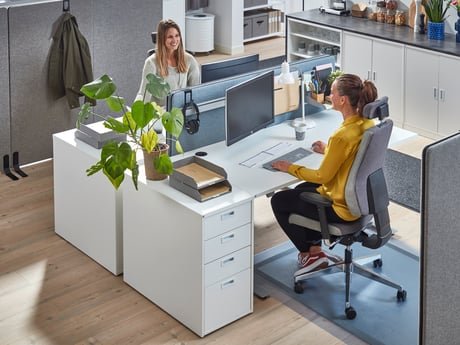
Credit: www.ajproducts.co.uk
Step-by-step Guide To Clean Your Office Desk
Cleaning your desk is easier when you break it into steps. Follow these actions for a deeper, lasting clean.
1. Clear Everything Off
Start by taking everything off your desk—monitors, papers, cups, pens, everything. Place all items in a box or on a nearby table.
Why this works: It’s easier to clean and organize when you start with a blank surface. You’ll also see how much stuff you actually have.
2. Wipe Down The Desk Surface
With your desk empty, use a disinfectant wipe or a damp cloth with mild soap. Pay attention to corners, edges, and under your desk accessories. Don’t forget to clean your mouse pad, keyboard, and phone.
Tip: Use a can of compressed air to blow crumbs out of your keyboard.
3. Sort And Purge Unnecessary Items
Go through everything you removed from your desk. Decide what to keep, what to store elsewhere, and what to throw away.
Ask yourself:
- Do I use this at least once a week?
- Does this item help me do my job?
- Is it broken or outdated?
Throw away old papers, dry pens, broken gadgets, and random junk. For important documents, consider scanning them and saving digital copies.
4. Organize Items By Category
Group similar items together—pens, paper clips, sticky notes, chargers, etc. This will help you decide how much space each group needs.
Use small containers or drawer organizers to keep items separated. If you have lots of cables, use zip ties or cable clips.
5. Only Put Back What You Need
Before returning items to your desk, ask: “Do I really need this here?” Keep only what you use daily within arm’s reach. Store less-used items in drawers, shelves, or storage boxes.
6. Clean Your Electronics
Your keyboard, mouse, monitor, and phone collect a lot of germs. Wipe them with alcohol-based wipes or a microfiber cloth. Don’t spray cleaners directly onto electronics—spray onto the cloth instead.
7. Set Up A System For Papers
Paper clutter is a major problem on most desks. Here’s how to manage it:
- Use in-trays for new documents that need action.
- Have an out-tray for completed work or papers to file.
- Store reference materials in folders or binders off your desk.
If possible, go digital with scanning apps and cloud storage.
8. Manage Cables
Cables can make your desk look messy and be hard to clean. Use cable organizers, clips, or sleeves to keep them neat and out of the way. Label chargers and USB cords to avoid confusion.
9. Personalize Without Cluttering
Personal touches like photos or plants can make your desk feel welcoming. But limit yourself to 2-3 personal items. Choose things that make you happy but don’t take up valuable space.
10. Set A Cleaning Schedule
Cleaning your desk once isn’t enough. Schedule 5-10 minutes at the end of each day to tidy up. Do a deeper clean every week or month.
Add a reminder on your calendar or phone so you don’t forget.
Essential Desk Organization Tools
Having the right tools can make desk cleaning and organization much easier. Here are some useful items to consider:
- Desk organizer trays: Hold pens, sticky notes, and small items.
- File holders: Store important documents vertically.
- Cable clips and ties: Keep cords under control.
- Drawer dividers: Separate items inside drawers.
- Label maker or labels: Mark folders, boxes, and cables.
- Monitor stand: Raises your screen and creates space underneath.
- Small trash can: For easy disposal of trash.
- Desktop shelves: Add vertical storage for books or office supplies.
You don’t need all these tools. Choose the ones that solve your biggest problems. For example, if you have lots of paper, file holders and labels will help most. If tangled cords are an issue, invest in cable management.
Here’s a comparison of common desk organizers:
| Tool | Best For | Typical Price Range |
|---|---|---|
| Desk Organizer Tray | Small items, pens | $5 – $25 |
| File Holder | Papers, documents | $8 – $40 |
| Cable Clips | Managing cords | $3 – $15 |
| Monitor Stand | Screen elevation, storage | $15 – $70 |
Investing in the right tools doesn’t have to be expensive. Even simple containers or recycled jars can work if you’re on a budget.
Going Paperless: Reduce Clutter At The Source
One of the best ways to keep your desk clean is to handle less paper. Many offices now use digital systems, but paper still sneaks in. Here’s how you can reduce paper clutter:
- Request digital copies of reports, memos, or invoices.
- Scan important documents using your phone or a small scanner.
- Use cloud storage (like Google Drive or Dropbox) for easy access.
- Set up automatic bill payments and e-statements.
- Recycle junk mail and flyers immediately.
Switching to digital takes time, but it’s worth it. You’ll have less to file, lose, or clean. Plus, digital documents are easier to search and share.
A 2022 report from Statista showed that the average office worker still uses about 10,000 sheets of paper per year. Even reducing this by half will make your workspace easier to manage.
Hygiene: Keeping Germs Away
Cleaning isn’t just about organization. Desks can be hotspots for germs and bacteria. Here’s what you can do to keep your workspace healthy:
- Wipe your desk and phone daily with disinfectant wipes.
- Wash your hands regularly—especially after eating at your desk.
- Avoid eating directly on your desk; use a placemat or tray.
- Clean your keyboard and mouse weekly.
According to a study by the University of Arizona, common desk items like telephones and keyboards can host up to 25,000 germs per square inch. That’s why it’s smart to keep cleaning supplies handy.
Here’s a quick comparison of cleaning frequency for different desk items:
| Item | Recommended Cleaning Frequency |
|---|---|
| Desk Surface | Daily |
| Keyboard & Mouse | Weekly |
| Phone | Daily |
| Monitor Screen | Biweekly |
Keeping disinfectant wipes and a small hand sanitizer at your desk can make these habits easier.
Managing Desk Clutter: Practical Tips
Even with the best intentions, clutter can sneak back. Here’s how to keep your desk tidy for the long term:
1. Adopt A “one In, One Out” Rule
Each time you bring something new to your desk (a gadget, notepad, decoration), remove something old. This prevents the slow buildup of extra items.
2. Tidy Up At The End Of Each Day
Spend 5 minutes before you leave to put things back in place, throw out trash, and wipe down your desk. This small habit prevents messes from growing.
3. Use Vertical Space
If your desk is small, add shelves or wall organizers above or next to your desk. This creates more room without making your desk crowded.
4. Limit Personal Items
Too many photos, souvenirs, or plants can make your desk feel crowded. Choose a few meaningful items and rotate them every few months.
5. Store Supplies Elsewhere
Keep extra supplies like staplers, tape, or notepads in a nearby drawer or supply closet instead of on your desk.
6. Go Digital With Notes And To-do Lists
Instead of sticky notes everywhere, use apps like Microsoft OneNote or Google Keep. Digital notes are easier to find and don’t create physical mess.
7. Review And Purge Regularly
Once a week, quickly scan your desk for items you no longer need. Throw away, recycle, or move them to storage.
These small habits, when done consistently, make a big difference over time.
Handling Shared Desks And Hot Desking
Many offices now use hot desking or shared workspaces. This can make it harder to keep your desk clean and organized. Here’s how to manage:
- Bring only what you need each day.
- Use a portable organizer or bag for your essentials.
- Wipe down the desk before and after you use it.
- Avoid leaving personal items behind.
- Store digital files in the cloud for easy access from any desk.
If you share a desk with others, agree on basic rules for cleanliness. Respect each other’s space and keep common areas tidy.
Dealing With Digital Clutter
A clean physical desk is great, but don’t forget your digital workspace. Desktop files, email inboxes, and open tabs can also get messy.
Here’s how to keep your digital desk clean:
- Organize files into clearly named folders.
- Delete or archive old emails.
- Close unused browser tabs and apps.
- Use cloud storage for backups.
- Regularly update your passwords and security settings.
Digital clutter can slow down your computer and make it hard to find what you need. Set aside time each week to tidy up your digital space.
Common Mistakes To Avoid
When trying to keep an office desk clean, beginners often make the same mistakes. Avoid these to stay on track:
- Piling instead of filing: Stacking papers in piles just moves the mess around.
- Ignoring cables: Unmanaged cords look messy and are hard to clean around.
- Over-decorating: Too many personal items take up space and create clutter.
- Cleaning only when it’s dirty: Regular maintenance is easier and faster.
- Not setting up systems: Without organizers and routines, clutter always returns.
A clean desk is not a one-time event. It’s a combination of smart systems, good habits, and regular cleaning.
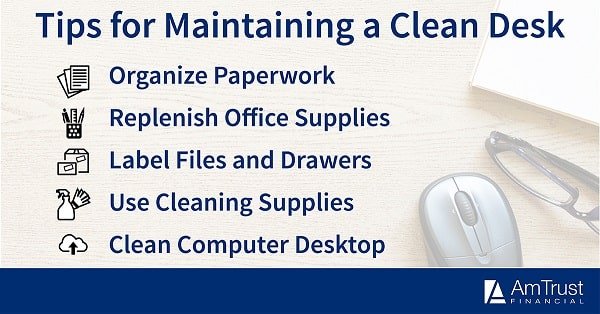
Credit: amtrustfinancial.com
Motivating Yourself To Keep The Desk Clean
Staying motivated can be hard, especially during busy times. Here are ways to keep yourself on track:
- Set a small reward for a clean desk (like a treat or a 5-minute break).
- Take before-and-after photos to see your progress.
- Invite a coworker to join you—accountability helps.
- Print a simple checklist and keep it on your wall.
- Remind yourself of the benefits: More focus, less stress, a better impression.
Remember, even small improvements can make your workday easier and more pleasant.
Real-world Example: Transforming A Messy Desk
Consider a typical office worker, Sarah. She used to have piles of paper, tangled cables, and old coffee mugs everywhere. After following the steps above, she:
- Cleared and cleaned her desk completely.
- Threw out 3 bags of trash and recycling.
- Set up trays for incoming and outgoing papers.
- Used cable clips to organize her cords.
- Limited her personal items to one photo and a small plant.
- Added a calendar reminder for Friday afternoon desk cleaning.
The results? Sarah spent less time searching for things, felt less stressed at work, and her boss even noticed her improved organization. Her story shows that a little effort goes a long way.

Credit: www.pcmag.com
Comparing Clean Vs. Messy Desks
Here’s a quick side-by-side look at how clean and messy desks affect daily work:
| Clean Desk | Messy Desk |
|---|---|
| Easy to find items | Wastes time searching |
| Less stress | Feeling overwhelmed |
| Fewer germs | More bacteria and dust |
| Professional image | Unprofessional impression |
| More workspace | Limited space for work |
A clean desk isn’t just about looks—it changes how you work and feel each day.
Frequently Asked Questions
Why Does My Desk Get Messy So Quickly?
Desks get messy fast because we often bring items to work, take notes, or receive papers without having a system for storage or disposal. Small habits, like leaving empty coffee cups or not filing papers right away, add up. Setting up simple routines—like clearing your desk at the end of each day—can prevent mess from building up.
What Should I Keep On My Desk?
Only keep essentials on your desk, such as your computer, phone, a notepad, a pen, and maybe one or two personal items like a photo or plant. Store less-used items in drawers or shelves. The goal is to keep your main workspace clear for daily tasks.
How Often Should I Clean My Office Desk?
Wipe your desk and phone daily to remove germs. Organize and tidy your workspace at the end of each day. Do a deeper clean—like sorting papers, cleaning electronics, and organizing drawers—once a week. Regular cleaning keeps your desk looking good and stops clutter from growing.
Can A Clean Desk Really Improve My Productivity?
Yes, studies show that a clean and organized desk helps you focus better and reduces stress. Without clutter, it’s easier to find what you need and get work done faster. A clean desk also helps you feel more in control and comfortable in your workspace. For more on the science behind this, see this Psychology Today article.
What If I Share A Desk With Others?
If you share a desk, keep your personal items minimal and use a portable organizer for your supplies. Wipe down the desk before and after use. Respect shared space by not leaving trash, food, or extra items behind. Agree on basic rules with your coworkers to keep the area tidy.
A clean desk can change the way you work and feel every day. With just a few simple habits and the right tools, you can transform your workspace into a place that helps—not hinders—your productivity and well-being. Start today, and enjoy the benefits of a clean, organized office desk.
Related Office Guides
Continue with these related workspace guides:
