
Keeping an office truly clean goes far beyond emptying bins and wiping desks. A deep clean is about targeting every area, large and small, that builds up dust, germs, and clutter over time. For businesses, this is not just about looking tidy.
Deep cleaning helps create a healthier environment, reduces sick days, impresses visitors, and even boosts productivity. Yet, many offices only scratch the surface, missing key spots that hide bacteria and grime.
If you want your workspace to be truly spotless, you need a clear, step-by-step office deep clean checklist. This guide covers every area you should focus on, practical tips for each, and non-obvious details most people forget. Whether you’re doing the job yourself or guiding a cleaning crew, this checklist will help you achieve a deep, professional-level clean.
Why Office Deep Cleaning Matters
Regular cleaning helps, but deep cleaning is essential for long-term office health. Dust, allergens, and germs build up in places that are not cleaned every day. According to the Centers for Disease Control and Prevention (CDC), shared workspaces can carry up to 400 times more bacteria than a household toilet seat. Common illnesses like colds and flu spread quickly in offices, especially during busy seasons. Deep cleaning reduces these risks, making the office safer for everyone.
On top of health, a deep clean boosts morale. Employees feel more comfortable and respected in a fresh environment. Clients and guests also notice when an office is truly clean, which helps your business image. Plus, regular deep cleaning can extend the life of furniture, carpets, and equipment, saving you money over time.
How Often Should You Deep Clean An Office?
The frequency depends on your office size, the number of employees, and the type of work you do. As a general rule:
- Every 6-12 months: Full office deep clean for most standard offices.
- Quarterly: If your office has high foot traffic or many shared spaces.
- Monthly: For special areas like kitchens, restrooms, or medical-related offices.
It’s smart to schedule deep cleans during quiet periods, such as weekends or holidays, to avoid disrupting work.
Office Deep Clean Checklist
The following checklist is split into clear sections for each area and task. Each area includes specific steps, tools to use, and extra tips to get a truly thorough clean.
1. Reception And Entrance Areas
First impressions matter, so start here. Dirt, dust, and fingerprints can quickly build up where people enter and exit.
- Wipe down doors and handles: Use disinfectant on all handles, push plates, and glass doors.
- Clean entry mats and rugs: Shake out, vacuum, or wash mats. They trap a lot of dirt from shoes.
- Dust and clean surfaces: Reception desks, counters, and waiting chairs need attention.
- Clean windows and glass: Fingerprints and smudges are common here.
- Disinfect shared items: Pens, sign-in sheets, and brochures.
Non-obvious tip: Look up! Dust and cobwebs collect on entrance lights, ceiling corners, and door frames.
2. Workstations And Desks
Personal desks are used every day but rarely deep cleaned. Germs and crumbs hide in keyboards and under stacks of papers.
- Remove all items: Take everything off the desk.
- Disinfect surfaces: Wipe the desk, chair arms, and drawer handles.
- Clean electronics: Use suitable wipes for keyboards, mice, monitors, and phones.
- Vacuum fabric chairs: Use a HEPA vacuum to pick up dust and allergens.
- Sanitize under the desk: Don’t forget the space under and behind desks.
Pro insight: Most people forget the underside of chairs and the back of computer monitors. These areas can be dusty and sticky.
3. Conference And Meeting Rooms
Shared spaces see lots of different people. Germs spread quickly here.
- Wipe down tables and chairs: Use disinfectant, especially on armrests and table edges.
- Clean remote controls and phones: These are often missed.
- Polish glass boards: Use glass cleaner to remove fingerprints and marker residue.
- Vacuum and mop floors: Move chairs and tables to get every spot.
- Dust electronics: Projectors, screens, and cables.
Non-obvious tip: Clean cable organizers and under-table power strips. Dust collects here and is rarely removed.
4. Break Rooms And Kitchens
These spaces are high-risk for bacteria because of food and drink spills. A deep clean is crucial for health.
- Empty and clean fridges: Throw away old food, wipe shelves, and clean drawers.
- Sanitize coffee makers and kettles: Descale and wipe surfaces.
- Disinfect microwaves inside and out: Don’t forget the buttons and handles.
- Clean sinks and taps: Use antibacterial cleaner.
- Wipe countertops and tables: Remove crumbs and sticky spots.
- Mop floors: Food and drink spills often make floors sticky.
Hidden danger: Check the area behind appliances and under the sink for mold or leaks. These spots often go unnoticed.
5. Restrooms
Restrooms are obvious, but a deep clean means going further than daily cleaning.
- Scrub toilets and urinals: Use a strong disinfectant and pay attention to the base and flush handles.
- Sanitize sinks and counters: Remove buildup and wipe all surfaces.
- Clean mirrors: Use streak-free cleaner.
- Disinfect soap dispensers and hand dryers: Wipe down all touchpoints.
- Mop floors with disinfectant: Don’t forget corners and behind doors.
Advanced tip: Check and clean air vents and ceiling tiles. Mold can grow quickly in humid environments.
6. Floors And Carpets
Floors hold dust, dirt, and allergens. Deep cleaning keeps them in top shape.
- Vacuum carpets with a HEPA filter: Removes fine dust and allergens.
- Shampoo or steam clean carpets: Removes stains and kills germs.
- Mop hard floors: Use the right cleaner for wood, tile, or vinyl.
- Clean floor edges and corners: These trap dust and debris.
Pro insight: Move furniture and clean underneath. Many offices only clean “around” objects, not under them.
7. Windows And Blinds
Clean windows let in more light and improve mood. Blinds are dust magnets.
- Wash windows inside and out: Use streak-free glass cleaner.
- Dust and wipe blinds: Use a damp cloth or specialty blind cleaner.
- Clean window sills and frames: Dirt and dead bugs collect here.
Non-obvious tip: Check for mold or condensation in window tracks. This can cause long-term damage.
8. Office Equipment And Technology
Shared equipment is touched by many hands daily.
- Wipe down printers, copiers, and fax machines: Use electronics-safe disinfectant.
- Disinfect shared phones and tablets: Clean screens and buttons.
- Dust cables and power strips: Use a microfiber cloth.
- Clean computer mice and keyboards: Pay attention to crevices.
Extra detail: Unplug devices before cleaning to stay safe. Use compressed air for hard-to-reach spots.
9. Storage Areas And Supply Rooms
These spaces are often ignored, but clutter and dust can build up quickly.
- Sort and organize supplies: Throw away expired or broken items.
- Dust shelves and storage bins: Use a damp cloth.
- Sweep and mop floors: Dust bunnies love hidden corners.
- Disinfect handles and light switches.
Pro tip: Label shelves and bins after cleaning. This keeps the area tidy longer.
10. Walls, Doors, And Light Switches
These surfaces are touched often but rarely cleaned.
- Wipe down walls: Remove marks, smudges, and fingerprints.
- Clean doors and frames: Use disinfectant, especially around handles.
- Sanitize light switches and thermostats.
Extra tip: Use a gentle cleaner for painted walls to avoid removing paint.
11. Air Vents And Hvac Systems
Clean air is essential for a healthy office. HVAC systems spread dust and germs if not maintained.
- Vacuum air vents: Remove dust and debris.
- Wipe vent covers with disinfectant.
- Replace or clean filters: Check manufacturer guidelines.
- Schedule professional HVAC cleaning: At least once a year for large offices.
Hidden insight: Dirty air systems can make allergies worse. If you notice extra dust or sneezing, it may be time to check the vents.
12. Trash And Recycling Areas
Overflowing bins attract pests and smell bad.
- Empty all bins: Replace liners.
- Clean and disinfect bins: Don’t just empty—wash them.
- Wipe down recycling stations: Remove sticky spots and labels.
Non-obvious tip: Don’t forget outside dumpsters or recycling containers. These can spread odors inside if not kept clean.
13. Shared Office Supplies
Pens, staplers, and other supplies are touched by many people.
- Wipe down all shared items: Use antibacterial wipes.
- Check for broken or dirty items: Replace as needed.
Extra detail: Store supplies in closed containers to keep dust away.
14. Office Decor And Plants
Decorations and plants add comfort but can collect dust and pests.
- Dust picture frames, clocks, and artwork: Use a microfiber cloth.
- Clean artificial plants: Wipe leaves with a damp cloth.
- Water and inspect real plants: Remove dead leaves and check for pests.
Hidden tip: Use a small brush to clean detailed decorations where dust collects.
15. Emergency Exits And Safety Equipment
Safety equipment must be easy to access and clean.
- Check fire extinguishers and alarms: Make sure they are not blocked.
- Clean exit signs and lights: Dust and wipe down.
- Clear paths to emergency exits: Remove clutter.
Extra tip: While cleaning, check expiration dates and batteries on safety equipment.
Sample Office Deep Cleaning Schedule
To help organize your deep cleaning, here’s an example of a simple cleaning rotation:
| Area | Frequency | Responsible |
|---|---|---|
| Restrooms | Monthly | Cleaning Crew |
| Workstations | Every 6 Months | Cleaning Crew |
| Break Room | Quarterly | Cleaning Crew |
| Carpets | Yearly | Professional Service |
| Windows | Twice a Year | Cleaning Crew |
This schedule ensures every area gets deep cleaned regularly. Adjust to fit your office’s needs.

Credit: jbncleaning.com.au
Common Mistakes To Avoid
Many offices miss the mark when deep cleaning. Here are the biggest mistakes:
- Ignoring hidden areas: Under desks, behind cabinets, and inside vents are often skipped.
- Using the wrong cleaners: Not all surfaces need the same cleaner. For example, glass cleaners can damage electronics.
- Not disinfecting shared equipment: Phones, remotes, and copiers are some of the dirtiest items in an office.
- Skipping air quality checks: Dirty HVAC systems can undo your hard work.
- Rushing the job: Deep cleaning takes time. Don’t try to do everything in an hour.
Even experienced cleaners sometimes overlook high-touch points like elevator buttons, stair rails, and shared kitchen gadgets.
Tools And Supplies You’ll Need
The right supplies make deep cleaning faster and safer:
- Disinfectant sprays and wipes
- Glass cleaner
- Microfiber cloths
- HEPA vacuum
- Mop and bucket
- Scrubbing brushes
- Trash bags and liners
- Protective gloves
- Compressed air (for electronics)
- Label maker (for organizing storage)
- Carpet shampooer or steam cleaner (rent if needed)
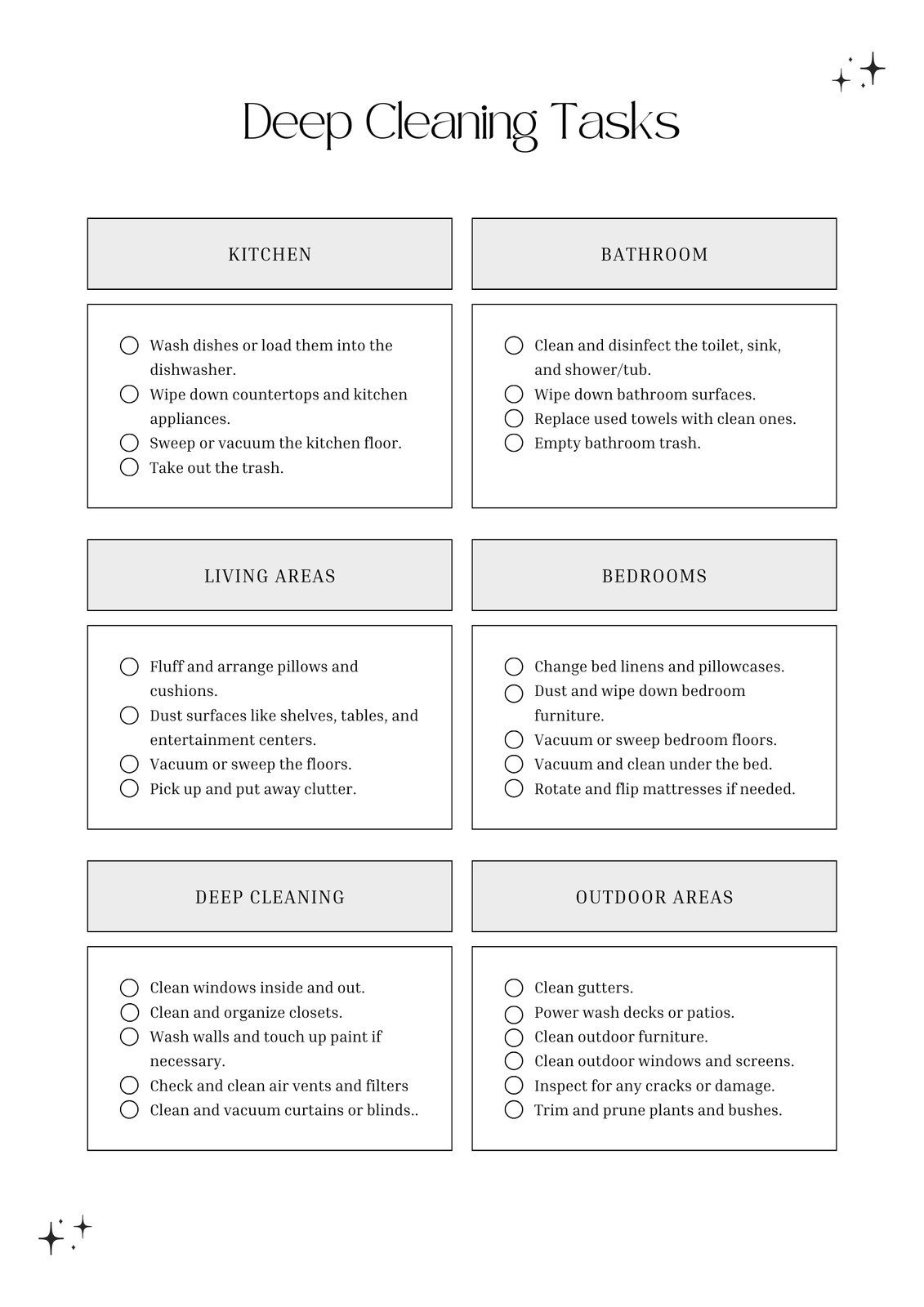
Pro tip: Always check that cleaning products are safe for the surfaces you use them on. Some chemicals can damage delicate materials.
Credit: www.canva.com
Office Deep Clean Vs. Regular Cleaning
Many wonder: What’s the real difference between deep cleaning and regular cleaning? Here’s a side-by-side comparison:
| Task | Regular Cleaning | Deep Cleaning |
|---|---|---|
| Desks & Surfaces | Dust and wipe | Remove all items, disinfect, clean under/behind |
| Floors | Vacuum and mop visible areas | Move furniture, clean edges, shampoo carpets |
| Restrooms | Clean sinks, toilets, replace supplies | Scrub grout, clean vents, sanitize all touchpoints |
| Shared Equipment | Wipe surfaces | Disinfect all parts, clean cables, use compressed air |
Deep cleaning is about detail and thoroughness. It covers places and items that daily routines miss.
Signs Your Office Needs A Deep Clean
Sometimes it’s easy to see when deep cleaning is overdue:
- Lingering odors in kitchens or restrooms
- Dust on vents, shelves, or electronics
- Stained carpets or furniture
- More employee sick days
- Visible mold or water stains
- Unexplained allergy symptoms
If you notice any of these, it’s time to schedule a deep clean soon.
Should You Hire Professionals Or Diy?
For small offices, a team effort can work. For larger spaces, hiring professional cleaning services saves time and ensures nothing is missed. Professionals bring:
- Industrial-grade equipment
- Safe, effective cleaning products
- Experience with hard-to-clean areas
- Consistent results
If you do it yourself, plan for at least one full day and assign tasks to each team member. Always follow safety instructions, especially when using chemicals or moving heavy furniture.
Surprising insight: Even professional cleaners sometimes skip storage rooms and inside appliances. Use your checklist to make sure every area is covered.
Keeping The Office Clean After A Deep Clean
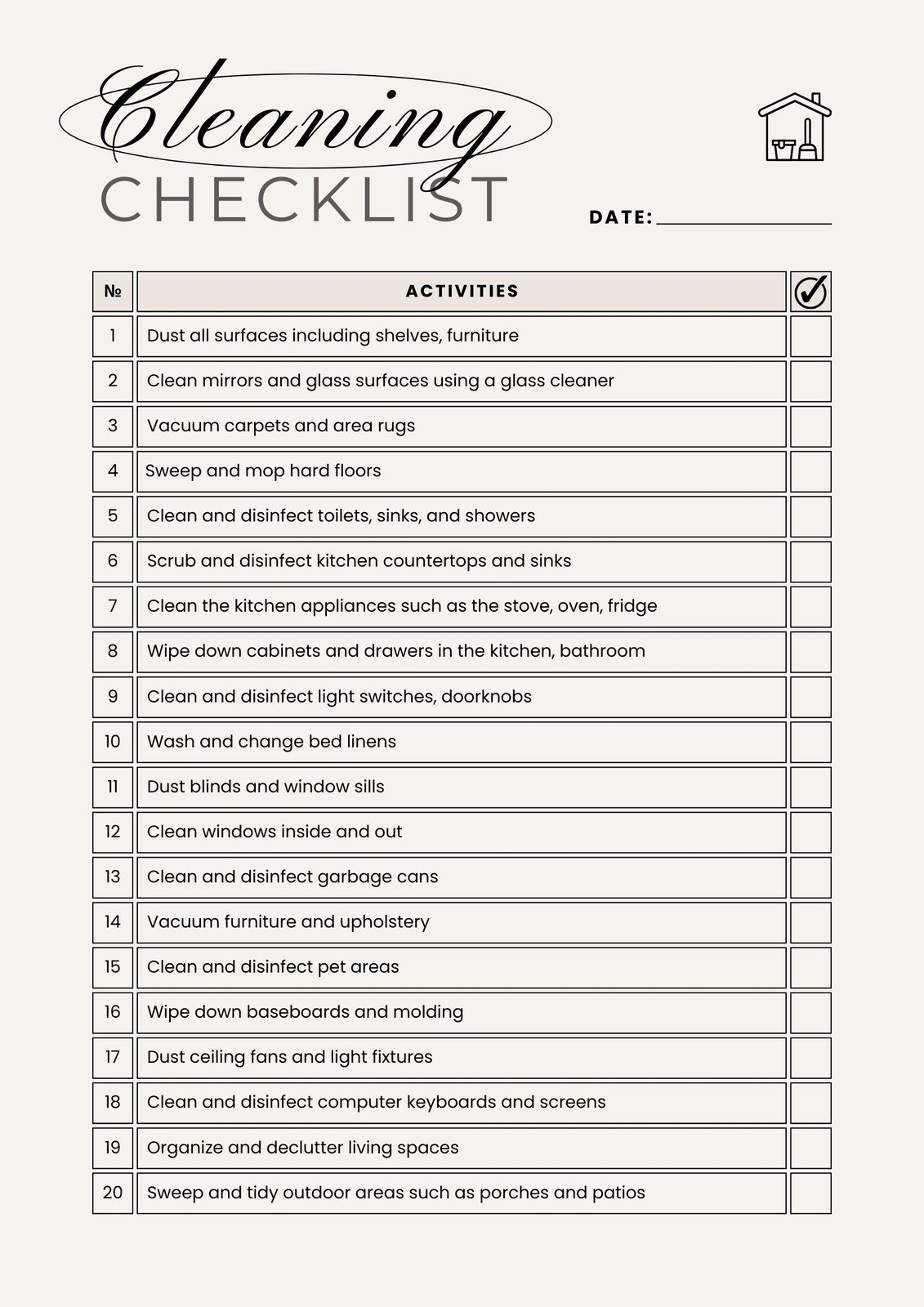
A deep clean is a big investment. Keep your office cleaner for longer by:
- Creating a regular cleaning schedule
- Assigning responsibilities for shared areas
- Encouraging staff to wipe down their own desks weekly
- Placing sanitizing wipes and sprays in common areas
- Holding quarterly “clean-up days” for small tasks
A little regular effort makes the next deep clean much easier.
Credit: www.canva.com
Real-world Example: The Impact Of Deep Cleaning
A study by the University of Arizona found that after a single deep cleaning, the amount of bacteria on office surfaces dropped by over 80%. Employees reported feeling less stressed and more focused. In another case, a tech company saw a 20% reduction in sick days after implementing quarterly deep cleans.
These results show the real value of a thorough cleaning routine.
Environmental Considerations
Many offices now want to use eco-friendly cleaning products. These are safer for employees and reduce environmental impact. Look for:
- Biodegradable cleaners
- Non-toxic disinfectants
- Reusable microfiber cloths
- High-efficiency vacuums
Read more about green cleaning at the EPA Safer Choice program.
Frequently Asked Questions
What Is The Difference Between Office Cleaning And Deep Cleaning?
Office cleaning usually means daily or weekly tasks like emptying bins and wiping desks. Deep cleaning is much more detailed. It includes cleaning hidden spots, disinfecting all surfaces, and moving furniture to clean underneath. Deep cleaning targets germs, allergens, and dirt that regular cleaning misses.
How Long Does An Office Deep Clean Take?
The time depends on your office size and the number of people cleaning. For a small office (10–20 employees), plan for 4–8 hours. Large offices may take one or two full days. Professional teams work faster, but thoroughness is more important than speed.
What Are The Most Commonly Missed Areas During Deep Cleaning?
People often forget air vents, behind appliances, under desks, window tracks, and inside storage rooms. Shared items like remote controls, light switches, and door handles are also missed. Using a detailed checklist helps avoid these mistakes.
Can We Do Office Deep Cleaning Ourselves, Or Should We Hire Professionals?
Small offices can often do it themselves with the right tools and a good plan. Larger offices, or those needing carpet and HVAC cleaning, should hire professionals. Professionals have better equipment and know how to clean delicate or technical areas safely.
How Can We Keep The Office Clean After A Deep Clean?
Create a regular cleaning schedule, assign responsibilities, and encourage staff to keep their own areas tidy. Place sanitizing wipes in common areas, and hold quick weekly clean-up sessions. The cleaner you keep things daily, the less effort your next deep clean will require.
A truly clean office is an ongoing project. With a clear checklist and good habits, your workspace will stay fresh, healthy, and welcoming for everyone.
Related Office Guides
Continue with these related workspace guides:
