
If you often work from home, you might notice dust building up faster than you expect. Dust isn’t just annoying—it can trigger allergies, lower your air quality, and even damage electronics. For people spending hours in their home office, reducing dust isn’t just about cleanliness—it’s about health, productivity, and protecting your workspace investment. The good news is, you don’t need expensive tools or a cleaning crew. With a smart approach and a few practical habits, you can keep your home office much cleaner, safer, and more comfortable.
This guide gives you everything you need to know about controlling dust in your home office. From daily habits to smart tech solutions, you’ll find practical steps and real-world advice for creating a workspace that feels fresh and healthy. Let’s look at why dust is a problem, how it gets in, and what you can do—starting today.
Why Dust Builds Up In Home Offices
Dust is more than just tiny bits of dirt. It’s a mix of dead skin cells, fabric fibers, pet dander, pollen, mold spores, and even microscopic bits of plastic. In home offices, dust can build up quickly for several reasons:
- Limited ventilation: Many offices are in spare rooms or basements with closed windows and doors, trapping dust.
- Electronics: Devices like computers and monitors attract dust through static electricity.
- Carpets and textiles: Rugs, curtains, and soft chairs release fibers and trap particles.
- Paper: Stacks of documents and books collect dust and make cleaning harder.
Understanding these sources is the first step to controlling them.
The Health Impact Of Dust
Dust isn’t just ugly—it can make you sick. For people with allergies or asthma, dust can trigger coughing, sneezing, itchy eyes, and even asthma attacks. Even healthy people might feel tired, get headaches, or have trouble concentrating in dusty rooms. Over time, dust can clog computer fans, overheat devices, and shorten their life.
A recent study from the Environmental Protection Agency found that indoor air can be two to five times more polluted than outdoor air, mostly due to dust and other small particles. That’s a big reason to keep dust under control.
Essential Habits To Reduce Dust
Small changes in your daily routine can make a big difference. Here’s how to start:
1. Keep Surfaces Clear
A cluttered desk is a dust magnet. Papers, books, and gadgets collect dust and make cleaning harder. At the end of each day, take five minutes to clear unnecessary items. Use organizers or trays to keep small things tidy.
2. Wipe Down Daily
Use a microfiber cloth to wipe your desk, monitor, keyboard, and shelves. Microfiber is better than regular cloth because it traps dust instead of moving it around. For best results, slightly dampen the cloth. Avoid using feather dusters, which just spread dust into the air.
3. Vacuum Regularly
Vacuum your office at least twice a week. Pay special attention to corners, under desks, and behind electronics, where dust builds up fast. If you have carpet, vacuuming is even more important. Use a vacuum with a HEPA filter—these catch fine dust and allergens instead of blowing them back into the room.
4. Mop Hard Floors
If you have hardwood or tile, mop once a week. Dust and hair stick to hard floors and can get pushed around by your feet or chair. Use a damp mop or a microfiber floor pad.
5. Wash Textiles Often
Curtains, throw blankets, and fabric office chairs all collect dust. Wash or vacuum them every few weeks. If you have removable slipcovers, wash them monthly.
6. Change And Wash Clothes
If you have pets, change clothes before entering your office. Pet hair and dander stick to clothing and transfer easily. Keep a lint roller handy.
Managing Dust With Smart Choices
Some office choices make dust worse, but smart choices can help keep it down.
1. Use Hard Flooring
Carpet is a dust trap. If possible, choose hard floors—like wood, laminate, or tile—in your office. They’re easier to clean and don’t hold onto dust. If you must have a rug, pick a low-pile or washable one.
2. Choose Simple Furniture
Furniture with lots of detail, fabric, or open shelves collects more dust. Choose smooth surfaces and closed storage (like cabinets with doors). Avoid open bookshelves unless you dust them often.
3. Limit Paper Use
Go digital when you can. Fewer papers mean less dust and less clutter. Scan important documents and use cloud storage.
4. Organize Cables
Cables and power strips on the floor collect dust. Use cable organizers to lift them off the floor and make cleaning easier.
5. Upgrade Air Vents
Dirty HVAC vents blow dust into your office. Clean vent covers every few months and consider using vent filters.
Air Filtration: Your Secret Weapon
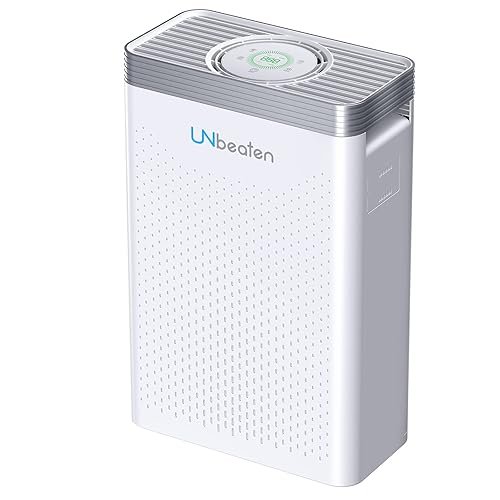
Air purifiers can make a huge difference in dust control, especially in small or poorly ventilated rooms. But not all purifiers are equal.
What To Look For In An Air Purifier
- HEPA filter: Captures 99.97% of particles down to 0.3 microns.
- CADR rating: Higher numbers mean faster cleaning (look for Clean Air Delivery Rate above 200 for medium rooms).
- Quiet operation: So it won’t disturb your work.
Place the purifier near your desk but not blocked by furniture. Run it on low all day for best results.
Hvac Filters Matter Too
If your home has central heating or air, use high-quality filters. Replace them every 2–3 months, or more often if you have pets.
Here’s a quick comparison of common filter types:
| Filter Type | Efficiency | Replacement Frequency | Best For |
|---|---|---|---|
| Basic Fiberglass | Low | 1 month | Large particles |
| Pleated | Medium | 2-3 months | Dust, pollen |
| HEPA | High | 6-12 months | Allergens, fine dust |
Controlling Humidity
Dry air makes dust more likely to become airborne. The ideal humidity for a home office is 40–50%. If air is too dry, consider a humidifier. If it’s too humid, use a dehumidifier—high humidity can lead to mold, which is another allergen.
A digital hygrometer can help you monitor levels. Remember, sudden changes in humidity can also damage electronics and furniture.
Credit: www.airtasker.com
Window And Door Strategies
Windows and doors are gateways for dust. Here’s how to manage them:
1. Keep Windows Closed During High Pollen Or Wind
On windy days or during pollen season, keep windows shut to prevent more dust from blowing in. Use air conditioning or fans instead.
2. Seal Gaps
Small gaps under doors and around windows let dust sneak in. Install weatherstripping or door sweeps to close these gaps. This also improves energy efficiency.
3. Clean Window Screens
Screens catch dust and pollen. Clean them with soapy water every few months.
Managing Electronics
Electronics create static, which attracts dust. Here’s how to keep them cleaner:
1. Unplug And Clean
Turn off and unplug devices before cleaning. Use a microfiber cloth and compressed air for keyboards and vents. Never spray liquid directly onto electronics.
2. Raise Devices
Use monitor stands or laptop risers. This lifts them off the desk and reduces dust buildup underneath. It also makes it easier to wipe surfaces.
3. Improve Cable Management
As mentioned earlier, bundle and lift cables off the floor with clips or sleeves. Fewer cables on the floor means less dust traps.
4. Add Dust Covers
If you don’t use a device every day (like a printer), cover it with a cloth or plastic cover to keep dust out.
Keeping Air Flow Clean
Good airflow helps move dust out and brings fresh air in—but only if it’s managed well.
Ceiling And Portable Fans
Fans move air but also stir up dust. Clean fan blades every month. If you use a portable fan, point it away from the floor and wipe it often.
Open Doors Sometimes
A completely closed room can get stuffy. If your home is clean, open the office door for a few minutes each hour to balance air. But close it when vacuuming, dusting, or if there are pets nearby.
Pet Management
Pets are a joy but bring extra dust and hair. Here’s how to manage:
- Keep pets out of the office if possible. If not, brush them regularly to reduce shedding.
- Use a lint roller on chairs and rugs.
- Place a washable mat at the office entrance to catch hair and dirt from paws.
Decluttering For Dust Control
Every extra item in your office is a dust collector. Here’s how to cut down:
- Sort paperwork weekly and recycle what you don’t need.
- Store items in closed bins or drawers, not on open shelves.
- Avoid unnecessary decorations—choose a few easy-to-clean items instead of many small trinkets.
Cleaning Routine: What To Do And When
Consistency is more important than cleaning intensity. Here’s a sample cleaning schedule for a dust-free office:
| Task | Frequency |
|---|---|
| Wipe desk & electronics | Daily |
| Vacuum/mop floor | 2–3 times a week |
| Wash textiles (curtains, covers) | Monthly |
| Clean vents and filters | Every 2–3 months |
| Declutter papers/items | Weekly |
A regular routine prevents dust from getting out of hand.
Advanced Solutions And Smart Tech
If you want to go further, these high-tech tools can help:
Robotic Vacuums
A robotic vacuum can clean under desks and around cables while you work. Some models have HEPA filters and mapping features to target dustiest spots. Empty the dustbin often.
Uv Air Sanitizers
UV sanitizers use ultraviolet light to kill mold, bacteria, and viruses in the air. While not a replacement for HEPA filters, they’re a good extra layer—especially if you have allergies.
Smart Air Quality Monitors
These devices measure dust, pollen, and other particles in the air. They connect to your phone and alert you when levels rise so you can run your air purifier or check for problems.
Common Mistakes In Dust Control
Many people make small mistakes that undo their hard work:
- Using feather dusters: These just move dust around. Use microfiber instead.
- Ignoring hidden spots: Dust collects behind monitors, under furniture, and in vents.
- Overlooking HVAC maintenance: Dirty filters and vents blow dust right back into your office.
- Not washing cleaning tools: Dirty cloths and mops can spread more dust than they remove.
- Letting clutter build up: Too many things on desks and shelves make cleaning impossible.
Credit: www.amazon.com
Non-obvious Tips Most People Miss
Even careful cleaners miss these:
- Let your office “rest” after dusting: After wiping, wait 15–30 minutes for airborne dust to settle, then vacuum. This catches particles that floated up during cleaning.
- Check your shoes: Shoes bring in dirt and dust. Keep a mat outside the office door and switch to indoor slippers.
- Clean plants: Houseplants catch dust on their leaves. Wipe them gently with a damp cloth every few weeks.
- Watch out for air leaks: Cracks in walls or floors can let in dust from basements or outside. Seal these with caulk.
When To Get Professional Help
If you notice dust returning within hours of cleaning, or if you have unexplained allergy symptoms, it might be time for professional help. Duct cleaning and deep carpet cleaning can address hidden dust sources. If you suspect mold, get a professional inspection—mold is dangerous and hard to remove on your own.
Real-world Example: Dust Reduction Success
Anna, a freelance graphic designer, used to sneeze all day in her home office. She switched from carpet to vinyl flooring, bought a HEPA-filter air purifier, and reduced her paperwork by scanning old files. By adding a weekly cleaning schedule and sealing her window gaps, she cut dust by over half in two months.
Not only did her allergies improve, but her computer stopped overheating.
Anna’s experience shows that small, consistent changes can make a big difference.
A Quick Reference: Dust Control Tools
Here’s a side-by-side look at popular dust-control tools:
| Tool | Effectiveness | Best Use |
|---|---|---|
| Microfiber cloth | High | Daily surface dusting |
| HEPA vacuum | High | Carpets, floors, upholstery |
| Air purifier | High | Continuous air cleaning |
| Lint roller | Medium | Chairs, textiles, pet hair |
| Damp mop | Medium | Hard floors |
| UV air sanitizer | Medium | Extra air treatment |
Choose the right mix for your space and habits.
Long-term Benefits Of A Dust-free Office
A clean workspace does more than just look nice. It can:
- Lower your risk of allergies and respiratory problems.
- Improve focus and productivity (a Princeton study found that clutter and dust reduce the brain’s ability to focus).
- Make your electronics last longer and run better.
- Create a more professional, welcoming environment for video calls or guests.
Even small improvements add up over time.
Frequently Asked Questions
How Often Should I Clean My Home Office To Keep Dust Away?
For best results, wipe surfaces daily and vacuum or mop floors 2–3 times a week. Wash textiles and clean vents every few months. Consistency is key—regular, small efforts prevent big dust problems.
Do Air Purifiers Really Help With Dust?
Yes, especially those with HEPA filters. They trap fine particles that normal filters miss. Place the purifier near your desk and run it while working. For more details, check out this EPA guide to air cleaners.
Is It Better To Have Carpet Or Hard Floors In My Office?
Hard floors are best for dust control. They are easier to clean and don’t trap dust like carpet does. If you need a rug, choose one that’s washable or low-pile.
Can Houseplants Help With Dust?
Yes, but only a little. Plants can trap dust on their leaves and may improve air quality slightly. Remember to wipe their leaves regularly to prevent dust buildup.
What If My Office Is Still Dusty After Cleaning?
Check for hidden sources—dirty vents, gaps in windows or doors, or cluttered shelves. Consider upgrading to a HEPA vacuum and air purifier. If dust returns quickly, get your air ducts cleaned or check for sources like mold or leaks.
A dust-free home office is not just a dream—it’s a goal you can reach with steady habits and smart choices. The time you invest pays back in health, comfort, and better work every day.
Credit: oman.whizzcart.com
Related Office Guides
Continue with these related workspace guides:
