
When you plug in a new laptop or phone, you expect fast charging and easy connections. But with the rise of USB4, things are changing quickly—especially around charging capabilities. Many people hear about USB4 and think only about speed. But USB4 charging is a big step forward, too.
Understanding what USB4 charging means, what it can do, and how it compares to older USB versions will help you avoid mistakes and get the most from your devices.
In this article, you’ll discover everything you need to know about USB4 charging capability. You’ll learn what makes USB4 different, how charging works, and what you need to look for when buying devices and cables. We’ll also break down the four core aspects of USB4 charging so you get a clear picture. By the end, you’ll have practical knowledge, not just tech buzzwords.
What Is Usb4?
USB4 is the latest version of the Universal Serial Bus (USB) standard, released in 2019. It was designed to unify and improve the USB experience for both data and power. USB4 builds on previous versions like USB 3.2 and Thunderbolt 3, but makes things simpler and much faster. With USB4, you can transfer data at up to 40 Gbps, connect multiple devices to a single port, and charge devices with high power.
But USB4 isn’t just about speed. It’s also about smarter and more powerful charging. Devices and cables that support USB4 can offer new levels of convenience—if you know what to look for.
The Four Key Usb4 Charging Capabilities
To fully understand USB4 charging, you need to know its four main capabilities. Each one changes the way you power and use your devices.
1. Higher Power Delivery (pd) Support
One of the biggest changes with USB4 is how it handles power delivery. Power Delivery (PD) is a technology that lets USB devices negotiate power levels for safe, fast charging.
- USB4 supports PD up to 240W (48V, 5A), thanks to the USB Power Delivery Revision 3.1 standard.
- This is a huge jump from earlier USB standards, which usually maxed out at 100W or less.
This higher power means you can charge not only phones and tablets, but also powerful laptops, monitors, and even some desktop replacements through a single USB-C port. For example, a high-end laptop that needs 120W can now be powered with a USB4 charger and cable—something not possible with USB 3.
2.
Non-obvious insight: Many people think all USB-C ports with USB4 are equal. In reality, the maximum charging power depends on both the device and the charger supporting PD 3.1. If your charger or cable only supports 100W, you won’t get the 240W benefit—even if your device is USB4.
Confident guidance: Always check the specs of your charger, device, and cable. Look for “USB PD 3.1” and the wattage rating. Don’t assume every USB4 product supports 240W.
2. Backward Compatibility With Older Standards
USB4 is designed to work with older USB standards, but charging capability varies. Here’s how:
- If you connect a USB4 device to a USB 3 or USB 2 charger, it will charge at the highest level supported by both.
- Older chargers often provide less power (often 5V/2A or 10W max).
- USB4 can also support Thunderbolt 3 devices and cables, which may have their own power limits.
This backward compatibility is important, but it also creates confusion. Many users expect fast charging on every USB-C port, but the reality is, the weakest link sets the speed.
Here’s an example:
- Your USB4 laptop can accept 100W charging.
- You use a USB-C charger that only supports USB 2.0 (10W).
- Your laptop will only charge at 10W, much slower than it could.
Non-obvious insight: Not all USB-C to USB-C cables support high-wattage charging. Some are limited to 60W or even less, and the difference isn’t always clear from looking at the cable.
Tip: When buying cables, look for “e-marker” chips or explicit wattage ratings (e.g., “Supports 240W PD”).
3. Smart Power Negotiation
USB4 uses intelligent power negotiation. This means devices and chargers “talk” to each other to decide the safest, fastest charging speed.
How it works:
- When you plug in a USB4 device, the charger and device exchange information.
- They agree on the voltage (5V, 9V, 15V, 20V, 28V, 36V, or 48V) and current (up to 5A) based on what both can handle.
- Charging happens at the highest safe level.
This prevents overheating, damage, or unsafe charging. For example, if your phone only supports 18W, but your USB4 charger can provide 100W, the phone will only take what it needs.
Practical example: You plug a USB4 monitor (which needs 90W) into your USB4 laptop (which supports 100W PD) using a 100W cable. Power negotiation ensures the monitor gets exactly what it needs, and your laptop can still charge at a safe rate.
Common mistake: Using cheap, unmarked USB-C cables can prevent proper power negotiation or even cause damage. Always use cables certified for the right wattage.
4. Charging And Data At The Same Time
A powerful feature of USB4 is the ability to charge and transfer data simultaneously at full speed.
In earlier standards, charging might slow down if you transferred lots of data, or vice versa. USB4 is designed to maximize both—so you can charge a laptop while running a high-resolution monitor, transferring files, or connecting other devices.
Here’s what this means in practice:
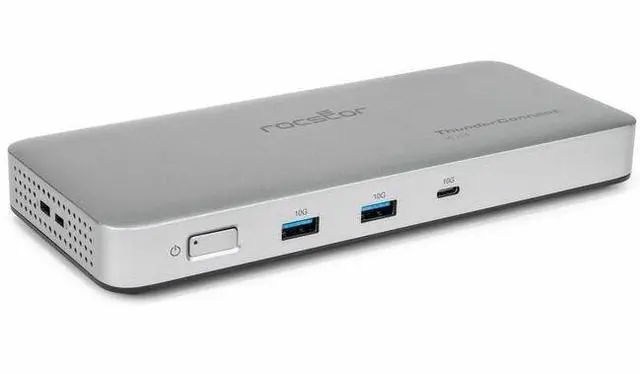
- You connect your USB4 laptop to a docking station.
- The docking station charges your laptop, runs two 4K monitors, and connects to external drives—all through one cable.
- You don’t need separate power bricks or messy cables.
Non-obvious insight: The cable matters here, too. Only USB4-certified cables can reliably handle both high-wattage charging and the fastest data speeds. Standard USB-C cables may limit speed or power.
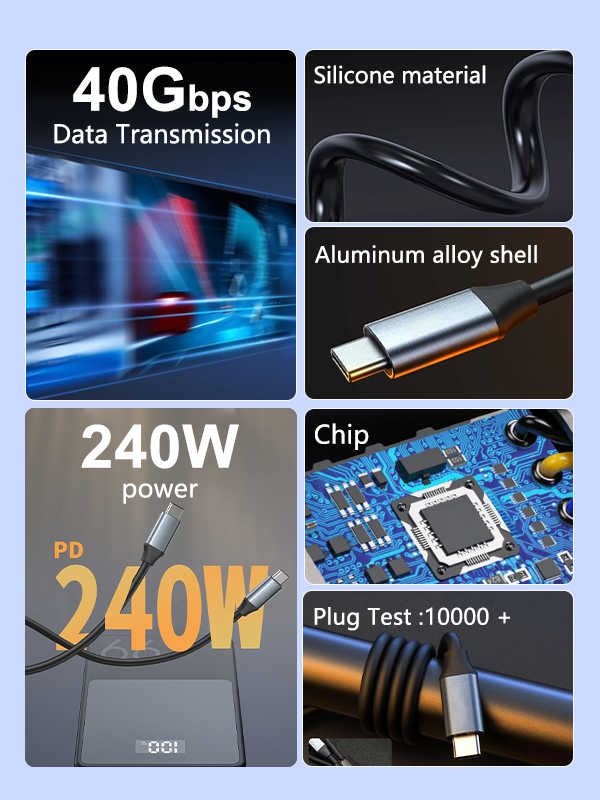
Example: Some USB4 cables are “passive” (up to 40Gbps and 100W) while “active” cables can handle 40Gbps and 240W charging. Always match the cable to your device’s needs.
Credit: www.newegg.com
Usb4 Charging Compared To Previous Usb Versions
Understanding how USB4 charging stacks up against previous versions helps you see the real-world benefits.
| USB Version | Max Charging Power | Max Data Speed | Connector Type |
|---|---|---|---|
| USB 2.0 | 2.5W (5V/0.5A) | 480 Mbps | USB-A, USB-B, USB Mini/Micro |
| USB 3.2 | 15W (5V/3A) | 20 Gbps | USB-A, USB-C |
| USB4 | 240W (48V/5A) | 40 Gbps | USB-C only |
As you can see, USB4 offers much higher charging power and data speeds, but only uses the USB-C connector. This simplifies things, but also means you need the right cables and chargers.
How To Choose The Right Usb4 Charger And Cable
With all these features, it’s important to pick the right accessories for your devices.
- Check Device Requirements: Look at your device’s specs to see the max charging wattage it supports.
- Look for USB PD 3.1: Only chargers and cables that support this standard can deliver up to 240W.
- Cable Certification: Use cables labeled for “USB4,” “240W,” or “e-marker.” Avoid generic USB-C cables for high-power devices.
- Avoid Counterfeits: Cheap or fake cables can be dangerous or limit performance. Buy from reputable brands.
- Consider Your Setup: If you plan to connect multiple devices (like a docking station), make sure all parts support the needed power and data rates.
Expert tip: The charging power is always set by the lowest-rated part of your chain (charger, cable, or device). Even one weak link can limit performance.
Practical Examples: Real-world Usb4 Charging Scenarios
To make this clearer, here are three real-life examples:
Charging A High-power Laptop
You have a gaming laptop that needs 180W charging. You buy a USB4 charger and cable rated for 240W. The charger, cable, and laptop negotiate and deliver exactly 180W. You get fast, safe charging through a single USB-C port.
Running A Monitor And Charging Simultaneously
You connect your USB4 laptop to a docking station. The docking station charges your laptop at 100W, connects two 4K monitors, and provides USB ports for accessories—all through one cable. You avoid clutter and get full performance.
Using Older Chargers With New Usb4 Devices
You plug your new USB4 tablet into an old USB-C charger rated at 15W. The tablet charges, but much slower than with a USB4 charger. You realize you need to upgrade your charger and cable to get the full benefit.
Advantages And Limitations Of Usb4 Charging
Advantages:
- Much higher charging power (up to 240W)
- Safer charging through smart negotiation
- Simultaneous charging and data transfer at high speeds
- Works with a wide range of devices, from phones to powerful laptops
- Cleaner, simpler setups (fewer cables)
Limitations:
- Not all devices and cables support the highest power levels
- USB4 chargers and cables can be expensive
- Backward compatibility can confuse users about what speeds or power they’re really getting
Common Myths And Mistakes About Usb4 Charging
- “All USB-C cables are equal.” False—only some support USB4 and 240W power.
- “If my device has USB4, I always get fast charging.” Not true—the charger and cable must also support the standard.
- “I can use any USB charger with my USB4 laptop.” You can, but it may charge very slowly or not at all if the charger can’t provide enough power.
- “Cheap cables are fine.” They may work, but can overheat, fail, or even damage your device.
Data And Charging: What To Expect
Here’s a quick comparison of what you can expect with different cables and chargers:
| Cable Type | Max Charging Power | Max Data Speed | Typical Use |
|---|---|---|---|
| USB 2.0 Cable | 15W | 480 Mbps | Charging phones, basic data transfer |
| USB4 Passive Cable | 100W | 40 Gbps | Laptops, monitors, high-speed data |
| USB4 Active Cable | 240W | 40 Gbps | High-power laptops, docking stations |
Credit: www.target.com
The Future Of Usb4 Charging
USB4 is set to become the standard for high-power, high-speed connections. As more devices adopt USB4, expect to see:
- More laptops and monitors powered by USB-C
- Fewer proprietary chargers and cables
- Better compatibility between brands
- Simpler setups for home and office
For the latest official details, you can check the USB4 Wikipedia page.
Frequently Asked Questions
What Is The Maximum Charging Power Of Usb4?
USB4 supports up to 240W of charging power, but only if both the device and charger support USB Power Delivery 3.1 and you use a compatible cable.
Can I Use My Old Usb-c Charger With A Usb4 Device?
Yes, but the charging speed will be limited to the maximum supported by your charger and cable, not USB4’s maximum.
Do All Usb-c Cables Support Usb4 Charging?
No. Only cables labeled as “USB4” or with high wattage ratings (100W, 240W) can handle full USB4 charging speeds. Always check the specs before using.
Is Usb4 Charging Safe For All Devices?
Yes, USB4 uses smart power negotiation to ensure devices only receive the power they need. This prevents overheating or damage, as long as you use certified chargers and cables.
Does Usb4 Charging Work With Thunderbolt Devices?
Yes, USB4 is compatible with Thunderbolt 3 devices for both charging and data. However, charging power will be limited by the lowest capability in your setup.
USB4 charging brings a new level of convenience and power to modern devices. By understanding its capabilities and choosing the right accessories, you’ll enjoy faster, safer charging and a simpler setup—without confusion or risk.
Credit: www.stephanedeneve.com
Related Office Guides
Continue with these related workspace guides:
