
When your power goes out, you expect your UPS (Uninterruptible Power Supply) to keep your devices running smoothly. But if the UPS battery is old or weak, it can fail right when you need it most. Many people think replacing a UPS battery is confusing or risky, but with the right guide, it’s a task you can do safely and confidently. This article will walk you through every step of the UPS battery replacement process, explain how to choose the right battery, and share tips most beginners miss. Whether you use a UPS at home or in a business, this guide will help you avoid common mistakes and maximize your UPS performance.
Why Ups Battery Replacement Matters
A UPS battery is the heart of your backup system. Over time, all batteries lose their ability to hold a charge. If you wait too long, your UPS can’t protect your computer, router, or other important devices during a blackout or power surge. This can lead to:
- Data loss from sudden shutdowns
- Damaged electronics due to power spikes
- Lost productivity if your work stops suddenly
Manufacturers usually recommend replacing UPS batteries every 2 to 5 years, but some batteries may fail earlier if exposed to high temperatures or frequent outages.
How To Tell When Your Ups Battery Needs Replacement
Don’t wait for a complete failure. Here are clear signs your UPS battery is getting weak:
- Short backup time – The UPS runs out of power quickly, even with a light load.
- Warning lights or alarms – Most UPS units have indicators for battery problems.
- Unusual noises – A clicking or beeping sound that doesn’t stop.
- Bulging or leaking battery – Physical signs of battery aging.
- Test failure – Many UPS models have a self-test button. If it fails, the battery needs attention.
Pro tip: Even if your UPS seems fine, test it every 3-6 months by unplugging it from the wall and seeing how long it powers your devices.
What To Know Before Replacing A Ups Battery
Safety First
Working with batteries means handling electrical power and sometimes acid. Always:
- Unplug the UPS from the wall.
- Turn off all connected devices.
- Wear gloves and safety glasses if possible.
Never open a battery case, and avoid touching battery terminals with metal tools.
Identify The Right Replacement Battery
It’s essential to buy a battery that matches your UPS model. Check:
- Voltage (V) – Most home UPS batteries are 12V, but always confirm.
- Capacity (Ah) – This affects how long your UPS can run.
- Physical size – The new battery must fit inside your UPS.
Look at the UPS manual or the old battery label for details. If you’re unsure, visit the manufacturer’s website or call their support.
Warranty And Disposal
Replacing the battery yourself may affect your UPS warranty. Some brands require you to use their service centers. Also, old batteries are hazardous waste and should be recycled, not thrown in the trash.
Tools And Materials Needed
Before you begin, gather these items:
- Replacement UPS battery (correct type and size)
- Screwdriver (usually Phillips)
- Soft cloth or brush (for cleaning contacts)
- Gloves and safety glasses (for protection)
- Battery terminal grease (optional, reduces corrosion)
- Small container (for screws)
Step-by-step Ups Battery Replacement
Let’s break down the actual replacement process. These steps work for most small to medium home or office UPS systems.
1. Power Down And Unplug
Turn off all devices connected to the UPS. Unplug the UPS from the power outlet. This prevents accidental shock.
2. Access The Battery Compartment
Most UPS units have a removable panel on the back or bottom. Use a screwdriver to open it. Keep screws in a safe place.
3. Disconnect The Old Battery
Carefully pull out the old battery. Some may be connected with simple clips; others use small bolts. Note the wire color and position (usually red for positive, black for negative).
4. Clean The Contacts
Wipe the battery terminals and UPS connectors with a dry cloth. This removes dust or corrosion for better contact.
5. Connect The New Battery
Attach the wires to the new battery—red to positive (+), black to negative (–). Make sure the connections are snug.
6. Reinstall And Close
Slide the new battery into place. Replace the panel and tighten the screws.
7. Power Up And Test
Plug in the UPS, turn it on, and let it charge for several hours. Run a self-test or unplug the UPS from the wall to check if it switches to battery smoothly.
Example: Apc Back-ups Replacement
For the popular APC Back-UPS 600, the process is as simple as sliding out a cartridge and inserting a new one—no tools needed.
Common Mistakes To Avoid
Many first-time users make errors that reduce battery life or damage the UPS. Here’s what to watch for:
- Wrong battery model: Even if the voltage matches, a different capacity or size can cause problems.
- Reversing polarity: Connecting wires to the wrong terminals can damage your UPS instantly.
- Not charging fully before use: New batteries should be charged for at least 8 hours before heavy use.
- Skipping cleaning: Dirty contacts cause poor power flow.
- Forgetting to recycle: Old batteries contain lead and acid—never put them in household trash.
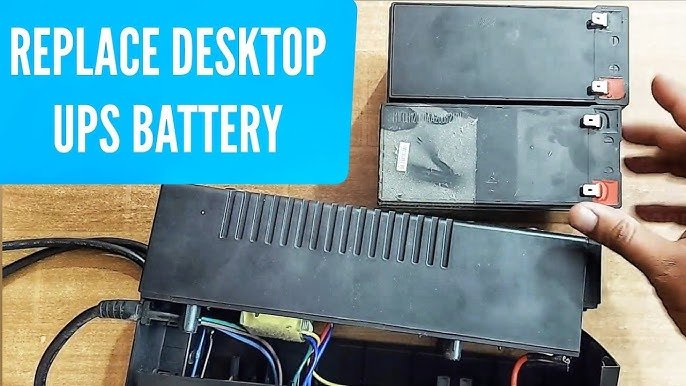
Credit: www.youtube.com
How To Choose The Best Ups Battery
Not all batteries are created equal. Here’s what matters most:
- Brand reputation: Stick to trusted brands like APC, CyberPower, or the original UPS manufacturer.
- Freshness: Batteries lose power with time, even unused. Check the manufacturing date.
- Warranty: Good batteries come with at least a 1-year warranty.
- Genuine vs. generic: Generic batteries are cheaper but may not last as long. For critical equipment, buy OEM (original equipment manufacturer) parts.
Ups Battery Comparison
Here’s a quick comparison of popular UPS battery types for home and small office use:
| Type | Typical Voltage | Lifespan | Maintenance | Cost |
|---|---|---|---|---|
| Sealed Lead Acid (SLA) | 12V | 3-5 years | Low | Low |
| Lithium-ion | 12V | 5-10 years | Very low | High |
| Gel Cell | 12V | 4-6 years | Low | Medium |
Sealed Lead Acid (SLA) is the most common for home UPS units due to its low cost, but lithium-ion is gaining popularity for its longer life.
How To Extend Ups Battery Life
Proper care can help your new battery last longer. Try these tips:
- Keep the UPS cool: High temperatures shorten battery life. Place it in a well-ventilated area.
- Avoid overloading: Don’t plug in more devices than the UPS can handle.
- Regular testing: Unplug your UPS every few months to check backup time.
- Charge fully: Let the battery charge completely after installation or deep discharge.
- Clean regularly: Dust and corrosion can reduce performance.
Recycling And Safe Disposal Of Old Batteries
Old UPS batteries contain lead and acid, which are dangerous for the environment. Here’s what to do:
- Take the old battery to an electronics recycling center or battery retailer.
- Never throw batteries in regular trash or burn them.
- Many stores offer battery take-back programs; check with your local electronics shop.
For more information on safe battery disposal, see the EPA’s battery recycling guide.
Troubleshooting After Replacement
Sometimes, the UPS may still show errors or fail to provide backup even after you change the battery. Try these steps:
- Check connections: Make sure wires are tight and not reversed.
- Reset the UPS: Some models need a reset after battery change. Look for a small reset button or consult your manual.
- Charge fully: If the new battery was stored for a long time, it may need several hours to reach full power.
- Review alarms: If alarms continue, double-check the battery model and installation.
Typical Ups Battery Problems And Solutions
| Problem | Possible Cause | Solution |
|---|---|---|
| UPS not turning on | Loose connections, dead battery | Check wires, try another battery |
| Short backup time | Old or small battery | Replace with correct capacity |
| Beeping after replacement | Needs reset or wrong battery | Consult manual, check battery type |

Credit: blog.it-planet.com
When To Replace The Whole Ups Instead Of Just The Battery
In some cases, changing the battery won’t fix your problems. Consider replacing the entire UPS if:
- The UPS is over 7 years old
- It has physical damage (cracks, burn marks)
- It fails self-tests even with a new battery
- Replacement batteries cost more than half of a new UPS
Sometimes, new models offer better efficiency and features—like energy monitoring or silent operation.
Hidden Insights Most People Miss
- Not all UPS batteries are hot-swappable: Some UPS units allow you to change the battery while running (hot-swap), but others require you to power down everything. Always check your manual.
- Battery shelf life matters: Even a brand-new sealed battery loses strength after 1-2 years on a warehouse shelf. Always ask for the manufacturing date before buying a replacement.

Credit: thaihuaweibattery.com
Frequently Asked Questions
How Often Should I Replace My Ups Battery?
Most UPS batteries last 2 to 5 years, depending on usage and temperature. Test your UPS every 6 months and replace the battery if you notice short backup time or warning lights.
Can I Use Any 12v Battery For My Ups?
No. The replacement battery must match the voltage, capacity, and size specified by your UPS manufacturer. Using the wrong type can damage your UPS or void the warranty.
Is It Safe To Change A Ups Battery Myself?
Yes, for most home and small office UPS units. Follow all safety steps: power off devices, unplug the UPS, and avoid touching both terminals at once. Wear gloves for extra protection.
What Should I Do With The Old Battery?
Take it to a battery recycling center or electronics store. Do not throw batteries in the trash—they are hazardous waste.
Why Does My Ups Beep After I Install A New Battery?
This can happen if the battery is not fully charged, incorrectly installed, or not compatible. Double-check connections, let the battery charge for several hours, and consult your UPS manual for error codes.
Changing your UPS battery is a smart way to protect your electronics and data from power problems. With the steps and tips in this guide, you can handle replacement safely and keep your backup system working at its best. If you ever feel unsure, contact a professional or refer to official resources for extra support.
Related Office Guides
Continue with these related workspace guides:
