
Lightning is one of nature’s most powerful forces. Every year, it strikes the ground millions of times around the world, causing fires, injuries, and serious damage to property. For anyone who uses electronic devices—from TVs and computers to home automation equipment—lightning is a real threat. Even a single strike near your home can send a massive surge of electricity through wires and outlets, ruining valuable equipment in seconds.
Many people only worry about lightning during big storms, but the truth is, you need to prepare before the clouds even gather. This article breaks down how to protect electronics from lightning, with practical steps, expert advice, and insights that go beyond basic tips.
Whether you live in a lightning-prone area or just want to be safe, these strategies will help you keep your devices safe and working.
Why Lightning Is Dangerous For Electronics
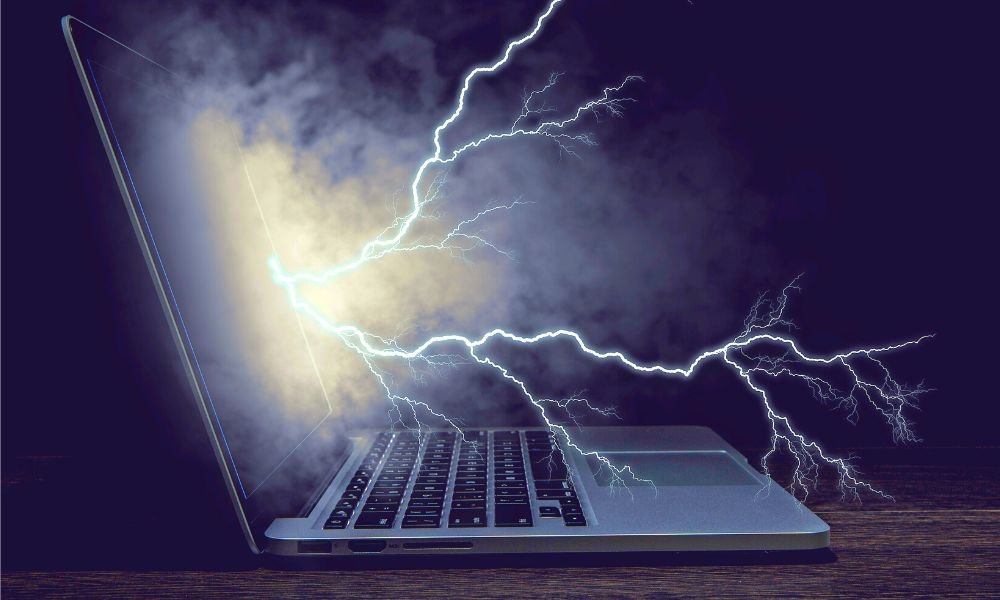
When lightning hits, it doesn’t need to strike your house directly to cause damage. A strike even a mile away can send a power surge through wires, phone lines, and even the ground itself. These surges can:
- Burn out circuits in TVs, computers, routers, and smart home gear
- Cause data loss on hard drives and servers
- Start fires inside walls by overheating wires
- Void warranties on most electronics
Lightning surges can reach millions of volts, far beyond what normal surge protectors can handle. Understanding this risk is the first step in protecting your electronics.
The Different Ways Lightning Reaches Your Devices
Most people think of a direct lightning strike as the only danger. But lightning can travel along many paths to your electronics:
- Power lines: Lightning can hit power poles, sending surges along wires to your home.
- Phone and internet cables: It can enter through landlines or coax cables for cable TV and internet.
- Ground surges: A strike to the ground can spread out, entering your home’s electrical system through plumbing, grounding rods, or metal structures.
- Antenna wires: Outdoor antennas for TV or radio are direct paths for lightning.
Even electronics not plugged in can sometimes be damaged if connected by cables (like a TV connected to a satellite dish outside). This is why lightning protection must be multi-layered.
Essential Steps To Protect Electronics From Lightning
1. Unplug Devices During Storms
The single most effective way to protect electronics is to unplug them from outlets and disconnect all data cables before a storm. No device can be fried if it’s not connected to power or the outside world.
- Unplug TVs, computers, routers, and game consoles.
- Remove plugs from both power and data sockets (internet, phone, antenna).
- If you are away from home, unplugging before travel offers full protection.
This is simple but not always practical. For devices you can’t unplug (like fridges or security systems), further protection is needed.
2. Install Whole-house Surge Protectors
A whole-house surge protector is installed at your electrical panel and acts as a barrier, blocking most surges from entering your home’s wiring. These devices can handle much larger surges than plug-in strips.
Key points:
- Professional installation is required.
- They reduce (but do not fully block) the risk of lightning-induced surges.
- Combine with point-of-use surge protectors for best results.
Whole-house units cost between $200–$800 including installation but can save thousands in device replacement.
3. Use High-quality Surge Protector Strips
Standard power strips are NOT surge protectors. For real protection, use strips with:
- UL 1449 rating (this means they are tested for surges)
- Joule rating of at least 1000 for computers, 2000+ for home theaters
- Indicator lights showing protection is active
Replace surge protectors every 2–3 years, as they wear out after a few big surges.
4. Protect All Incoming Wires
Many people forget that surges can enter through:
- Telephone lines (for landlines, fax, or DSL)
- Cable/satellite TV lines
- Ethernet (internet) cables
Use surge protectors made for these connections. They work like power strips but for data lines. Install them where cables enter the house and before sensitive equipment.
5. Grounding: The Foundation Of Protection
Good grounding is the backbone of lightning safety. It gives surges a safe path into the earth, away from your devices.
- Have an electrician check your home’s ground rod and wiring.
- Metal water pipes and other systems should be bonded (connected) to grounding.
- Poor or broken grounds make all other protection useless.
A surprising insight: Many homes, especially older ones, have poor grounding and don’t know it. A $100 inspection can prevent disaster.
6. Install Lightning Arresters For Outdoor Equipment
Outdoor antennas, satellite dishes, and even solar panels are magnets for lightning. Install lightning arresters (special devices that divert lightning safely to the ground) on these systems.
- Place them where cables enter the house.
- Connect directly to your home’s grounding system.
A common mistake: Forgetting to bond all metal parts (poles, masts) to ground.
7. Use Uninterruptible Power Supplies (ups)
A UPS is a battery backup that instantly switches to battery if power is lost, and provides surge protection. While it won’t stop a direct lightning strike, it protects against smaller surges and keeps computers safe during outages.
- Choose a UPS with automatic voltage regulation (AVR) for best results.
- Size the UPS to your device’s wattage needs.
A UPS also gives you time to safely shut down electronics during a storm.
8. Avoid Using Electronics During Storms
Even with protection, it’s safest not to use wired electronics during lightning. Power surges can still damage devices, especially if protection fails.
- Avoid using corded phones.
- Do not take showers or use plumbing (water pipes can conduct surges).
- Prefer laptops on battery power over desktops during storms.
9. Install Surge Protection For Network Equipment
Routers, modems, and smart home hubs are often forgotten. Use surge protectors designed for low-voltage devices. For network equipment mounted on walls or ceilings, use inline surge protectors on both power and data cables.
- Protect both sides: What comes from the wall and goes to your device.
- Replace network surge protectors after big storms.
10. Insure Your Electronics
Even with the best protection, no system is perfect. Consider updating your homeowner’s insurance to cover electronics specifically. Some insurers offer extra riders for high-value equipment.
- Take photos and keep receipts for your devices.
- Review policy limits and exclusions related to lightning.
A little paperwork now can save big money after a storm.
Comparing Key Lightning Protection Methods
To see the differences between common methods, here’s a quick comparison:
| Method | Protects Against Surges | Protects Against Direct Strikes | Cost | DIY or Pro? |
|---|---|---|---|---|
| Unplugging Devices | Yes (100%) | Yes (100%) | Free | DIY |
| Surge Protector Strip | Yes (Moderate) | No | $20–$50/device | DIY |
| Whole-House Protector | Yes (High) | No | $200–$800 | Pro |
| Lightning Arrester | Yes (High for antennas) | Partial | $50–$200 | Pro/DIY |
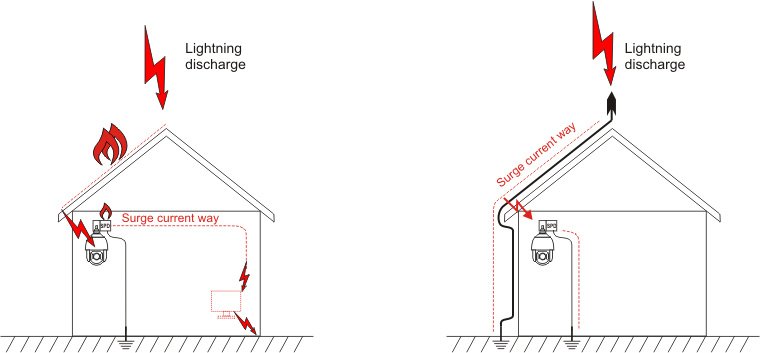
Credit: ewimar.com
Surprising Dangers People Often Miss
Many people believe lightning only hits tall buildings or rural areas. In reality, lightning can strike anywhere—even inside cities. Here are a few non-obvious risks:
- Surge protectors do NOT last forever. After a big lightning event, their internal parts can wear out or melt, leaving you unprotected.
- Smart home devices (like thermostats or security cameras) are often wired directly and forgotten during storms.
- Solar panel systems need their own dedicated lightning protection.
Practical Examples
Imagine you’re working at home during a thunderstorm. A bolt hits a power line a half-mile away. If your computer is plugged into a cheap power strip (no surge protection), it could be destroyed instantly. But if you have a whole-house surge protector plus a good surge strip, your device is much more likely to survive.
Or picture a satellite dish on your roof. If it’s not grounded with a lightning arrester, a nearby strike could fry not only your TV but the wiring inside your walls.
Table: Key Features Of Good Surge Protector Strips
Not all surge protectors are equal. Here are features to check when buying one:
| Feature | Why It Matters | Recommended Value |
|---|---|---|
| Joule Rating | Measures energy it can absorb | 1000+ for computers, 2000+ for home theater |
| Clamping Voltage | Voltage at which protection kicks in | 400V or lower |
| Indicator Light | Shows if protection is active | Must-have |
| UL 1449 Certification | Meets safety standards | Required |
Steps For Long-term Lightning Protection
It’s not enough to protect your devices once. Make lightning safety a habit:
- Check surge protectors yearly for worn-out lights or visible damage.
- Schedule a grounding inspection every 5 years, or after any major electrical work.
- Practice unplugging: Teach family members which devices to unplug during storms.
- Store backups of important data in cloud storage or on hard drives kept unplugged.
- Stay updated: New devices and smart home gear may need extra protection.

Credit: discover.centurylink.com
Common Myths About Lightning Protection
- “My house has never been hit, so I’m safe.” Lightning can hit anywhere, and climate change is making storms more unpredictable.
- “Surge protectors stop all damage.” No device can stop a direct strike; only unplugging truly works.
- “Wireless devices are safe.” Many smart devices are powered or connected by wires, which can carry surges.
Table: Signs Your Home Needs Better Lightning Protection
Are you at risk? Watch for these warning signs:
| Sign | What It Means |
|---|---|
| Frequent blown fuses/breakers | Possible wiring problems or surges |
| No visible ground rod outside | Poor grounding system |
| Electronics fail after storms | Surge protection is not enough |
| Older home (built before 1970) | May lack modern grounding |
Credit: www.cablewholesale.com
Frequently Asked Questions
What Is The Best Way To Protect My Electronics From Lightning?
Unplugging devices before a storm is the most effective way. For daily safety, use a mix of whole-house surge protectors and good surge strips, and make sure your home is properly grounded.
Do Surge Protectors Work Against Lightning?
Surge protectors can block small surges from nearby strikes but are not guaranteed to stop a direct hit. High-quality, UL-certified protectors offer the best defense but should be combined with other strategies.
Can Lightning Damage Devices If They Are Turned Off?
Yes. As long as electronics are plugged in, they can be damaged by surges—even if switched off. Only unplugging fully separates them from power surges.
Is Grounding Really Necessary For Lightning Protection?
Absolutely. Proper grounding is essential. Without it, surge protectors and lightning arresters cannot safely move dangerous electricity into the earth.
Where Can I Learn More About Lightning Safety?
You can find detailed information and safety tips from the National Weather Service, a trusted authority on lightning and storm protection.
Protecting your electronics from lightning is not just about buying gadgets—it’s about understanding the risks, making smart choices, and acting before the next storm arrives. With the right steps, you can enjoy your technology with peace of mind, no matter what the weather brings.
Related Office Guides
Continue with these related workspace guides:
