
Cleaning earbuds safely means removing earwax, skin oil, dust, and sweat without pushing debris deeper into the speaker mesh or getting liquid into microphones, vents, charging contacts, or the case. The exact method depends on whether your earbuds have removable silicone tips, foam tips, exposed mesh, charging contacts, or a water-resistance rating.
For most earbuds, start dry: power them off, remove the tips, brush away loose debris, and wipe the body with a soft lint-free cloth. Use moisture only when the manufacturer allows it, and apply it to the cloth or swab rather than directly to the earbud.
This guide focuses on routine earbud cleaning for better hygiene, fit, and reliable charging. It is different from general headphone cleaning and from sanitizing shared over-ear headphones, which require different material and surface-care decisions.
What You Need
- Soft lint-free or microfiber cloth
- Soft dry brush
- Cotton swabs
- Small clean container for removable tips
- Mild soap and water for washable silicone tips, if permitted
- Manufacturer-approved cleaning solution where specified
- A dry wooden or plastic pick only if the manufacturer recommends one for surface debris
Avoid needles, metal pins, knives, aggressive scraping tools, and any liquid poured directly into the speaker opening. Those methods can damage the mesh, microphone ports, protective membranes, or charging contacts.
Step 1: Power Off and Disconnect
Turn the earbuds off if the model allows it and remove them from the charging case. Disconnect any cable from wired earbuds. If the case is connected to power, unplug it before cleaning.
This prevents accidental operation and makes it easier to inspect the body, tips, microphones, and charging contacts without the device actively charging.
Step 2: Remove the Ear Tips
If the earbuds use removable silicone or foam tips, take them off gently. Do not twist aggressively if the tip feels stuck. Check the model manual if the attachment method is unclear.
Keep the left and right tips organized if they are different sizes. If you use third-party tips, follow that tip maker’s cleaning instructions because foam, silicone, and specialty materials do not tolerate the same cleaning methods.
Step 3: Clean Silicone Tips Separately
Many silicone ear tips can be cleaned separately with mild soap and water, but confirm the manufacturer permits washing. If so:
- Wash only the removed silicone tips.
- Use mild soap and clean water.
- Rinse away all soap residue.
- Dry with a lint-free cloth.
- Let them air dry completely before reinstalling.
Do not reinstall a tip while water remains inside the bore. Moisture can transfer directly to the earbud nozzle or mesh.
Step 4: Treat Foam Tips More Carefully
Foam tips can absorb water and may deform if soaked or squeezed too aggressively. Some foam tips are designed to be replaced rather than deeply washed. Follow the tip manufacturer’s instructions.
For light maintenance, a slightly damp cloth may be enough. If the foam remains oily, cracked, permanently compressed, loose, or odorous after approved cleaning, replacement is usually a better option than repeated soaking.
Step 5: Clean the Speaker Mesh
Earwax around the speaker mesh is one of the most common reasons earbuds look dirty or sound muffled. Start with a dry method.
- Hold the earbud so loosened debris can fall away from the opening.
- Use a soft dry brush with gentle strokes across the mesh.
- Do not press debris through the mesh.
- Do not scrape the mesh with a sharp object.
If the model manufacturer provides a specific mesh-cleaning method or cleaning tool, use that procedure. Some earbuds use acoustic membranes or protective screens that can be damaged by alcohol, adhesive putty, metal tools, or compressed air.
Step 6: Wipe the Earbud Body
Use a dry microfiber cloth first. If body oils or residue remain, use only a lightly dampened cloth with a cleaner compatible with the exact model. Keep moisture away from speaker openings, microphones, pressure vents, seams, and charging contacts unless the manufacturer explicitly permits contact.
Water resistance does not mean an earbud should be rinsed or submerged during cleaning. An IP rating describes specific test conditions and does not automatically authorize every cleaning method.
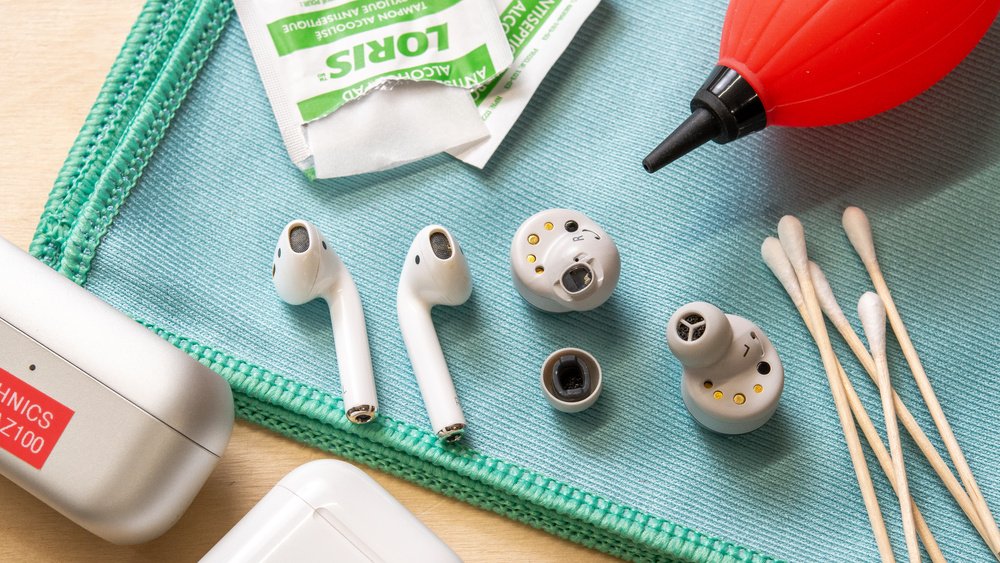
Credit: www.rtings.com
Step 7: Clean Charging Contacts
If true wireless earbuds are not charging consistently, inspect the metal contacts on the earbuds and inside the case. Dust, lint, or skin oil can interfere with physical contact.
- Use a dry lint-free swab or cloth first.
- Do not flood the contact area.
- Do not scrape plated contacts with metal tools.
- Make sure the contacts are fully dry before returning the earbuds to the case.
If the contacts are corroded, damaged, loose, or visibly burned, cleaning is no longer the right fix. Stop using the device and consult the manufacturer or a qualified service provider.
Step 8: Clean the Charging Case
The case collects pocket lint, dust, and oil. Clean the exterior with a dry or manufacturer-approved lightly dampened cloth. Use a soft dry brush or swab around the wells where the earbuds sit.
Be conservative around the charging pins, USB-C or Lightning port, hinges, and status LEDs. Do not spray cleaner into the case. If debris is lodged in the charging port, use only a method recommended by the manufacturer.
Earbuds After Exercise
Sweat can leave salt and skin oils on the earbud body and tips. After a workout, wipe the exterior and removable tips according to the model guidance before putting the earbuds back into a closed charging case.
Do not assume sweat resistance means the earbuds can be washed under a tap. Clean according to the specific water-resistance instructions for the model.
Wired Earbuds Need a Slightly Different Check
For wired earbuds, inspect the cable, strain relief, remote, and plug. Wipe the cable with a soft cloth and avoid bending the wire sharply near the plug or earpiece.
If the cable jacket is split, the plug is loose, or sound cuts out when the cable moves, cleaning will not repair the electrical fault.
What Not to Do
- Do not soak the earbud body. Water resistance is not permission to submerge electronics for cleaning.
- Do not push wax inward. Aggressive tools can drive debris through the mesh.
- Do not use metal pins. They can puncture mesh or protective membranes.
- Do not spray alcohol or cleaner directly. Apply approved liquid to a cloth or swab.
- Do not use heat to dry earbuds. Hair dryers and heaters can damage batteries, adhesives, coatings, and plastics.
- Do not use unverified cleaning putty on speaker mesh. Residue can remain in the openings.
- Do not place damp earbuds in a charging case. Let cleaned parts dry first.
How Often Should You Clean Earbuds?
There is no universal schedule that fits everyone. Clean based on visible buildup, use conditions, skin oils, exercise, shared use, and manufacturer guidance.
A person who wears earbuds during workouts may need to wipe them more often than someone who uses them occasionally for calls. The useful rule is condition-based maintenance: clean when you can see wax, oil, lint, or residue, and inspect the tips and case regularly.
Earbuds vs Headphones: Different Cleaning Intent
This page is specifically about in-ear and true wireless earbuds. Over-ear and on-ear headphones have larger ear pads, headbands, fabric, leatherette, or foam materials that require different treatment.
For those devices, see how to clean headphones. If your goal is hygiene between multiple users rather than routine dirt removal, see how to sanitize headphones.
Can Cleaning Fix Muffled Sound?
It can if the problem is caused by visible wax or debris on the external mesh. After cleaning, test the earbuds at a normal listening level.
If one side remains much quieter, the cause may be internal contamination, a software balance setting, an acoustic filter problem, battery behavior, or hardware damage. Do not keep scraping the mesh after the visible debris is gone.
Can Cleaning Fix Charging Problems?
Cleaning can help when dry debris prevents the charging contacts from touching correctly. It will not fix a worn battery, broken case pin, damaged connector, or failed charging circuit.
If the earbuds charge only when pressed into the case, inspect the fit and contacts. If a contact is bent or loose, seek service rather than forcing it.
Shared Earbuds
Sharing in-ear earbuds increases the importance of hygiene because the tips contact the ear canal. If earbuds must be shared, use removable tips that can be cleaned or replaced according to the manufacturer’s instructions.
Do not make medical claims about cleaning preventing infection. If a user has ear pain, discharge, persistent irritation, or a diagnosed ear condition, device cleaning is not a substitute for medical care.
When to Replace the Tips
Replace tips when they are cracked, torn, permanently stretched, no longer grip the nozzle securely, or remain unpleasant after approved cleaning. A poor-fitting tip can affect seal and comfort even when the earbud itself is working normally.
Use replacement tips that are compatible with the specific model and do not block microphones, vents, sensors, or the charging case.
When to Stop Cleaning and Get Help
Stop and seek manufacturer support when:
- The mesh is torn or pushed inward.
- Liquid entered the earbud body.
- The battery area becomes unusually hot.
- Charging contacts are corroded or damaged.
- One earbud no longer powers on after drying.
- The case or earbud shows swelling, cracking, or electrical damage.
Final Earbud Cleaning Checklist
- Power off and disconnect.
- Remove compatible tips.
- Clean silicone or foam tips according to material guidance.
- Brush speaker mesh gently and dry.
- Wipe the earbud body without flooding openings.
- Clean charging contacts and the case conservatively.
- Let every cleaned part dry completely.
- Reinstall tips and test charging and sound.
Good earbud cleaning is mostly about restraint. Start dry, use minimal moisture, respect the model’s water-resistance and material limits, and stop when a problem moves from surface dirt to damaged hardware. That keeps the cleaning process useful without creating a new fault.
