
Choosing the right device for protecting your electronics can feel confusing, especially with terms like Automatic Voltage Regulator (AVR) and Uninterruptible Power Supply (UPS). Both play a key role in keeping your devices safe from electrical problems, but they work in different ways. Many people think they do the same thing, but that’s not true. Understanding the differences can save you money, prevent damage, and make sure your work never stops suddenly.
What Is An Automatic Voltage Regulator (avr)?
An Automatic Voltage Regulator is a device designed to keep the voltage going to your equipment steady. In many places, the electricity from the grid can change often — sometimes it’s too high, sometimes too low. These changes are called voltage fluctuations. Too much or too little voltage can damage computers, TVs, refrigerators, and other devices.
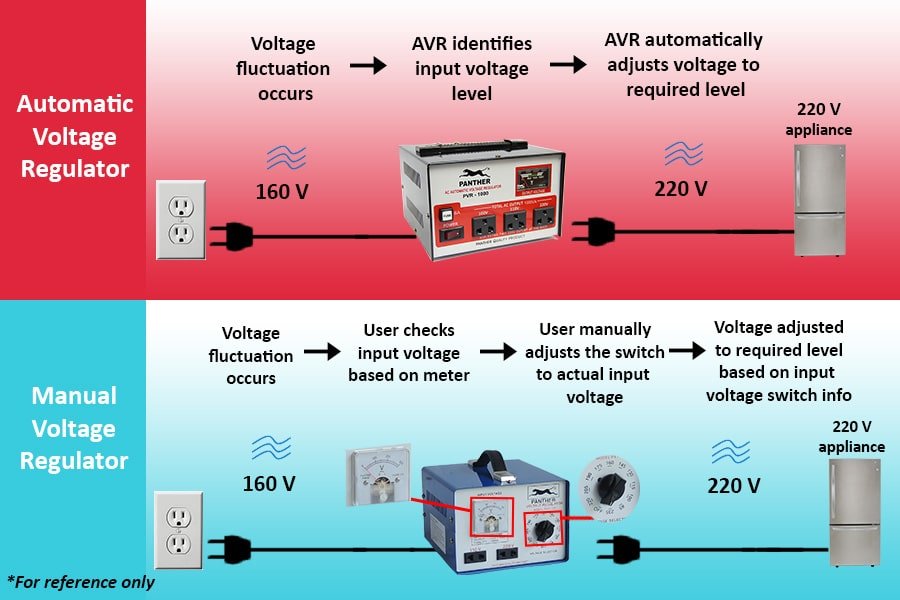
The AVR senses if the voltage is outside a safe range. If it is, the AVR adjusts the voltage up or down to keep it safe for your devices. This process happens automatically and usually within a fraction of a second.
How Does An Avr Work?
An AVR uses electronic circuits and sometimes transformers to correct the voltage. It constantly checks the input voltage. If the voltage drops below or rises above the set point, the AVR adjusts it so the output stays steady. For example, if the input voltage is 180V but your equipment needs 220V, the AVR will boost it.
Common Uses Of Avrs
- Home electronics: TVs, routers, and computers
- Office equipment: Printers, copiers, and servers
- Industrial machines: Motors and control panels
Key Benefits
- Protects against voltage surges and drops
- Increases lifespan of devices
- Prevents unexpected shutdowns due to voltage issues
One thing beginners often miss: While an AVR can protect against voltage changes, it does not provide backup power if the electricity goes out completely.
What Is An Uninterruptible Power Supply (ups)?
A UPS is a device that not only manages voltage problems but also provides temporary battery backup when the main power goes out. This is especially important for computers, servers, and medical equipment that can lose data or fail if turned off suddenly.
When the power supply is normal, the UPS charges its batteries and supplies power to connected devices. If the power fails or fluctuates, the UPS instantly switches to battery mode, so your devices keep running without interruption.
Main Types Of Ups
- Offline/Standby UPS: Basic protection, battery kicks in only during power loss.
- Line-interactive UPS: Handles minor voltage drops and surges, battery backup during outages.
- Online UPS: Provides constant power from the battery, best for sensitive equipment.
Where Is A Ups Used?
- Desktop computers and servers
- Network equipment
- Medical devices
- Home entertainment systems
Key Benefits
- Gives time to save work and shut down safely
- Protects against power cuts, surges, and drops
- Prevents data loss and hardware damage
Surprisingly, not all UPS devices offer strong voltage regulation. Some cheaper models only supply battery backup and basic surge protection, so reading the specs is important.
The Core Differences: Avr Vs Ups
Many people confuse an AVR with a UPS because both protect devices from electrical problems. But their main functions are different. The table below highlights the main differences:
| Feature | AVR | UPS |
|---|---|---|
| Main purpose | Stabilizes voltage | Provides battery backup |
| Protects from surges | Yes | Yes |
| Protects from power outage | No | Yes |
| Battery included | No | Yes |
| Cost | Lower | Higher |
When Should You Use An Avr?
An AVR is a great choice if you live in an area where the power stays on but the voltage is unstable. For example, some countries or rural areas have steady electricity, but the voltage level changes a lot.
Use an AVR for:
- Protecting TVs or fridges from voltage swings
- Office equipment that doesn’t store important data
- Audio/video equipment for clear sound and picture
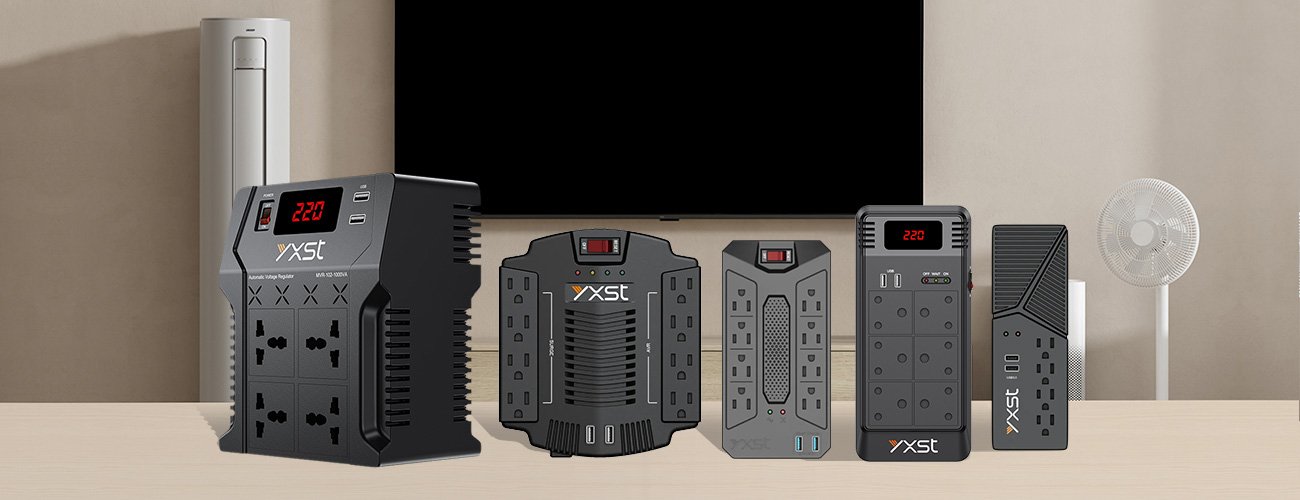
An AVR is also good if you want a low-cost solution and don’t need backup power. It’s simple, easy to install, and usually lasts many years.
Extra Tips For Using An Avr
- Always match the AVR capacity (measured in VA or watts) to your device’s power needs.
- Plug only one high-power device into each AVR to avoid overloading it.
- Remember, an AVR cannot save your work if the power goes out — it only keeps the voltage steady.
Credit: www.mzeacn.com
When Is A Ups Necessary?
A UPS is the right choice if you need both power backup and voltage regulation. If sudden power loss could cause data loss, equipment damage, or serious interruptions, a UPS is essential.
Use a UPS for:
- Desktop computers and servers storing important files
- Medical equipment that must never lose power
- Routers and security systems that must always stay on
UPS systems come in many sizes. Some offer just a few minutes of backup, while others can run equipment for hours. Always check the battery runtime and load capacity before buying.
Practical Examples
- If you’re writing a report and the power goes out, a UPS gives you time to save your work.
- In a hospital, a UPS can keep life-saving machines running until generators start.
- For online businesses, a UPS keeps servers running so websites never go offline.
Avr And Ups: Can You Use Both Together?
Some people combine an AVR and a UPS for double protection. This makes sense in areas with both unstable voltage and frequent outages. The AVR handles the small voltage changes, and the UPS steps in if the power fails.
There are two ways to do this:
- AVR before the UPS: The AVR connects to the wall, and the UPS connects to the AVR. This setup means the UPS gets stable voltage, which can help its battery last longer.
- UPS with built-in AVR: Some modern UPS devices already include voltage regulation, so you don’t need a separate AVR.
If you choose both, make sure they are compatible. Using a poor-quality AVR can actually harm a good UPS, so always use reliable brands.
Real-life Example: Home Office Protection
Let’s say you work from home using a desktop PC, printer, and Wi-Fi router. Here’s how you might decide:
- If power cuts are rare but voltage drops happen often, an AVR will protect your devices and keep everything running smoothly.
- If power cuts are common, a UPS will keep your work safe and give you time to save files and shut down properly.
- If you want the best of both worlds, choose a UPS with built-in AVR features.
Understanding your local power situation is the key to making the right choice.
How To Choose: Avr Vs Ups
Selecting between an AVR and a UPS depends on your needs and budget. Consider these factors:
- Nature of power problems: Is it mainly voltage fluctuation, or do you also experience blackouts?
- Type of equipment: Does your equipment need to stay on all the time (like a server), or can it be switched off safely?
- Budget: AVRs are usually cheaper, while UPS devices cost more due to their batteries.
- Space and setup: UPS units are bigger and heavier due to the battery.
Here’s another side-by-side comparison for quick reference:
| Problem | AVR | UPS |
|---|---|---|
| Voltage fluctuation only | ✔️ | ✔️ (if AVR function included) |
| Sudden power outage | ❌ | ✔️ |
| Short backup time needed | ❌ | ✔️ |
| Low budget | ✔️ | ❌ |
Credit: panther.ph
Common Mistakes To Avoid
Many beginners make errors when choosing or using AVRs and UPS devices. Here are some things to watch out for:
- Choosing the wrong capacity: If the AVR or UPS cannot handle your device’s power needs, it may fail or even cause damage.
- Ignoring battery maintenance: UPS batteries wear out over time. Not replacing them can lead to sudden failure.
- Assuming all UPS units stabilize voltage: Some cheaper UPS devices only offer battery backup, not voltage regulation.
- Plugging high-power devices into a small AVR: This can lead to overheating or fire risk.
Always read the product details and, if unsure, ask a qualified electrician.
Modern Trends: Smart Power Protection
Today’s market has advanced options. Some UPS units connect to Wi-Fi and send alerts to your phone if the power fails. Others offer software to safely shut down your computer if you are not at your desk.
Environmentally friendly UPS devices use Lithium-ion batteries, which last longer and charge faster than older lead-acid batteries. Some AVRs are also more energy efficient, saving power when not in use.
According to a recent Wikipedia article, the global demand for UPS systems is rising as more people work from home and use sensitive electronics.
Credit: www.mingchele.com
Frequently Asked Questions
What Is The Main Difference Between An Avr And A Ups?
An AVR stabilizes the voltage to protect your devices from voltage changes but does not provide backup power. A UPS gives you battery backup during power outages and may also regulate voltage, depending on the model.
Can I Use An Avr And A Ups Together?
Yes, many people use both for extra protection. Connect the AVR to the wall socket, then plug the UPS into the AVR. Some UPS models already have built-in AVR features.
How Long Does A Ups Battery Last?
Most UPS batteries last between 2 to 5 years, depending on the quality and how often they are used. Regular testing and replacement help keep your equipment safe.
Do I Need An Avr For My Refrigerator Or Air Conditioner?
If you have voltage fluctuations but not frequent power cuts, an AVR is a good idea for fridges and air conditioners. These appliances can be damaged by high or low voltage.
Will A Ups Save My Work If The Power Goes Out?
Yes, a UPS gives you a few minutes (sometimes more) to save your work and shut down your device safely during a power outage. The exact time depends on the UPS size and how many devices are connected.
Choosing between an AVR and a UPS doesn’t have to be confusing. Think about your needs, local power problems, and what you want to protect. With the right device, you can keep your electronics safe and your work secure, no matter what happens to the electricity supply.
Related Office Guides
Continue with these related workspace guides:
