
A messy charging setup can quickly turn any desk or room into a stressful place. Wires get tangled, chargers go missing, and finding the right cable becomes a daily struggle. But it doesn’t have to be this way. Smart cable management for charging setup can bring order, safety, and even a sense of calm to your workspace or home. Whether you charge one phone or a dozen devices, the right approach can save time and frustration every day.
In this guide, you’ll discover practical methods and products to organize your charging cables efficiently. You’ll see how good cable management isn’t just about looks—it’s about extending cable life, reducing hazards, and making charging easy for everyone. From simple tricks to advanced solutions, you’ll find ideas for every budget and space.
Why Cable Management Matters
Many people underestimate how much cable clutter affects daily life. Messy cables can:
- Shorten cable life due to repeated bending or tangling.
- Create tripping hazards if cables spill onto the floor.
- Make cleaning harder as dust collects in cable nests.
- Look unprofessional in shared or work environments.
- Slow down troubleshooting, since it’s hard to know which cable goes where.
A well-managed charging setup fixes these problems. You save money by replacing cables less often, reduce cleaning time, and enjoy a calmer space.
Planning Your Charging Area
Before you buy organizers or start tidying, take a moment to plan your setup. Think about these steps:
- Count your devices: Phones, tablets, headphones, power banks—list all gadgets you regularly charge.
- Check cable types: USB-C, Lightning, micro-USB, proprietary cables—know what you need, so you don’t keep extras.
- Pick a charging spot: Choose a location that’s easy to reach, close to power outlets, and safe from water or pets.
- Measure space: Desk, shelf, or wall? Know the size to avoid buying organizers that won’t fit.
People often skip planning, but it helps prevent wasted money and effort.
Credit: toolbalancersusa.com
Choosing The Right Cable Management Tools
Not all organizers are equal. Here are popular options and how they compare:
| Tool | Best For | Pros | Cons |
|---|---|---|---|
| Cable Clips | Desks, nightstands | Cheap, easy to install | Hold few cables |
| Cable Sleeves | Bundling groups | Neat look, dust protection | Harder to add/remove cables |
| Cable Boxes | Power strips | Hide adapters & cables | Bulky, takes space |
| Magnetic Organizers | Frequent cable swaps | Quick, flexible | May not hold thick cables |
When picking tools, match them to your devices and habits. For example, if you often change cables, magnetic holders save time.
Step-by-step Cable Management Process
Organizing cables is easier with a clear process. Here’s how to do it:
1. Sort And Declutter
Start by unplugging everything. Lay out all cables and chargers. Throw away any that are damaged or unused. If you have several of the same type, keep only what you need plus one spare.
2. Label Cables
Many cables look alike, but serve different devices. Use cable labels or colored tape to mark each cable. For example, a red tag for your phone, blue for your tablet. This simple step saves time and confusion.
3. Choose Cable Lengths Wisely
Long cables can create loops and mess. Use short cables (20–30cm) for devices close to the charging station, and longer ones (1–2m) only when necessary. Avoid winding excess cable tightly, as this can damage the wire.
4. Bundle And Secure
Group cables that go the same way using Velcro ties, reusable zip ties, or cable sleeves. Avoid regular plastic zip ties unless you’re sure you won’t need to move them—removing them usually means cutting.
5. Mount Or Hide Power Strips
Power strips often add to clutter. Mount them under your desk or behind furniture using adhesive strips or brackets. Alternatively, use a cable management box to hide both the strip and extra cable length.
6. Use Desk Grommets
If your desk has grommet holes, route charging cables through them. This keeps cables off the desk surface and makes everything look tidy.
7. Set Up Charging Stations
For families or offices, a multi-device charging station keeps everyone’s devices in one spot. Look for stations with built-in cable organizers, or add your own clips.
8. Check And Adjust Regularly
Cable management isn’t one-and-done. Check your setup monthly to remove unused cables and make improvements. This keeps your space organized long-term.
Advanced Solutions For Cable Management
If you want to take things further, consider these advanced options:
Under-desk Trays
Install a cable tray under your desk to hold adapters, power strips, and extra cables. This keeps everything off the floor and out of sight.
Wireless Charging Pads
A wireless charging pad reduces the number of cables you need. Many models can charge multiple devices at once. However, they work only with compatible devices, and charging is usually slower.
Custom Wall-mounted Solutions
For shared spaces, wall-mounted charging shelves with built-in cable management can save desk space and keep walkways clear. Some even come with lockable covers for public areas.
Integrated Furniture
Some modern desks and nightstands have built-in cable channels or wireless chargers. If you’re upgrading furniture, look for these features—they make cable management much easier.
Safety And Maintenance Tips
Cable management isn’t just about looks—it’s about safety. Here’s what to remember:
- Avoid overloading outlets: Too many chargers on one strip can cause overheating.
- Keep cables away from heat: Don’t run cables near radiators or heaters.
- Check cables for damage: Frayed or cracked cables can be a fire risk.
- Don’t run cables under carpets: This can trap heat and cause wear.
- Use surge protectors: Protect devices from power spikes.
Many people forget that regular cleaning also extends cable life. Dust can build up around adapters and connectors, so wipe them down monthly.
Common Mistakes And How To Avoid Them
Even with the best intentions, it’s easy to make mistakes. Here are some to watch for:
- Using the wrong size organizers: Clips that are too small or sleeves that are too big won’t work well.
- Mixing different types of cables in one bundle: Keep USB, HDMI, and power cables separate where possible to avoid interference.
- Ignoring cable slack: Too much or too little slack can strain connectors or look untidy.
- Not planning for future devices: Leave space or extra outlets for new gadgets, so you don’t have to redo everything later.
Cable Management For Different Environments
Every space has unique needs. Here’s how to adapt your setup:
Home Office
Most people charge laptops, phones, and headphones here. Use desk cable clips for daily-use chargers, and a cable tray for hiding larger adapters under the desk.
Bedroom/nightstand
A small cable box or a dock keeps cables from falling behind furniture. Consider a wireless charger for phones to further reduce clutter.
Living Room
If you charge devices on the couch or TV stand, use longer cables with fabric sleeves that blend with decor. Attach cable clips to furniture edges to keep cables from slipping.
Shared Spaces
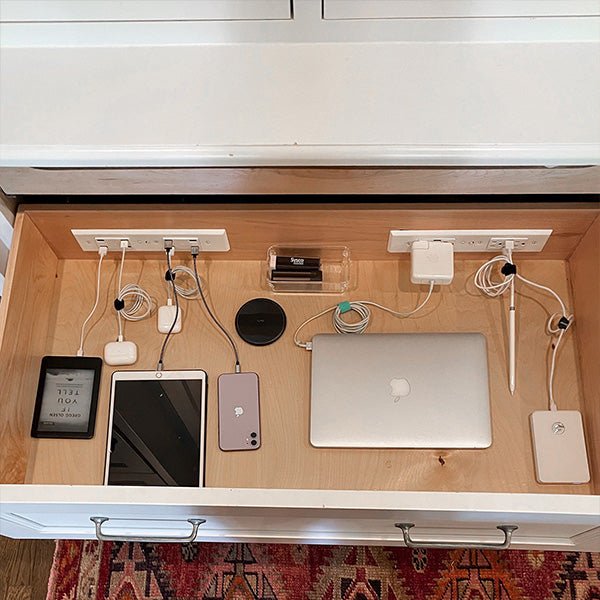
For family or roommates, a central charging station with labeled slots prevents cable mix-ups. Keep the area neat with a cable box and regular clean-ups.
Credit: www.dockingdrawer.com
Cost Comparison: Diy Vs. Ready-made Solutions
Is it better to buy organizers or make your own? Here’s a quick comparison:
| Solution | Average Cost | Setup Time | Best For |
|---|---|---|---|
| DIY (tape, zip ties, boxes) | $5–$20 | 1–2 hours | Custom setups, saving money |
| Ready-made organizers | $15–$60 | 10–30 minutes | Quick, polished look |
| Integrated furniture | $80–$300+ | Depends on assembly | Permanent, high-end setups |
DIY is best if you like to customize and save money. Ready-made products are faster and look more professional but cost more.
Non-obvious Tips For Better Cable Management
Some advice is rarely mentioned but makes a big difference:
- Anchor cables at two points: Attach cables near the plug and halfway up the desk or wall to prevent them dangling or slipping.
- Store spare cables vertically: Use a magazine holder or small box to stand extra cables upright. This prevents tangles and makes it easy to find the right one.
- Use color coding: Assign a different color to each type of device (phone, tablet, laptop). This makes sorting and swapping much faster.
- Test before finalizing: Plug in all devices and check if every cable reaches comfortably. Adjust before fixing everything in place.
Eco-friendly Cable Management
With so many cables, waste can add up. Here’s how to be greener:
- Recycle old cables at e-waste centers.
- Buy organizers made from recycled materials.
- Choose durable cables that last longer, reducing waste.
- Avoid one-time-use zip ties; opt for reusable versions.
Small changes can reduce your environmental impact and still keep your space organized.
When To Upgrade Your Charging Setup
There are signs it’s time to rethink your cable management:
- You regularly lose or break charging cables.
- You can’t quickly find the right charger.
- Your power strips are always full.
- Dust and dirt collect around cables.
- Devices sometimes don’t charge because of poor connections.
If you notice any of these, it’s time for an upgrade. Technology and organization tools are always improving. For more innovative cable management ideas, check out Wirecutter’s recommendations.
Credit: www.amazon.com
Frequently Asked Questions
What Is The Best Way To Hide Charging Cables?
The best way is to use a cable management box for adapters and excess cords, combined with cable sleeves or clips to keep visible sections tidy. Under-desk trays and desk grommets also work well for hiding cables out of sight.
How Can I Stop Cables From Falling Behind The Desk?
Use cable clips or adhesive cable holders at the edge of your desk. These keep cables in place and ready to use, so they don’t slip behind furniture when unplugged.
Are Wireless Chargers A Good Alternative For Cable Management?
Wireless chargers are great for reducing cable clutter, especially for phones and earbuds. However, they charge slower and only work with compatible devices, so most setups still need some cables.
How Often Should I Check Or Update My Cable Management?
Check your cable setup at least once a month. Remove unused cables, check for damage, and tidy up any new clutter. Regular maintenance keeps everything safe and organized.
What Are The Risks Of Poor Cable Management?
Poor cable management can cause tripping hazards, fire risks from damaged cables, and shorten the life of your chargers. It also creates stress and makes devices harder to use.
A neat charging setup does more than look good—it saves time, money, and headaches. With the right tools and habits, you can turn even the messiest tangle into a smooth, safe, and satisfying part of your daily routine.
Related Office Guides
Continue with these related workspace guides:
