
When you’re working on a computer, using network equipment, or running a small business server, power problems can cause big headaches. From sudden blackouts to voltage drops, unstable electricity can damage devices, interrupt work, and even cause data loss. That’s where an Uninterruptible Power Supply (UPS) comes in. But not all UPS systems are the same. One of the most popular types, especially for home and small business use, is the Line Interactive UPS. In this article, you’ll get a clear, complete understanding of how line interactive UPS systems work, their advantages, and how they compare to other types.
What Is A Line Interactive Ups?
A Line Interactive UPS is a special kind of power backup device. It does more than just supply power during an outage. It also helps correct minor power problems—like voltage drops (sags) or spikes—without switching to battery mode right away. This makes it more efficient and reliable for common electrical issues.
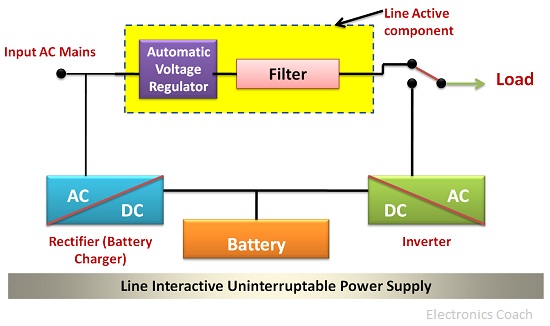
At the heart of a line interactive UPS is an automatic voltage regulator (AVR). This feature is what sets it apart from a basic offline or standby UPS. The AVR adjusts the voltage up or down as needed before it reaches your equipment, keeping things steady even when your main power supply isn’t perfect.
Here’s a simple way to think about it: if your electrical supply is like a road, then a line interactive UPS is like a smart traffic manager. It keeps the flow steady, only pulling out the “emergency battery” when the road is completely blocked.
How Line Interactive Ups Systems Work
To understand why line interactive UPS systems are popular, it helps to know how they work inside.
When the main power is normal, the UPS lets electricity flow straight to your devices. At the same time, it quietly keeps its battery charged. If the voltage goes a bit too high or low, the AVR steps in to adjust it. Only when there’s a serious power failure does the UPS quickly switch to battery power.
Here’s a step-by-step look:
- Normal Power: Utility power goes to your devices. The battery is kept full.
- Voltage Fluctuation: If voltage is too high or low, the AVR corrects it.
- Power Failure: If power is lost, the UPS switches to battery in milliseconds.
- Recovery: When utility power returns, the system goes back to normal mode and recharges the battery.
This process is nearly instant. Most line interactive UPS systems can switch to battery in less than 5 milliseconds—so fast, your computer or network gear won’t even notice.
Key Components Of A Line Interactive Ups
Understanding the main parts of a line interactive UPS will help you see why it’s reliable and efficient.
- Automatic Voltage Regulator (AVR): Adjusts voltage up or down without using the battery.
- Battery: Provides backup power during outages.
- Inverter: Converts battery’s DC power to AC power your devices need.
- Charger: Refills the battery when normal power is available.
- Controller Circuit: Manages switching and keeps everything working smoothly.
The AVR is the real star here. In cheaper, standby UPS systems, every voltage problem drains the battery. But in a line interactive UPS, the AVR handles most issues, so the battery lasts longer and is ready when you truly need it.
Main Features And Benefits
Line interactive UPS systems are popular for good reasons. Here are their main advantages:
- Voltage Regulation: Steadies the power supply, protecting devices from brownouts or surges.
- High Efficiency: Less battery use means less wear and longer battery life.
- Fast Switching: Switches to battery nearly instantly during an outage.
- Affordable: Usually costs less than online/double-conversion UPS systems.
- Quiet Operation: Runs silently most of the time, as the inverter is not always running.
These features make them ideal for personal computers, network switches, small business servers, and even point-of-sale (POS) systems.
Credit: www.kstar.com
Common Applications
Where do people use line interactive UPS systems? Here are some common examples:
- Home Offices: Protects computers and modems from power issues.
- Small Business Servers: Keeps critical files and emails safe.
- Retail POS Systems: Prevents loss of sales data during outages.
- Networking Equipment: Routers and switches stay connected.
- Security Systems: Alarms and cameras keep working even if power fails.
Many devices today are sensitive to power changes. Using a line interactive UPS helps prevent costly downtime and damaged electronics.
Comparing Ups Types: Line Interactive Vs. Others
Choosing the right UPS type matters. Here’s how line interactive UPS systems compare to the two other main types: Offline/Standby and Online/Double-Conversion.
| Feature | Offline/Standby UPS | Line Interactive UPS | Online/Double-Conversion UPS |
|---|---|---|---|
| Voltage Regulation | No | Yes (AVR) | Yes (Perfect) |
| Switching Time | 2-10 ms | 2-5 ms | 0 ms (always on battery) |
| Cost | Low | Medium | High |
| Best For | Home PCs | Offices, small servers | Data centers, critical systems |
| Battery Life | Shorter | Longer | Medium |
Line interactive UPS systems sit in the middle. They offer better protection than basic models, at a price most small businesses and home users can afford.

Credit: www.fs.com
Important Technical Specifications
When you’re shopping for a line interactive UPS, look for these key specs:
- Capacity (VA/Watt): Match this to your devices’ total power needs.
- Input Voltage Range: Wider range means better protection.
- Transfer Time: Lower is better (usually under 5 ms).
- Number of Outlets: Make sure you have enough for all equipment.
- Battery Run Time: How long can it support your devices? 5–20 minutes is typical.
- Display/Indicators: LCD screens or lights for status updates.
- Software Support: Some models let you monitor or shut down your PC safely.
Here’s a quick comparison of two sample models:
| Model | Capacity | Input Range | Outlets | Typical Run Time |
|---|---|---|---|---|
| APC BX1100LI-MS | 1100VA / 660W | 140-300V | 6 | 15 min (PC) |
| Eaton 5E1500iUSB | 1500VA / 900W | 170-280V | 4 | 10 min (PC) |
Common Mistakes When Choosing Or Using A Line Interactive Ups
Many buyers make the same errors when picking or using a line interactive UPS. Here are some pitfalls to avoid:
- Underestimating Power Needs: Always check the total wattage of your devices. If you overload the UPS, it won’t protect anything.
- Ignoring Battery Maintenance: Batteries wear out after a few years. Replace them as recommended, or the UPS may fail when you need it most.
- Wrong Placement: Don’t put your UPS in hot, humid, or dusty spots. Heat and moisture shorten battery life.
- Not Testing Regularly: Test your UPS every few months to make sure it works. Simulate an outage and see if your devices stay on.
- Forgetting Data Cable Protection: Some UPS units offer surge protection for network or phone lines—don’t skip using these features.
A non-obvious tip: Don’t plug laser printers into a small UPS. They draw a lot of power when printing and can overload the system. Use the UPS only for computers, network devices, or critical electronics.
Real-world Example: Protecting A Small Business Network
Let’s see how a line interactive UPS can make a difference. Imagine a small business with five computers, a network switch, and a server. Power in their area often dips in the afternoon, causing random reboots and lost work.
They install a line interactive UPS rated for 2000VA. Now, when the voltage drops, the AVR keeps all devices running smoothly. When a blackout happens, the UPS gives them 10–15 minutes to save files and shut down safely. Over a year, this prevents data loss, hardware damage, and hours of wasted time.
Is A Line Interactive Ups Right For You?
If you need more than basic protection but don’t want to spend thousands on a data-center-grade UPS, a line interactive model is a smart choice. It’s especially good if:
- You use computers for work or study at home.
- You have a small office with servers or network gear.
- Your area has frequent voltage problems (not just total outages).
- You want a balance of price and protection.
But if you run a hospital, bank, or critical server farm, you’ll need an online UPS for even higher protection.

Credit: www.pssdistributors.com.au
Maintenance Tips
To get the best life from your line interactive UPS:
- Keep it cool and clean: Heat kills batteries.
- Charge the battery fully after installation.
- Test the system every 3–6 months.
- Replace batteries every 2–4 years.
- Check for firmware updates if your UPS supports them.
If you notice reduced run time or frequent alarms, don’t ignore these warnings. Fix issues before they become emergencies.
Environmental Impact
Modern line interactive UPS systems are more efficient than older models. They use less battery, which means fewer battery replacements and less electronic waste. Some units use lead-acid batteries (which are recyclable), while others are starting to use lithium-ion batteries for longer life and better performance.
Be sure to recycle old batteries properly. Many manufacturers and electronics stores offer take-back programs.
The Bottom Line
A line interactive UPS is the “sweet spot” for power protection in homes and small businesses. It offers better voltage control than basic models, faster response to outages, and a battery that lasts longer because it isn’t overused. For most people, it’s the best balance of price, performance, and peace of mind.
Want to learn more about the technology behind UPS systems? Check out this detailed resource from Wikipedia.
Frequently Asked Questions
What Is The Main Difference Between A Line Interactive Ups And A Standby Ups?
A line interactive UPS has an automatic voltage regulator (AVR) that corrects voltage without switching to battery. A standby UPS switches to battery for any voltage problem, so its battery wears out faster.
How Long Does A Line Interactive Ups Battery Last During A Power Outage?
Most line interactive UPS systems provide 5 to 20 minutes of backup power, depending on the model and load. This is enough time to save work and shut down devices safely.
Can I Use A Line Interactive Ups With A Gaming Pc Or Home Theater?
Yes, it’s a good choice. The AVR helps protect sensitive electronics from voltage swings, and the battery backup keeps your PC or AV receiver safe during brief outages.
How Do I Know What Size Ups I Need?
Add up the wattage of all devices you want to protect. Choose a UPS with 20–30% more capacity than your total. For example, if your devices use 400W, look for at least a 500W (or 800VA) unit.
Do I Need To Replace The Battery In My Line Interactive Ups?
Yes. Most batteries last 2–4 years. If your UPS beeps often, runs for less time, or fails self-tests, it’s time to replace the battery for reliable protection.
